Over 50,000 hot-selling automation module components.
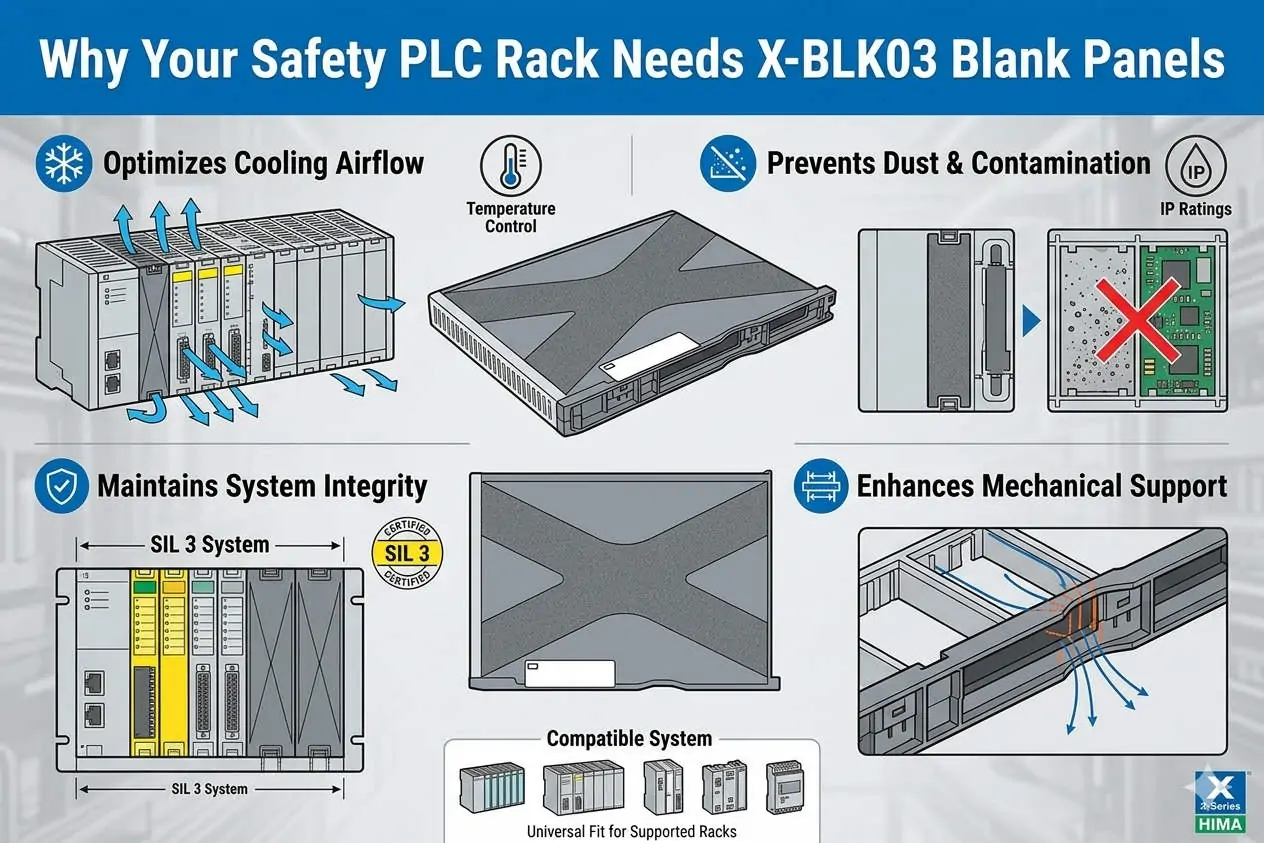
Why Your Safety PLC Rack Needs X-BLK03 Blank Panels

HIMA X-BLK03 Guide: Airflow Management in HIMax Racks

The Critical Role of HIMA X-BLK03 Blank Panels in HIMax Safety System Thermal Management

Beyond Aesthetics: The Functional Necessity of the X-BLK03

In high-stakes environments like oil and gas or power generation, every component must serve a safety function. The HIMA X-BLK03 blank panel is far more than a cosmetic filler for empty rack slots. It acts as a critical airflow regulator within the HIMax chassis. By sealing unused slots, the X-BLK03 maintains the internal pressure needed for efficient heat dissipation. This ensures that safety-instrumented systems (SIS) remain within their certified temperature ranges during continuous operation.

Why Your Safety PLC Rack Needs X-BLK03 Blank Panels

Why Your Safety PLC Rack Needs X-BLK03 Blank Panels

Optimizing Airflow and Thermal Stability in DCS Racks

Industrial control systems rely on predictable convection currents to cool sensitive processors and I/O modules. When an engineer leaves a slot open, the intended thermal channel collapses. Hot air begins to recirculate within the rack instead of exhausting through the top vents. Consequently, localized “hot spots” develop, which can prematurely age electronic components. According to industry reliability data, operating a PLC just 10°C above its rated temperature can halve its expected lifespan.

Enhancing EMC Shielding and Environmental Protection

The X-BLK03 also provides vital protection against electromagnetic interference (EMC) and physical contaminants. Open slots serve as entry points for airborne dust or conductive particles common in cement and chemical plants. These particles can settle on backplanes, eventually causing short circuits or signal degradation. Moreover, the metal-backed design of the X-BLK03 maintains the Faraday cage effect of the rack. This shielding protects the system from external high-frequency noise that could trigger intermittent faults.

Strategic Installation and Maintenance Best Practices

Proper planning during the initial cabinet layout prevents long-term thermal failures. We recommend these essential steps for field technicians:

  • ✅ Slot Coverage: Install X-BLK03 panels in every unused slot from day one of commissioning.
  • ⚙️ Ventilation Clearance: Maintain at least 100mm of vertical clearance above and below the HIMax rack.
  • 🔧 Preventive Audits: Verify the presence of all blank panels during annual safety integrity level (SIL) audits.
  • 🛡️ Component Integrity: Ensure the panel screws are tightened to maintain ground contact for EMC effectiveness.

Expert Commentary from Powergear X Automation Limited

At Powergear X Automation Limited, we often see thermal issues dismissed as “minor” until a CPU module trips. In SIL-3 rated environments, thermal stability is a prerequisite for safety. We advise against using third-party or “homemade” covers for HIMax racks. Generic alternatives rarely meet the specific flame retardancy standards (UL 94-V0) or the airflow resistance profiles of the original HIMA equipment. Investing in genuine X-BLK03 panels is a small price for maintaining system uptime and compliance.

Addressing Temperature Derating in Safety Systems

Most industrial automation hardware includes a derating curve, where performance drops as ambient temperatures rise. Without blank panels, a rack might operate at 55°C even if the room is only 40°C. This narrow margin leaves little room for unexpected HVAC failures. By utilizing the X-BLK03, you ensure the cooling air reaches the core of the modules. This practice keeps the system running safely within its intended engineering specifications defined by IEC 61508.

Industrial Solution Scenarios

  • Offshore Platforms: Maintaining strict EMC shielding in compact, high-density electrical rooms.
  • Chemical Refineries: Preventing corrosive salt-air or dust from settling on internal backplane connectors.
  • Future Expansion: Pre-provisioning racks for future I/O modules while maintaining immediate thermal integrity.

Frequently Asked Questions (FAQ)

Q: Will the HIMax system report a software error if a blank panel is missing?
No, the system does not electronically monitor the presence of physical blank panels. However, the internal temperature sensors on adjacent modules may trigger a high-temperature alarm. It is a physical safety requirement rather than a software-monitored one.

Q: Can I remove blank panels to help “vent” a hot rack?
Actually, removing panels makes the situation worse. It breaks the “chimney effect” of the rack’s cooling design. If your rack is overheating, check your external cabinet fans or clearance rather than removing the X-BLK03.

Q: How do blank panels impact the G3 harsh environment rating?
While the panels themselves are passive, they are essential for maintaining the integrity of a sealed or pressurized cabinet. They prevent the ingress of sulfurous gases and moisture that lead to PCB corrosion in G3-rated environments.

For more technical insights and to source genuine safety system components, please visit the official Powergear X Automation Limited website.

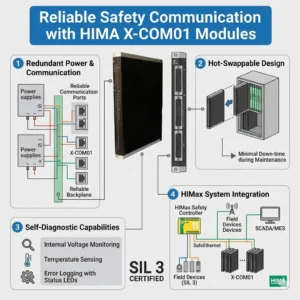
Reliable Safety Communication with HIMA X-COM01 Modules

HIMA X-COM01 Guide: Bridging SafeEthernet and Modbus TCP

Enhancing Functional Safety and Interoperability with the HIMA X-COM01 Communication Module

The Vital Role of X-COM01 in Modern Safety Architectures

The HIMA X-COM01 communication module serves as a critical bridge in high-integrity industrial environments. It connects safety-critical control systems with standard industrial networks without compromising functional safety. In sectors like oil and gas or pharmaceutical manufacturing, maintaining SIL-rated architectures is essential. This module enables deterministic data exchange while supporting both SafeEthernet and Modbus TCP protocols. As a result, engineers can achieve seamless integration between safety PLCs and higher-level monitoring systems.

Reliable Safety Communication with HIMA X-COM01 Modules

Reliable Safety Communication with HIMA X-COM01 Modules

Dual-Protocol Mastery: Balancing Safety and Openness

The X-COM01 handles SafeEthernet and Modbus TCP simultaneously to provide maximum flexibility. SafeEthernet ensures certified safety communication between HIMA controllers using advanced redundancy and CRC mechanisms. These features are vital for Emergency Shutdown (ESD) systems where data integrity is mandatory. Conversely, Modbus TCP offers interoperability with SCADA, DCS, and third-party hardware. This dual capability eliminates the need for external protocol gateways. Consequently, it reduces latency and removes potential points of failure in the network.

Optimizing Communication Latency and Determinism

In the world of factory automation, predictable response time outweighs raw transmission speed. The X-COM01 is specifically engineered for deterministic data exchange. It ensures that critical safety signals, such as trip commands, reach their destination within strict time windows. According to industry research from organizations like ARC Advisory Group, unstable latency is a leading cause of nuisance trips. Therefore, the X-COM01 provides the stability needed to maintain high plant availability and safety compliance.

Strategic Network Redundancy and Reliability

Reliability in continuous-process industries directly impacts the bottom line by preventing unplanned downtime. The X-COM01 module supports redundant communication paths within the SafeEthernet architecture. If one network path fails, the system continues to operate without interruption. However, achieving this level of reliability requires precise configuration. Misconfigured ring or star topologies often cause commissioning issues in complex control systems. Therefore, proper network design remains a prerequisite for leveraging the module’s full potential.

Professional Installation and Maintenance Best Practices

Maintaining a robust safety network requires adherence to strict engineering standards. Powergear X Automation Limited recommends the following field-proven strategies:

  • Implement Logical Segmentation: Use VLANs or dedicated switches to separate safety traffic from non-safety Modbus data.
  • Verify Shielding Integrity: Always use shielded industrial Ethernet cables in high-EMI environments to prevent intermittent faults.
  • Validate Redundancy: Physically disconnect network paths during Factory Acceptance Testing (FAT) to confirm seamless failover.
  • Monitor Environmental Factors: Ensure the control cabinet maintains proper cooling to prevent thermal stress on communication components.

Expert Analysis from Powergear X Automation Limited

At Powergear X Automation Limited, we see a clear trend toward “Safety-Integrated Openness.” The X-COM01 embodies this by allowing safety data to coexist with diagnostic monitoring. However, we believe users must remain vigilant about network security. As safety systems become more connected, robust cybersecurity measures must accompany physical hardware like the X-COM01. We recommend this module for users who need to modernize their DCS integration while maintaining strict adherence to IEC 61508 standards.

Application Scenarios and Solutions

  • Chemical Processing: Integrating reactor ESD systems with a centralized SCADA for real-time diagnostic visibility.
  • Offshore Platforms: Ensuring redundant communication between fire and gas (F&G) systems across long distances.
  • Pharmaceutical Plants: Maintaining batch traceability and safety integrity in highly regulated GAMP environments.

Frequently Asked Questions (FAQ)

Q: Can I use the X-COM01 for safety-related control of third-party VFDs via Modbus TCP?
No, Modbus TCP is not a safety-certified protocol on the X-COM01. For safety-related control (such as STO), you must use SafeEthernet between compatible HIMA devices or hardwired safety I/O for third-party hardware.

Q: What is the most common cause of “Communication Loss” alarms in new X-COM01 installations?
In our experience, most issues stem from IP address conflicts or incorrect subnet masks within the Modbus configuration. Ensure that your safety network range does not overlap with the plant-wide office network.

Q: Does the X-COM01 require special software for configuration?
Yes, configuration is typically handled through HIMA’s engineering tool (like SILworX). You must ensure your software version supports the specific firmware revision of the X-COM01 module to enable all SafeEthernet features.

To find the most reliable safety components and technical support for your next project, visit the Powergear X Automation Limited website today.

ABB S800 I/O Integration Guide: CI532 vs CI522A Comparison

Strategic Integration of ABB S800 I/O: Navigating the CI532 and CI522A Selection

The Vital Role of Communication Interfaces in Multi-Vendor Systems

In modern industrial automation, the ability to bridge disparate hardware ecosystems determines system flexibility. The ABB CI532 and CI522A represent two distinct paths for S800 I/O connectivity. While they look similar, their underlying protocols serve completely different architectural roles. For engineers integrating ABB I/O with third-party controllers like Siemens or Rockwell, making the wrong choice leads to costly communication bottlenecks. Consequently, understanding these functional boundaries is essential for maintaining a lean and responsive control network.

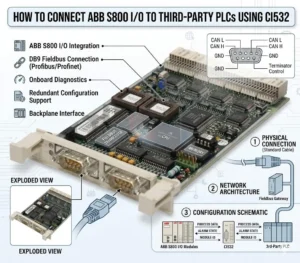
How to Connect ABB S800 I-O to Third-Party PLCs Using CI532

How to Connect ABB S800 I-O to Third-Party PLCs Using CI532

CI532: The Universal Bridge for Third-Party PLC Integration

The CI532 functions as a high-performance PROFIBUS DP-V0/V1 slave interface. This standardization allows the S800 I/O to appear as a native remote node to any PROFIBUS-capable PLC. In industries like chemical processing and oil and gas, mixed-vendor environments are common. Therefore, the CI532 solves the fundamental challenge of protocol compatibility. It enables stable, high-speed data exchange without requiring specialized ABB-proprietary software for the master controller. Moreover, it leverages standard GSD files for seamless configuration in environments like TIA Portal or Studio 5000.

CI522A: Specialized Connectivity for Legacy AF100 Ecosystems

Conversely, the CI522A is purpose-built for the Advant Fieldbus 100 (AF100) protocol. This is a proprietary ABB communication bus primarily found in legacy Advant and AC800M systems. While robust within its native ecosystem, it lacks direct compatibility with non-ABB PLCs. Using a CI522A in a third-party integration usually requires additional protocol gateways. As a result, this adds unnecessary latency and increases the number of potential failure points. Therefore, we recommend reserving the CI522A strictly for maintenance or expansion of existing ABB-centric architectures.

Ensuring Determinism in High-Speed Process Applications

Data exchange determinism directly impacts production quality in sectors like pharmaceutical manufacturing. The CI532 utilizes cyclic communication to ensure predictable scan times. Deterministic I/O updates prevent critical errors such as valve timing offsets or inconsistent mixing ratios. According to industry reports from organizations like PI (Profibus & Profinet International), maintaining a stable bus cycle is crucial for process variability reduction. By choosing the CI532, engineers align their I/O performance with the PLC’s logic scan for synchronized operation.

Field Maintenance and Installation Best Practices

Successful deployment of S800 I/O modules depends heavily on physical layer integrity and configuration accuracy. Technical teams should adhere to the following standards to maximize uptime:

  • PROFIBUS Termination: Always enable active termination at the first and last physical nodes of the network.
  • Shielding Protocols: Ground the cable shield at a single point to prevent interference from ground loops.
  • GSD Versioning: Ensure the GSD file revision matches the hardware firmware to avoid configuration faults.
  • Mechanical Seating: In high-vibration skids, verify that modules are fully locked into their terminal bases.

Strategic Analysis from Powergear X Automation Limited

At Powergear X Automation Limited, we advocate for “Direct-to-Protocol” strategies. While gateways can bridge CI522A to modern networks, they often obscure diagnostics. The CI532 remains the most reliable “Plan A” for legacy I/O migration or multi-vendor projects. However, as the industry shifts toward Industry 4.0, we also encourage users to evaluate PROFINET alternatives for new designs. The CI532 offers a proven, stable bridge today, but future-proofing requires a keen eye on Ethernet-based evolution.

Application Scenarios and Practical Solutions

  • Retrofit Projects: Use the CI532 to keep existing S800 I/O hardware while upgrading the master PLC to a modern Siemens S7-1500.
  • Offshore Skids: Implement CI532 for deterministic control of dosing pumps where timing precision is non-negotiable.
  • Legacy Maintenance: Utilize the CI522A only when replacing failed units within an established ABB AF100 network.

Technical Comparison FAQ

Q: Can I convert a CI522A system to PROFIBUS without changing the I/O modules?
Yes. One of the greatest advantages of the S800 system is the modularity of the communication interface. You can replace the CI522A head station with a CI532. This change allows the existing I/O modules on the same cluster to communicate via PROFIBUS without re-wiring the field signals.

Q: Why does my PLC report a configuration mismatch even though the I/O is correct?
This is frequently caused by a GSD file mismatch. PROFIBUS masters are very strict about the identification number and module parameters. Verify that the “Module Identity” settings in your configuration tool exactly match the physical hardware revision of the CI532.

Q: What is the maximum distance for a CI532 PROFIBUS segment?
The distance depends on the baud rate. At 1.5 Mbps, the segment limit is typically 200 meters. For longer distances, such as 1000 meters, you must drop the speed to 187.5 kbps or utilize PROFIBUS repeaters to maintain signal integrity.

To source genuine ABB components or receive expert consultation on your next integration project, visit the Powergear X Automation Limited official website.

Why 1769-OB32 Is Not Directly Compatible with ABB Systems

Allen-Bradley 1769-OB32 Technical Guide: Features & Integration

Strategic Integration and Technical Analysis of the Allen-Bradley 1769-OB32 Digital Output Module

High-Density Control in Industrial Automation Ecosystems

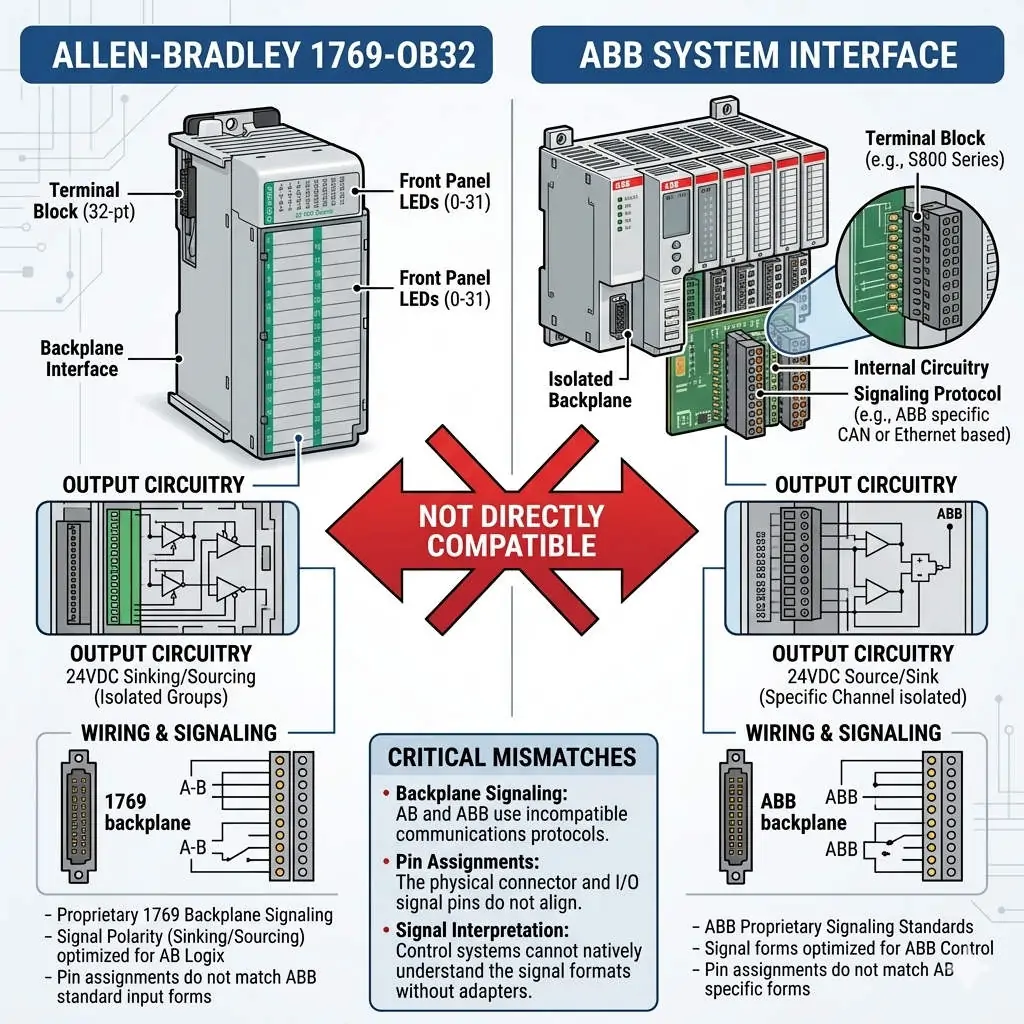
The Allen-Bradley 1769-OB32 stands as a high-density digital output solution within the Rockwell Automation CompactLogix family. This module provides 32 solid-state 24V DC sourcing outputs in a single compact slot. Consequently, it excels in factory automation environments where control cabinet space is at a premium. By consolidating multiple output points, engineers can drive relays, solenoids, and small actuators with maximum efficiency. However, its performance remains intrinsically linked to the Rockwell proprietary backplane architecture.

Why 1769-OB32 Is Not Directly Compatible with ABB Systems

Why 1769-OB32 Is Not Directly Compatible with ABB Systems

Technical Mechanics: Sourcing Outputs and Backplane Dynamics

The 1769-OB32 utilizes a sourcing (PNP) logic configuration, which is the standard for North American industrial automation. Each output point delivers current to the field load, requiring a common ground for the circuit. In addition, the module features a typical response time of less than 1 millisecond. This speed is vital for high-speed packaging and sorting systems. Nevertheless, this hardware relies on the 1769 bus protocol for data exchange. This proprietary communication ensures sub-millisecond synchronization within a CompactLogix rack but creates a barrier for non-Rockwell systems.

Addressing Cross-Platform Compatibility Challenges

A frequent engineering query involves connecting the 1769-OB32 to ABB control systems like the AC500 or 800xA. In practice, direct physical integration is impossible due to incompatible backplane buses and communication protocols. While ABB might support EtherNet/IP, the physical 1769 interface is exclusive to Allen-Bradley. To bridge this gap, engineers often deploy industrial gateways (e.g., EtherNet/IP to PROFINET). However, this method introduces latency and increases system complexity. Therefore, Powergear X Automation Limited recommends using native ABB I/O modules for ABB-centric projects to ensure long-term stability.

Installation Standards and Maintenance Best Practices

Field experience suggests that proper protection is essential for maximizing the lifespan of the 1769-OB32. Inductive loads, such as large solenoids, can generate significant back-EMF during switching. To mitigate this risk, follow these technical guidelines:

  • Surge Suppression: Install flyback diodes or RC snubbers across inductive loads to prevent output point damage.
  • Grounding Protocols: Use shielded cables for long-distance runs and implement single-point grounding to reduce EMI.
  • Power Quality: Deploy 24V DC surge protective devices (SPD) in environments prone to lightning or heavy motor interference.
  • Wiring Integrity: Ensure the 18-point removable terminal block (RTB) is securely seated to avoid intermittent connectivity.

Strategic Procurement: Assessing Total Cost of Ownership

From a buyer’s perspective, the 1769-OB32 is a high-value asset primarily when maintaining an existing Rockwell infrastructure. According to MarketsandMarkets, the global PLC market is shifting toward unified ecosystems to reduce downtime. Mixing I/O brands often leads to “hidden costs” in the form of specialized spare parts and extended troubleshooting hours. If your primary DCS is ABB, replacing 1769 modules with native S500 or S800 series I/O is usually the more cost-effective strategy over the machine’s lifecycle.

Expert Commentary from Powergear X Automation Limited

At Powergear X Automation Limited, we emphasize that the 1769-OB32 is a specialized component, not a generic universal tool. It represents the pinnacle of compact sourcing output technology for the CompactLogix range. While communication integration via gateways is technically feasible, it is rarely the most “elegant” engineering solution. We advise our clients to prioritize platform homogeneity. This approach minimizes “MTTR” (Mean Time To Repair) and simplifies the training requirements for plant floor technicians.

Application Scenarios and Practical Solutions

  • Automotive Assembly: Managing 32-point valve banks for pneumatic clamping systems in high-speed robot cells.
  • Discrete Manufacturing: Controlling small DC motor starters and signal indicators in compact control panels.
  • Legacy Migrations: Acting as a high-density replacement during upgrades of older SLC 500 systems to CompactLogix.

Frequently Asked Questions (FAQ)

Q: Can I mix NPN sensors with the 1769-OB32 sourcing outputs?
Direct connection is not possible because the 1769-OB32 provides current (PNP) while NPN sensors expect a sinking input. You must use intermediate relays or signal converters to bridge the two different logic types.

Q: What is the primary cause of individual output point failure on this module?
The most common cause is an overcurrent condition or a short circuit in the field wiring. Since these are solid-state outputs, a single high-voltage spike from an unprotected solenoid can permanently damage the switching transistor for that specific channel.

Q: Is it better to use a gateway or replace the module when switching to an ABB controller?
Unless the 1769-OB32 is part of a large, pre-existing rack that cannot be moved, replacing it with native ABB I/O is the superior choice. Gateways add a “point of failure” and increase communication jitter, which can affect precision timing.

To discover more high-performance modules and expert automation advice, please visit the official Powergear X Automation Limited website for our latest inventory and technical support.

ABB CI522A Redundancy Guide for AC800M Control Systems

ABB CI522A Redundancy Guide for AC800M Control Systems

Does CI522A Support Redundancy? Implementing ABB AC800M Serial Interfaces

The Role of CI522A in Industrial Control Systems

The ABB CI522A serves as a vital communication interface within the AC800M DCS ecosystem. It provides essential serial connectivity, typically supporting RS-232 or RS-485 protocols for third-party device integration. However, engineers must understand that the CI522A does not offer native hardware redundancy. Unlike high-level Ethernet modules like the CI854A, it operates as a single-channel interface. Consequently, designers must plan for system-level availability rather than relying on module-level failover.

ABB CI522A Redundancy Guide for AC800M Control Systems

ABB CI522A Redundancy Guide for AC800M Control Systems

Technical Architecture and Communication Constraints

The internal design of the CI522A lacks dual-port circuitry or hot-standby capabilities. As a result, any failure in the module or the serial physical link causes an immediate communication loss. In critical sectors like oil and gas, this single-point failure poses a significant risk to data acquisition. Therefore, maintenance teams must prioritize external backup strategies. Industry reports suggest that while serial protocols remain relevant, their inherent lack of built-in redundancy drives the shift toward smarter gateways.

Integration with Redundant AC800M Controllers

While the module itself is non-redundant, you can utilize the CI522A within redundant PM861 or PM864 controller pairs. In this configuration, each controller hosts its own independent CI522A module. This setup maintains high availability at the controller level during a switchover. However, the field device must support dual communication paths to ensure a seamless transition. Many legacy Modbus RTU devices only allow one master, which creates a significant bottleneck in automated production lines.

Optimizing Protocol Redundancy via Modbus and Custom Serial

The CI522A primarily handles Modbus RTU and proprietary serial strings. Since Modbus RTU follows a strict master-slave architecture, achieving redundancy requires complex application-level logic. Moreover, any disruption in the master’s polling sequence can lead to device timeouts. As a result, many modern facilities deploy serial-to-Ethernet converters. This allows the system to leverage ABB’s Redundant Network Routing Protocol (RNRP) for much higher reliability than traditional serial links.

Installation Standards for High-Reliability Environments

Reliable operation starts with proper physical layer installation. Serial communication is notoriously sensitive to electromagnetic interference (EMI) and ground loops. To maintain signal integrity, follow these technical standards:

  • ✅ Use high-quality shielded twisted-pair (STP) cables for all RS-485 runs.
  • ✅ Ensure the cable shield is grounded at only one end to prevent loop currents.
  • ✅ Implement isolated repeaters to segment long daisy chains and limit failure propagation.
  • ✅ Install surge protection for any outdoor cable runs exceeding 50 meters.

Strategic Maintenance and Field Engineering Insights

From the perspective of Powergear X Automation Limited, we recommend treating the CI522A as a legacy bridge. While it is highly reliable for its intended purpose, it represents a “non-redundant edge” in your control system. If your project demands 99.99% uptime, consider migrating to Ethernet-based I/O. However, for retrofitting existing systems where downtime must be minimized, the CI522A remains a cost-effective solution for interfacing with localized analyzers and older PLCs.

Application Scenarios and Practical Solutions

  • Chemical Processing: Use dual gateways to bridge CI522A serial data into the redundant Ethernet backbone of the AC800M.
  • Power Plants: Distribute critical sensors across multiple CI522A modules to ensure that a single module failure does not blind the entire operator station.
  • Water Treatment: Leverage the CI522A for non-critical monitoring while keeping core control on redundant Ethernet modules.

Frequently Asked Questions (FAQ)

Q: Can the AC800M firmware automatically switch between two CI522A modules if one fails?
No, the firmware does not perform an automatic “bumpless” switch for serial modules. You must write specific logic in Control Builder M to detect a “Module Error” and manually redirect communication tasks to a secondary module or port.

Q: Is the CI522A compatible with all versions of the PM866 controller?
The CI522A is compatible with most AC800M controllers, including the PM866. However, always verify that your specific firmware version supports the serial protocol you intend to use, as some older versions have library limitations for custom serial strings.

Q: How can I prevent data collisions when using two controllers with two CI522A modules?
The most effective way is to use a “Heartbeat” logic. Only the active controller should enable its CI522A communication block. If the backup controller takes over, it enables its communication port after a brief delay to ensure the serial bus is clear.

For high-quality modules and expert technical support for your control systems, visit the official Powergear X Automation Limited website to view our latest inventory.

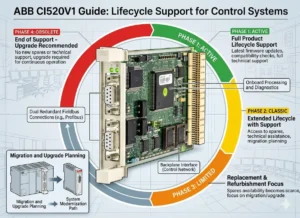
ABB CI520V1 Guide Lifecycle Support for Control Systems

Upgrading to CI520V1: Solving Component Obsolescence in DCS

Strategic Migration with ABB CI520V1: Ensuring Lifecycle Continuity in Industrial Automation

Enhancing System Reliability via Modern Communication Interfaces

The ABB CI520V1 represents a critical evolution in communication interface technology for distributed control systems (DCS). While legacy hardware often faces the threat of obsolescence, the V1 update serves as a high-reliability bridge for aging infrastructure. Industries like oil and gas or chemical processing rely on these modules to maintain connectivity without expensive full-scale upgrades. Therefore, the primary value of the CI520V1 lies in securing long-term operability through modernized hardware architecture.

ABB CI520V1 Guide Lifecycle Support for Control Systems

ABB CI520V1 Guide Lifecycle Support for Control Systems

Technical Comparison: CI520 vs. CI520V1 Lifecycle Management

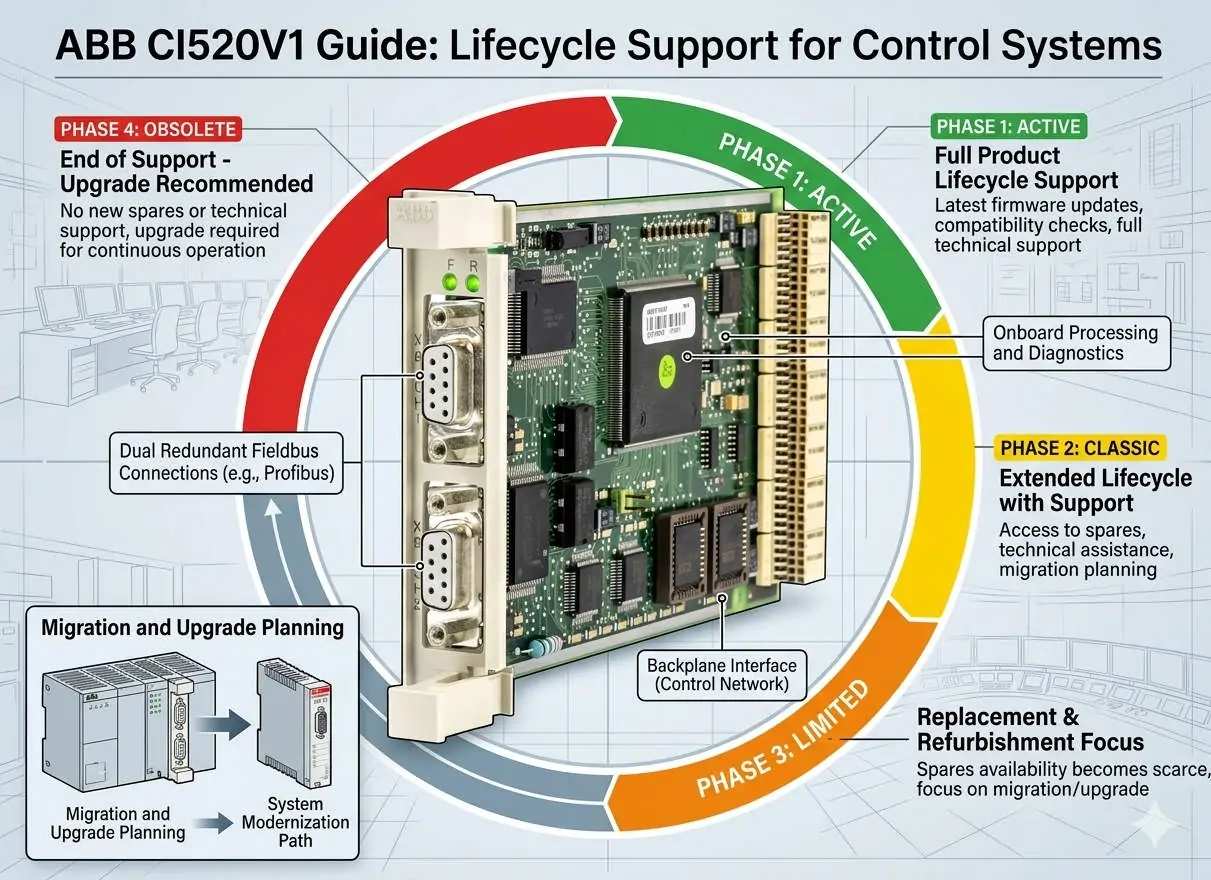
The most significant distinction between the original CI520 and the CI520V1 is component availability. The legacy CI520 relies on electronic parts that are now discontinued by global manufacturers. In contrast, the CI520V1 utilizes RoHS-compliant, actively supported components to align with modern supply chain standards. As a result, plants can mitigate the risk of extended downtime caused by hardware shortages. This shift ensures that critical spare parts remain accessible for the next decade of operation.

Optimizing Signal Integrity and Electrical Robustness

In harsh factory automation environments, electromagnetic interference (EMI) frequently compromises data transmission. The CI520V1 addresses this by incorporating improved Electromagnetic Compatibility (EMC) tolerance. It provides superior resistance to transients and electrical noise generated by variable frequency drives (VFDs) or high-current motors. Moreover, this enhanced robustness leads to better fault predictability and reduces the occurrence of intermittent communication errors that plague legacy systems.

Seamless Integration and Firmware Compatibility Requirements

The CI520V1 maintains protocol-level backward compatibility, which simplifies the migration process for most ABB control systems. Engineers usually do not need to rewrite complex application logic or communication blocks. However, subtle differences in firmware behavior regarding timeout handling or diagnostic reporting may exist. Consequently, Powergear X Automation Limited recommends conducting validation tests in safety-critical systems. This step ensures that the newer hardware revision integrates perfectly with the existing controller’s firmware environment.

Precision Installation and Maintenance Best Practices

Replacing a legacy module requires more than just physical swapping to ensure peak performance. Technicians should treat the upgrade as an opportunity to audit the entire communication loop. Improper grounding often masks issues that newer, more sensitive modules might detect as faults. Consider these essential technical steps:

  • ✅ Verify that the controller firmware version supports the V1 hardware revision.
  • ✅ Inspect cable shielding and ensure single-point grounding to prevent noise loops.
  • ✅ Confirm the specific backplane requirements before attempting any module replacement.
  • ✅ Test communication stability under full industrial load conditions.

Strategic Insights from Powergear X Automation Limited

At Powergear X Automation Limited, we believe that proactive hardware management is superior to reactive repair. Waiting for a CI520 failure in a petrochemical plant can result in losses exceeding the cost of the module by a factor of a thousand. We suggest a phased replacement strategy where the CI520V1 replaces older units during scheduled maintenance windows. This approach aligns with modern asset management strategies and protects the plant against sudden market shortages of discontinued components.

Industrial Application Scenarios and Solutions

  • Oil & Gas Refineries: Maintaining high-speed data links between remote I/O stations and the central DCS.
  • Chemical Processing: Ensuring signal integrity in environments with high electrical noise and strict safety protocols.
  • Legacy Power Plants: Extending the life of 15-year-old control cabinets by replacing obsolete communication interfaces.

Technical Maintenance FAQ

Q: Can the CI520V1 be hot-swapped while the system is under live load?
While many ABB backplanes support hot-swapping, it depends on the specific controller configuration and mounting base. We strongly advise powering down the module slot before replacement to avoid inrush current damage or backplane arcing, unless your specific documentation confirms hot-swap support.

Q: What is the most common error when upgrading from the older CI520?
The most frequent issue is a “Module Not Detected” error, which usually stems from outdated controller firmware. Even if the wiring is identical, the CPU must be updated to recognize the new hardware revision ID of the V1 module.

Q: Does the V1 version offer any speed advantages over the original module?
Functional speed remains identical to ensure logic timing consistency. The “V1” designation focuses on reliability, EMC protection, and component longevity rather than increasing the baud rate or data throughput.

For more technical specifications and to secure your inventory of high-quality interface modules, please visit the official Powergear X Automation Limited website.
Emerson VE4035S2B1 Guide Installation and DCS Integration

Emerson VE4035S2B1 Guide: Installation and DCS Integration

Resolving “Offline” Status in Emerson DeltaV VE4035S2B1 Interface Modules

Critical Value of Stable I/O Communication in DCS Environments

In high-stakes industries like oil and gas or pharmaceuticals, a single “Offline” status in DeltaV Explorer can halt production. The Emerson DeltaV VE4035S2B1 serves as a vital bridge for data exchange within the Distributed Control System (DCS). When this module loses its software handshake, the controller cannot process field signals. Consequently, maintaining a “Live” state is essential for deterministic control and preventing expensive cascading alarms across the facility.

Emerson VE4035S2B1 Guide Installation and DCS Integration

Emerson VE4035S2B1 Guide Installation and DCS Integration

Understanding Backplane Communication and Physical Integrity

The VE4035S2B1 communicates via a high-speed backplane within the DeltaV carrier system. If the module appears offline, it usually signals a disruption in the cyclic data exchange. According to industry reports from groups like the International Society of Automation (ISA), physical connectivity remains a leading cause of system downtime. Oxidation on terminal connectors or slight misalignments often break these sensitive communication paths. As a result, PID loops may enter safe states or revert to manual mode.

The Importance of Configuration Alignment and Node Matching

Digital configuration must perfectly mirror the physical hardware setup for successful module activation. The DeltaV system verifies the slot position, node assignment, and module type during the boot sequence. However, engineers frequently overlook the “Auto-Sense” step after replacing hardware. If the software configuration does not match the physical slot, the module remains stuck in an offline state. Therefore, proper software binding is just as critical as the hardware itself for industrial automation reliability.

Power Supply Stability and Electrical Sensitivity

The VE4035S2B1 module requires a highly stable 24VDC power bus to initialize correctly. Power dips or electrical noise in high-load cabinets can cause initialization failures. While the hardware may appear powered on, the internal processor might fail to complete its handshake with the controller. In our experience at Powergear X Automation Limited, we recommend dedicated power supplies for I/O banks to minimize interference. Stable voltage prevents intermittent offline events during heavy system startups.

Proven Maintenance Procedures for Rapid Recovery

Restoring an offline module requires a systematic approach to identify the root cause quickly. Follow these professional steps to ensure system health:

  • ✅ Confirm the module is fully seated and locked in the carrier slot.
  • ✅ Inspect the terminal blocks for bent pins or loose wiring connections.
  • ✅ Perform an “Auto-Sense I/O” operation within DeltaV Explorer.
  • ✅ Download the updated configuration to the controller to refresh the binding.
  • ✅ Review the system event logs for specific communication or hardware fault codes.

Expert Commentary from Powergear X Automation Limited

At Powergear X Automation Limited, we believe that preventive maintenance is the best defense against DCS failures. The VE4035S2B1 is a robust component, yet it relies heavily on the environment around it. We often see modules replaced unnecessarily when a simple re-seating or configuration refresh would suffice. As factory automation moves toward more complex architectures, understanding these fundamental handshakes becomes a competitive advantage for maintenance teams.

Application Scenarios and Industry Solutions

  • Chemical Processing: Prevents missing field signals from triggering emergency interlocks in volatile environments.
  • Pharmaceutical Manufacturing: Ensures compliance and data integrity by maintaining constant I/O synchronization.
  • Refinery Operations: Supports redundant controller architectures by providing reliable interface points for critical sensors.

Frequently Asked Questions (FAQ)

Q: How can I distinguish between a hardware failure and a configuration error?
Observe the status LEDs on the front of the VE4035S2B1. If the LEDs show a normal green sequence but the software says “Offline,” the issue is almost certainly configuration-based. A total lack of LED activity usually indicates a dead module or power failure.

Q: Can firmware mismatches keep my module from going online?
Yes. If the controller firmware version is significantly newer or older than the module revision, the handshake may fail. Always check the Emerson DeltaV compatibility matrix when integrating newer hardware into an legacy system.

Q: Is it safe to “hot-swap” the VE4035S2B1 while the system is running?
While DeltaV supports hot-swapping most I/O modules, you should always check the specific carrier and module documentation first. Removing a module during active control will trigger a fault, so ensure your loops are in a safe state before proceeding.

For high-quality spare parts and technical support for your control systems, please visit the official Powergear X Automation Limited website today.

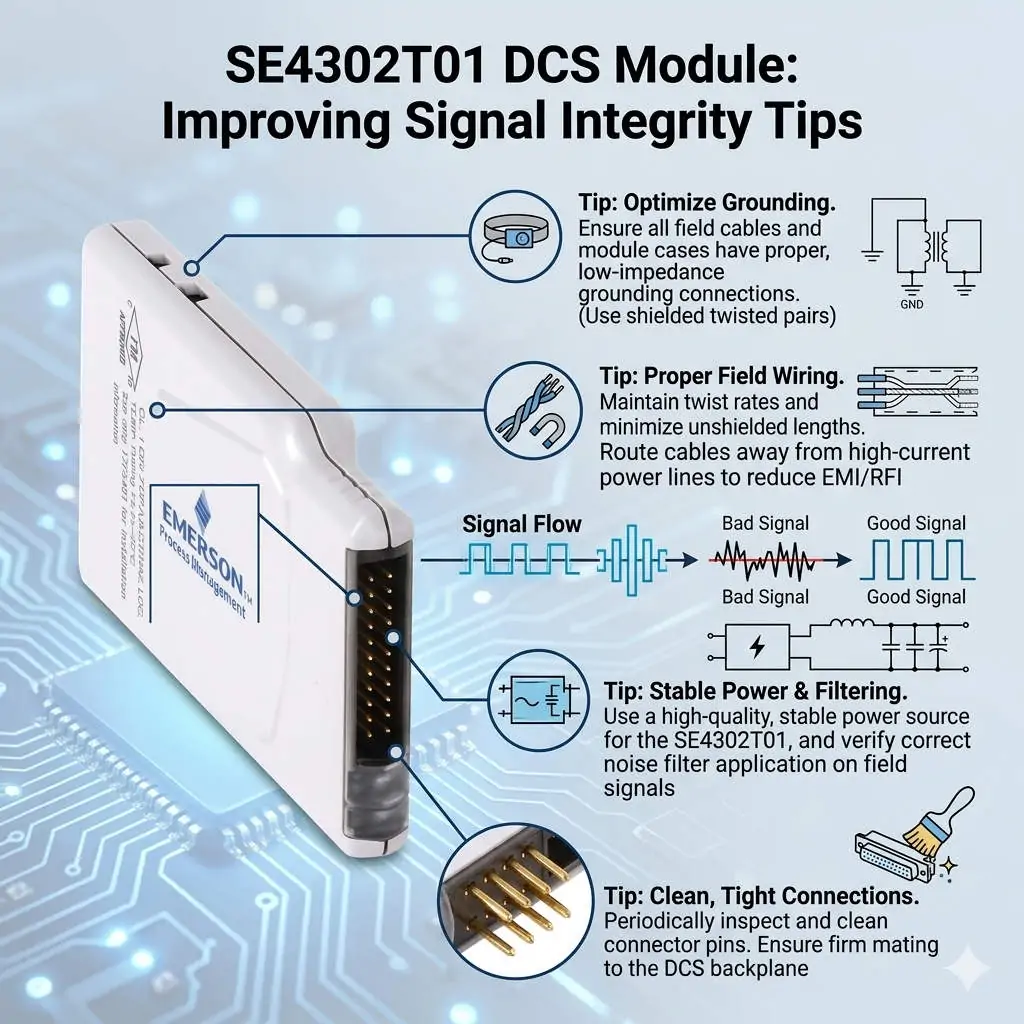
SE4302T01 DCS Module Improving Signal Integrity Tips

SE4302T01 DCS Module: Improving Signal Integrity Tips

Resolving Channel Interference in SE4302T01 DCS Modules through Advanced Signal Isolation

Addressing Signal Integrity in High-Demand DCS Environments

The SE4302T01 module functions as a critical interface for signal acquisition within Distributed Control Systems (DCS). However, engineers frequently encounter channel interference in petrochemical and pharmaceutical plants. These facilities often feature long cable runs and significant electromagnetic interference (EMI). While some mistake these fluctuations for hardware failure, they usually stem from signal integrity issues. Maintaining measurement accuracy is vital to prevent false trips and ensure process stability across the plant.

SE4302T01 DCS Module Improving Signal Integrity Tips

SE4302T01 DCS Module Improving Signal Integrity Tips

The Importance of Galvanic Isolation for SE4302T01 Stability

Direct exposure to field signals without proper galvanic isolation makes the SE4302T01 vulnerable. Ground loops and common-mode noise can easily penetrate the system near high-power motors or Variable Frequency Drives (VFDs). Therefore, adding an external isolator provides a necessary barrier against electrical noise. This setup significantly improves signal stability and reduces intermittent faults that plague unprotected modules. According to recent industrial automation trends, robust isolation remains a top priority for preventing unexpected downtime.

Balancing Module Response Time and High-Frequency Noise Filtering

Fast-response modules provide excellent dynamic tracking but also capture unwanted transient noise. Many engineers observe that “interference” is actually high-frequency noise misinterpreted as valid data. To solve this, you must balance responsiveness with stability. Introducing an isolator with built-in hardware filtering allows the DCS to receive clean data. Moreover, configuring software damping within the control system further refines the signal. This dual-layered approach ensures the system reacts to real process changes rather than electrical artifacts.

Compliance with EMC Standards and Environmental Immunity

Industrial sites rarely provide ideal conditions for electromagnetic compatibility (EMC). Modules operating near their immunity limits, as defined by IEC 61000 standards, often exhibit erratic behavior. This instability frequently occurs in aging plants where shielding and grounding systems have degraded over time. Isolation devices act as an additional EMC barrier. As a result, they extend the reliability of the SE4302T01 even in harsh, noisy environments where standard hardware might struggle to maintain precision.

Operational Guidance for Maintenance and Installation

Before replacing hardware, maintenance teams should verify the grounding topology of the entire loop. Improper grounding, such as multiple ground points or floating shields, causes most interference cases.

  • ✅ Ensure signal cable shields connect to ground at only one end to prevent loops.
  • ✅ Install signal isolators close to the DCS input side in mixed-signal environments.
  • ✅ Combine isolators with Surge Protection Devices (SPD) for outdoor or long-distance cable runs.
  • ✅ Periodically inspect cable integrity to identify degraded shielding or insulation.

These proactive steps often resolve “faults” without necessitating expensive module replacements.

Strategic Insights from Powergear X Automation Limited

At Powergear X Automation Limited, we emphasize that channel interference is often a system-level challenge. Replacing the SE4302T01 should be your final step after exhausting wiring and isolation checks. We have observed that adding high-quality isolators is more cost-effective than constant hardware swaps. This strategy improves long-term stability without altering the fundamental DCS architecture. Investing in proper isolation today prevents the high costs associated with process instability and false alarms tomorrow.

Industrial Application Scenarios

  • Petrochemical Refining: Prevents signal drift in temperature and pressure loops near heavy rotating machinery.
  • Pharmaceutical Manufacturing: Ensures precise measurement during sensitive batch processes where EMI from cleanroom equipment is high.
  • Retrofit Projects: Provides a practical solution for noise issues when rerouting existing cables is physically impossible.

Frequently Asked Questions (FAQ)

Q: How can I distinguish between a hardware failure and external interference?
Disconnect the field wiring and apply a local, clean 4-20mA source directly to the module input. If the reading stabilizes instantly, the issue lies in the field wiring or EMI, not the internal hardware of the module.

Q: Will adding an isolator introduce a delay in my control loop?
Most modern signal isolators have a response time in the millisecond range. While they do add a negligible delay, the benefits of a stable, noise-free signal far outweigh the slight increase in latency for 95% of industrial applications.

Q: Is it necessary to use HART-compatible isolators with the SE4302T01?
If your field instruments rely on HART protocol for remote calibration or diagnostics, you must select an isolator that supports HART pass-through. Standard isolators will strip the digital signal, leaving only the analog 4-20mA component.

For high-performance components and expert support in optimizing your DCS, please visit the official Powergear X Automation Limited website to view our latest technical solutions.

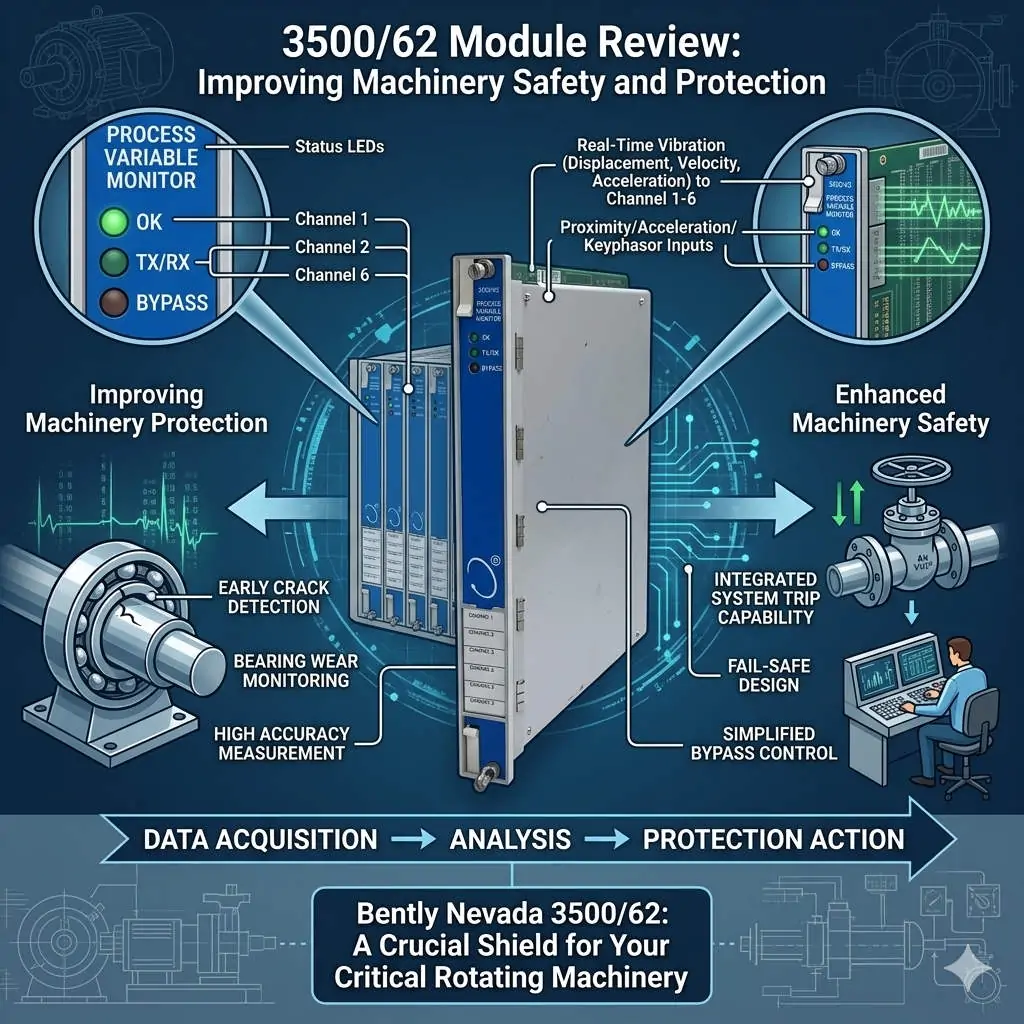
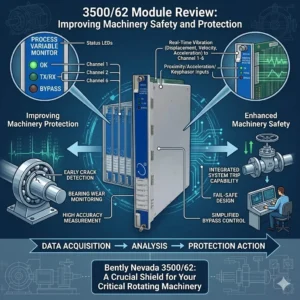
3500-62 Module Review Improving Machinery Safety and Protection

3500/62 Module Review: Improving Machinery Safety and Protection

Enhancing Machinery Protection with the Bently Nevada 3500/62 Process Variable Monitor

Bridging the Gap Between Process Data and Mechanical Integrity

The Bently Nevada 3500/62 serves as a vital bridge in modern industrial automation. While standard vibration monitors track mechanical movement, this module integrates critical process variables like pressure and temperature. In heavy industries, mechanical failures often stem from process upsets. Therefore, correlating these data points within a single rack is essential for comprehensive asset protection. By using the 3500/62, operators gain a holistic view of machine health, moving beyond simple vibration analysis to true condition-based monitoring.

3500-62 Module Review Improving Machinery Safety and Protection

3500-62 Module Review Improving Machinery Safety and Protection

Technical Core: Standardizing 4–20 mA Analog Input Integration

The 3500/62 module primarily utilizes 4–20 mA analog inputs to interface with field transmitters. This compatibility ensures a seamless connection with standard flow, pressure, and temperature sensors used in factory automation. Because it accepts direct signals, the system eliminates the need for external converters. Consequently, this architecture reduces signal drift and minimizes points of failure. However, engineers must carefully calculate the loop power budget. High-load smart transmitters may occasionally require an external power source to maintain signal integrity during peak operation.

Advanced Alarm Logic and System Redundancy

Integrated alarm setpoints differentiate the 3500/62 from basic PLC or DCS modules. This hardware allows for “unified trip logic” directly within the protection rack. For example, a system can trigger a shutdown only when both high vibration and extreme bearing temperature occur simultaneously. This local logic execution provides faster response times than cross-platform communication via Modbus. Moreover, it creates a redundant layer of safety. Even if the primary control system fails, the 3500/62 ensures the machinery remains within safe operating limits.

Optimizing Installation for High-Noise Industrial Environments

Signal interference remains a significant challenge in plants featuring large Variable Frequency Drives (VFDs). Analog signals are sensitive to electromagnetic noise, which can cause “phantom” alarms. At Powergear X Automation Limited, we recommend using shielded twisted-pair cabling grounded at only one end. Furthermore, installers should never run low-voltage signal wires parallel to high-voltage power lines. In extreme cases, adding signal isolators can prevent ground loops that compromise measurement accuracy. Proper cable management significantly improves the Mean Time Between Failures (MTBF) for the entire monitoring system.

Strategic Procurement: Compatibility and Selection Criteria

Choosing the right module requires a thorough understanding of the existing 3500 rack ecosystem. The 3500/62 is generally backward compatible with older racks, but firmware versioning is critical. Before purchasing, verify that your Rack Configuration Software supports the specific revision of the module. Additionally, check the power supply capacity of the rack. Adding multiple process variable monitors can increase the thermal load and current draw. Ignoring these hardware constraints often leads to unexpected commissioning delays or analog signal instability.

Professional Insight from Powergear X Automation Limited

From the perspective of Powergear X Automation Limited, the 3500/62 is a diagnostic powerhouse rather than just an input card. As the industry moves toward “Industry 4.0,” the demand for synchronized data increases. While a DCS handles broad process control, the 3500 system provides the “high-speed” protection layer. We suggest that users do not view this as a replacement for a PLC. Instead, treat it as a specialized tool for critical rotating equipment where the cost of a missed trip far outweighs the module investment.

Industrial Solution Scenarios

  • Centrifugal Compressor Protection: Monitoring suction pressure and discharge temperature alongside vibration to prevent surge conditions.
  • Steam Turbine Management: Integrating casing expansion and steam pressure into the 3500 rack for real-time thermal stress analysis.
  • Remote Pump Stations: Using the 3500/62 to provide autonomous protection in areas with limited DCS connectivity.

Technical Implementation Checklist

  • ✅ Verify transmitter loop power requirements (Active vs. Passive loops).
  • ✅ Match the 3500/62 firmware with the Rack Interface Module (RIM) version.
  • ✅ Implement proper shielding and separation from high-voltage AC cables.
  • ✅ Configure “Danger” and “Alert” setpoints based on machinery manufacturer specifications.

Frequently Asked Questions (FAQ)

Q: Does the 3500/62 support HART protocol for smart transmitter diagnostics?
While the 3500/62 reads the 4–20 mA analog signal, it typically does not pass HART digital diagnostic data to the rack. If you need HART information for asset management, you should use a signal splitter to send the data to a specialized HART multiplexer or DCS.

Q: Can I use this module for high-speed turbine overspeed protection?
No. The 3500/62 is designed for static or slowly changing process variables. For overspeed protection, you must use the dedicated 3500/53 Electronic Overspeed Detection System, which has the necessary millisecond response time.

Q: How does the 3500/62 handle a “Transmitter Not OK” status?
The module monitors the input current. If the signal drops below a certain threshold (typically <2 mA), the system flags a “Not OK” status. This prevents a broken wire from accidentally triggering a machinery trip, improving overall system reliability.

For more technical specifications and high-quality parts, please visit the Powergear X Automation Limited website for expert support.

Bently Nevada 991 Thrust Transmitter: Technical Guide & Application

Bently Nevada 991 Thrust Transmitter: Technical Guide & Application

Optimizing Thrust Measurement: A Technical Guide to the Bently Nevada 991 Thrust Transmitter

Defining the Role of the 991 Series in Industrial Automation

The Bently Nevada 991 is not a generic vibration sensor. Instead, it serves as a specialized signal conditioning device designed for axial position monitoring. Unlike radial vibration sensors, the 991 series focuses exclusively on thrust measurement. It integrates with proximity probes to transform complex displacement signals into a standard 4–20 mA output. This functionality allows PLC and DCS systems to process mechanical data without requiring high-frequency signal analysis modules.

Bently Nevada 991 Thrust Transmitter: Technical Guide & Application

Bently Nevada 991 Thrust Transmitter: Technical Guide & Application

Core Value: Standardizing Axial Displacement for Process Control

In critical sectors like oil, gas, and chemical processing, axial displacement directly impacts thrust bearing longevity. The 991 transmitter solves the problem of signal instability by providing a linearized analog output. By monitoring the rotor’s axial position, engineers can identify bearing wear or rotor surge early. Consequently, this prevents catastrophic machine failure and minimizes unplanned downtime in high-stakes environments.

Technical Insights: 4–20 mA Output and Signal Integrity

The 991 transmitter converts probe signals into a 4–20 mA loop, which offers several distinct advantages. First, this format provides high immunity to electromagnetic interference (EMI). Second, it supports long-distance transmission exceeding 100 meters without signal degradation. Therefore, the 991 is an ideal choice for integrating thrust monitoring into existing DCS architectures during plant retrofits. However, it is important to note that this device is intended for process-level monitoring rather than high-speed machinery protection like the 3500 series.

Precision Engineering: Measurement Range and Linearity

Axial position measurement requires extreme accuracy within a narrow range, typically ±2 mm. The 991 ensures high linearity, which allows for precise tracking of the thrust collar’s movement. In many industrial applications, a smaller, more accurate range is superior to a wide, generic one. High resolution prevents false alarms and ensures that subtle shifts in rotor position are detected before they exceed safety boundaries.

Critical Hardware Compatibility: Proximity Probe Matching

The 991 transmitter operates as part of a three-piece system including a proximity probe and an extension cable. System integrity depends on matching these components correctly. Specifically, the electrical length (e.g., 5m or 9m) must be consistent across the entire loop. Mixing different series, such as 3300 and 7200 components, will lead to calibration errors. Our field experience at Powergear X Automation Limited shows that mismatched cables remain the most frequent cause of incorrect axial readings.

Installation and Maintenance Best Practices

Proper physical alignment is vital for accurate data acquisition. The proximity probe must be mounted perpendicular to the thrust collar face. Even a slight angular deviation can introduce non-linear errors or periodic signal fluctuations. Furthermore, signal cables should be routed away from high-power lines to prevent noise. We recommend using single-point grounding at the control cabinet side to maintain a clean signal path in electrically noisy factory environments.

Environmental Considerations and Surge Protection

Industrial sites often expose electronic transmitters to harsh conditions and power transients. While the 991 is robust, it lacks heavy-duty internal surge protection. Therefore, external Surge Protective Devices (SPD) are necessary in lightning-prone areas or outdoor installations. Protecting the 4–20 mA loop ensures that signal drift does not interfere with the accuracy of the thrust position data during electrical storms.

Strategic Analysis from Powergear X Automation Limited

At Powergear X Automation Limited, we view the 991 as a bridge between mechanical hardware and digital control. While it does not replace a dedicated machinery protection system, it provides a cost-effective way to bring vital thrust data into a PLC. For compressors and turbines where axial movement is the primary failure mode, the 991 offers a reliable and scalable solution. However, we always advise users to verify that their probe and cable system is fully compatible before installation.

Application Scenarios and Industry Solutions

  • Centrifugal Compressors: Monitoring rotor “float” to protect internal seals and impellers.
  • Steam Turbines: Detecting thrust bearing degradation caused by steam quality issues or load changes.
  • Retrofit Projects: Adding axial position monitoring to older assets without upgrading the entire control rack.

Technical Highlights Checklist

  • ✅ Standard 4–20 mA output for easy DCS/PLC integration.
  • ✅ Supports 3300 and 3300 XL 8mm proximity probe systems.
  • ✅ DIN rail mounting for space-efficient control panel installation.
  • ✅ High-precision linearity for critical thrust bearing protection.

Frequently Asked Questions (FAQ)

Q: Can the 991 transmitter measure radial shaft vibration?
No, the 991 is specifically calibrated for axial position (Thrust). Using it for radial vibration will result in incorrect data, as the internal signal processing is optimized for displacement, not high-frequency oscillation.

Q: What is the most common reason for a “Signal Out of Range” error?
In most cases, this is caused by incorrect probe “gapping.” If the initial distance between the probe tip and the target is not set within the linear range of the 991, the 4–20 mA output will saturate at either 3.8 mA or 20.5 mA.

Q: Do I need to recalibrate the 991 if I replace the extension cable?
Recalibration is usually not required if you replace the cable with one of the exact same length and type. However, if the system length changes (e.g., switching from a 5m to a 9m system), you must use a transmitter designed for that specific length.

To discover more high-performance sensors and industrial control hardware, please visit the official Powergear X Automation Limited website for expert support and inventory.

Back to Top
Product has been added to your cart