
Over 50,000 hot-selling automation module components.
Troubleshooting 3500-62 Monitor OK, TX RX, and Bypass LED Meanings

Troubleshooting 3500/62 Monitor: OK, TX/RX, and Bypass LED Meanings

Advanced Diagnostic Guide for Bently Nevada 3500/62 Process Variable Monitor LED Indicators

Maximizing Operational Intelligence in Machinery Protection

The Bently Nevada 3500/62 serves as a vital bridge between field instrumentation and complex protection systems. This six-channel monitor processes critical variables like pressure, temperature, and flow. For field engineers, the front panel LEDs provide a real-time window into system health. Mastery of these indicators reduces Mean Time to Repair (MTTR) significantly. Consequently, teams can isolate faults without immediately resorting to external diagnostic software.

Troubleshooting 3500-62 Monitor OK, TX RX, and Bypass LED Meanings

Troubleshooting 3500-62 Monitor OK, TX RX, and Bypass LED Meanings

Interpreting the OK LED for System Integrity Verification

The OK LED acts as the primary heartbeat of the hardware. A solid green light confirms the module passed its internal self-tests successfully. Conversely, an extinguished or red LED signals a serious hardware fault or configuration error. Technicians often encounter a non-OK status after hot-swapping modules with mismatched firmware versions. Moreover, backplane communication failures frequently cause these intermittent drops. Maintaining a stable OK status is essential for SIL-rated safety loops in hazardous environments.

Analyzing TX/RX Indicators for Communication Health

The TX/RX LED monitors the data exchange between the module and the 3500 rack backplane. Rapid blinking indicates active and healthy digital communication. If the light remains off, the module is likely isolated from the system controller. This often points to wiring faults or incorrect baud rate settings in the rack configuration. In high-speed industrial automation environments, consistent communication ensures your DCS receives the most current process values.

Understanding the Safety Implications of the Bypass LED

The Bypass LED warns personnel when the module’s alarm or trip logic is inactive. A lit LED means the protection for one or more channels has been intentionally suppressed. Technicians use this mode during sensor calibration or routine maintenance to prevent false trips. However, leaving a module in bypass after service poses a severe risk to machinery. Therefore, many petrochemical plants integrate these bypass statuses directly into their SCADA alarm hierarchies for better visibility.

Proactive Maintenance and Installation Strategies

Successful deployment starts with verifying the module immediately after rack insertion. The OK LED should stabilize within a few seconds under normal conditions. If faults persist, check the slot configuration in the 3500 Rack Configuration Software. Additionally, observe the TX/RX behavior before assuming a hardware failure. Many integration issues stem from protocol mismatches rather than physical component damage. Always log every bypass event to ensure compliance with API 670 standards.

Expert Commentary from Powergear X Automation Limited

At Powergear X Automation Limited, we see a growing trend toward predictive maintenance. While the 3500/62 is a legacy powerhouse, its role in modern DCS and PLC architectures remains critical. We recommend that engineers treat the LEDs as a primary diagnostic tool rather than just “status lights.” High-reliability systems depend on the technician’s ability to read these visual cues quickly. Always maintain a validated configuration backup to facilitate rapid module replacement during outages.

Solution Scenarios for Field Engineering

  • Oil & Gas Refineries: Use the 3500/62 to monitor compressor suction pressure and ensure anti-surge protection.
  • Power Generation: Monitor steam turbine bearing temperatures to prevent catastrophic mechanical failure.
  • Chemical Processing: Integrate flow rate monitoring into safety instrumented systems (SIS) for emergency shutdowns.

Technical Troubleshooting Checklist

  • ✅ Confirm rack power supply voltage before replacing a non-responsive module.
  • ✅ Verify firmware compatibility between the 3500/62 and the Rack Interface Module (RIM).
  • ✅ Ensure all proximity probe or RTD wiring is secure to prevent “Not OK” channel faults.
  • ✅ Check that the bypass key switch on the rack is in the correct position for operation.

Frequently Asked Questions (FAQ)

Q: Can a module be “OK” if the sensors are disconnected?
Usually, no. If a channel is configured and the sensor is missing, the module will report a “Not OK” status for that specific channel, which often clears the global OK LED. You must bypass or configure unused channels to maintain a green OK status.

: How does the TX/RX LED help with Modbus troubleshooting?
If your external gateway isn’t receiving data, check the TX/RX LED. If it isn’t blinking, the 3500/62 isn’t being polled correctly by the Rack Interface Module. This narrows the problem to the rack’s internal bus or configuration software.

Q: Is it safe to hot-swap the 3500/62 while the plant is running?
The 3500 system supports hot-swapping; however, you must engage the module bypass first. Without a bypass, the transition might cause a transient signal that triggers a false trip in the protection logic.

For high-quality modules and expert technical support, visit the official Powergear X Automation Limited website to view our latest inventory.

3500-62 Module Review Improving Machinery Safety and Protection

3500/62 Module Review: Improving Machinery Safety and Protection

Enhancing Machinery Protection with the Bently Nevada 3500/62 Process Variable Monitor

Bridging the Gap Between Process Data and Mechanical Integrity

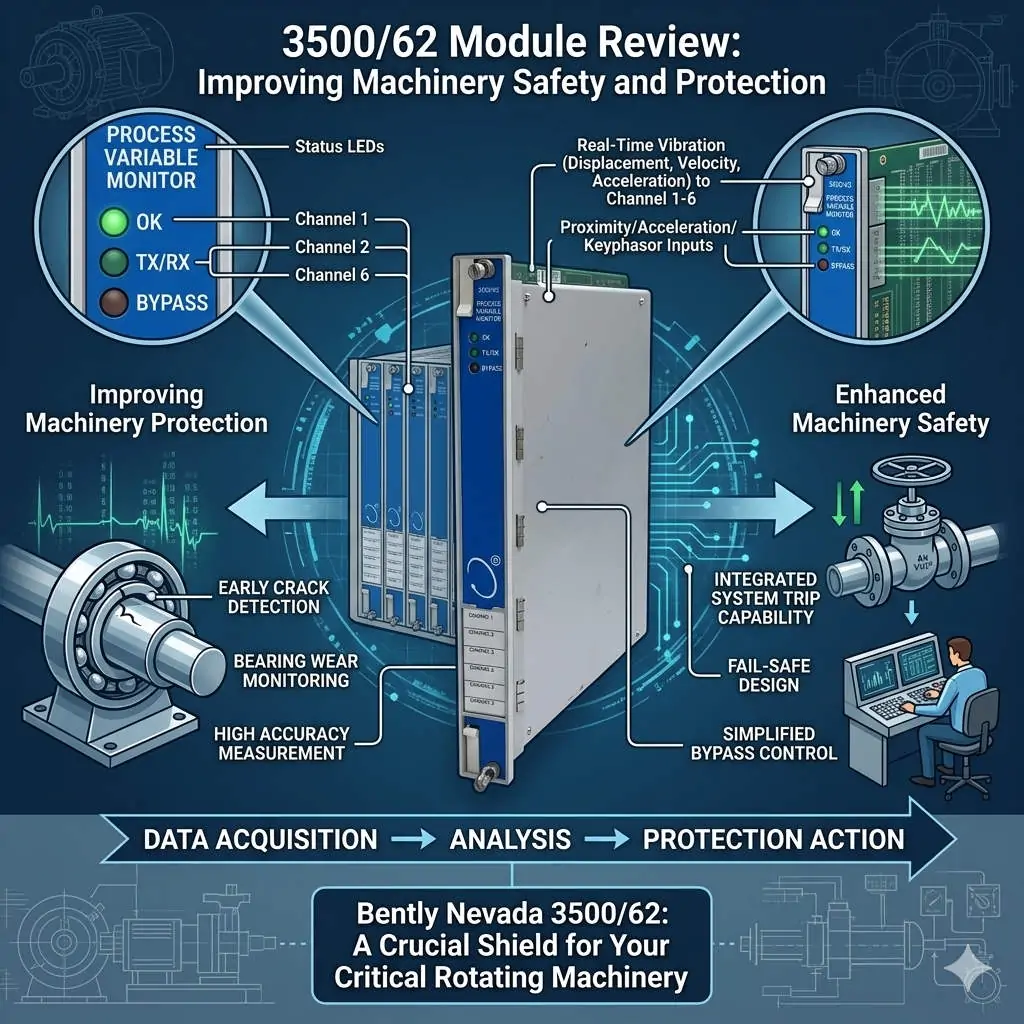
The Bently Nevada 3500/62 serves as a vital bridge in modern industrial automation. While standard vibration monitors track mechanical movement, this module integrates critical process variables like pressure and temperature. In heavy industries, mechanical failures often stem from process upsets. Therefore, correlating these data points within a single rack is essential for comprehensive asset protection. By using the 3500/62, operators gain a holistic view of machine health, moving beyond simple vibration analysis to true condition-based monitoring.

3500-62 Module Review Improving Machinery Safety and Protection

3500-62 Module Review Improving Machinery Safety and Protection

Technical Core: Standardizing 4–20 mA Analog Input Integration

The 3500/62 module primarily utilizes 4–20 mA analog inputs to interface with field transmitters. This compatibility ensures a seamless connection with standard flow, pressure, and temperature sensors used in factory automation. Because it accepts direct signals, the system eliminates the need for external converters. Consequently, this architecture reduces signal drift and minimizes points of failure. However, engineers must carefully calculate the loop power budget. High-load smart transmitters may occasionally require an external power source to maintain signal integrity during peak operation.

Advanced Alarm Logic and System Redundancy

Integrated alarm setpoints differentiate the 3500/62 from basic PLC or DCS modules. This hardware allows for “unified trip logic” directly within the protection rack. For example, a system can trigger a shutdown only when both high vibration and extreme bearing temperature occur simultaneously. This local logic execution provides faster response times than cross-platform communication via Modbus. Moreover, it creates a redundant layer of safety. Even if the primary control system fails, the 3500/62 ensures the machinery remains within safe operating limits.

Optimizing Installation for High-Noise Industrial Environments

Signal interference remains a significant challenge in plants featuring large Variable Frequency Drives (VFDs). Analog signals are sensitive to electromagnetic noise, which can cause “phantom” alarms. At Powergear X Automation Limited, we recommend using shielded twisted-pair cabling grounded at only one end. Furthermore, installers should never run low-voltage signal wires parallel to high-voltage power lines. In extreme cases, adding signal isolators can prevent ground loops that compromise measurement accuracy. Proper cable management significantly improves the Mean Time Between Failures (MTBF) for the entire monitoring system.

Strategic Procurement: Compatibility and Selection Criteria

Choosing the right module requires a thorough understanding of the existing 3500 rack ecosystem. The 3500/62 is generally backward compatible with older racks, but firmware versioning is critical. Before purchasing, verify that your Rack Configuration Software supports the specific revision of the module. Additionally, check the power supply capacity of the rack. Adding multiple process variable monitors can increase the thermal load and current draw. Ignoring these hardware constraints often leads to unexpected commissioning delays or analog signal instability.

Professional Insight from Powergear X Automation Limited

From the perspective of Powergear X Automation Limited, the 3500/62 is a diagnostic powerhouse rather than just an input card. As the industry moves toward “Industry 4.0,” the demand for synchronized data increases. While a DCS handles broad process control, the 3500 system provides the “high-speed” protection layer. We suggest that users do not view this as a replacement for a PLC. Instead, treat it as a specialized tool for critical rotating equipment where the cost of a missed trip far outweighs the module investment.

Industrial Solution Scenarios

  • Centrifugal Compressor Protection: Monitoring suction pressure and discharge temperature alongside vibration to prevent surge conditions.
  • Steam Turbine Management: Integrating casing expansion and steam pressure into the 3500 rack for real-time thermal stress analysis.
  • Remote Pump Stations: Using the 3500/62 to provide autonomous protection in areas with limited DCS connectivity.

Technical Implementation Checklist

  • ✅ Verify transmitter loop power requirements (Active vs. Passive loops).
  • ✅ Match the 3500/62 firmware with the Rack Interface Module (RIM) version.
  • ✅ Implement proper shielding and separation from high-voltage AC cables.
  • ✅ Configure “Danger” and “Alert” setpoints based on machinery manufacturer specifications.

Frequently Asked Questions (FAQ)

Q: Does the 3500/62 support HART protocol for smart transmitter diagnostics?
While the 3500/62 reads the 4–20 mA analog signal, it typically does not pass HART digital diagnostic data to the rack. If you need HART information for asset management, you should use a signal splitter to send the data to a specialized HART multiplexer or DCS.

Q: Can I use this module for high-speed turbine overspeed protection?
No. The 3500/62 is designed for static or slowly changing process variables. For overspeed protection, you must use the dedicated 3500/53 Electronic Overspeed Detection System, which has the necessary millisecond response time.

Q: How does the 3500/62 handle a “Transmitter Not OK” status?
The module monitors the input current. If the signal drops below a certain threshold (typically <2 mA), the system flags a “Not OK” status. This prevents a broken wire from accidentally triggering a machinery trip, improving overall system reliability.

For more technical specifications and high-quality parts, please visit the Powergear X Automation Limited website for expert support.

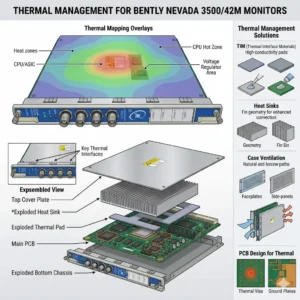
Thermal Management for Bently Nevada 3500-42M Monitors

Thermal Management for Bently Nevada 3500/42M Monitors

Thermal Management Risks for Bently Nevada 3500/42M Proximitor Seismic Monitors

Critical Role of Vibration Monitoring in Industrial Automation

The Bently Nevada 3500/42M serves as a vital component in high-reliability vibration and position monitoring. In sectors like oil and gas or power generation, this module protects critical rotating machinery. However, thermal stress can compromise its signal accuracy. Excessive heat directly undermines system stability. As a result, operators may face false alarms or missed mechanical faults.

Thermal Management for Bently Nevada 3500-42M Monitors

Thermal Management for Bently Nevada 3500-42M Monitors

Technical Impact of Overheating on Signal Integrity

The standard operating range for the 3500/42M typically spans from 0°C to 65°C. When internal temperatures exceed these limits, signal conditioning circuits begin to drift. Moreover, high heat accelerates the aging of electrolytic capacitors. This degradation shortens the module’s overall lifespan significantly. In many refinery environments, poor ventilation pushes temperatures above 70°C, causing intermittent channel dropouts.

Operational Risks and Response Stability Challenges

Heat introduces electrical noise and ADC instability within the monitor’s analog front-end. Consequently, proximitor signal scaling may drift away from calibrated values. These deviations often lead to false high-vibration alarms. Such errors trigger unnecessary machinery shutdowns and lost production time. Conversely, drift might mask early-stage bearing wear. This delay turns minor maintenance into a catastrophic unplanned outage.

System-Level Reliability in Rack Architectures

The 3500 system architecture relies on seamless integration between modules and power supplies. An overheating 3500/42M module increases the total thermal load of the entire rack. This heat transfer can trigger system-wide watchdog resets. Furthermore, redundant configurations suffer when thermal stress affects both primary and backup channels simultaneously. Maintaining a balanced thermal profile is essential for modern control systems.

Installation and Maintenance Best Practices

Field experience suggests that most overheating issues stem from installation errors rather than hardware defects. Engineers must prioritize cabinet thermal management to ensure longevity. Proper airflow prevents heat pockets from forming around sensitive electronics. In addition, dust accumulation acts as a thermal insulator, blocking essential cooling paths.

  • ✅ Maintain minimum airflow clearance at the top and bottom of the rack.
  • ✅ Avoid placing racks near heat sources like VFD panels or transformers.
  • ✅ Inspect and clean cabinet air filters monthly in dusty environments.
  • ✅ Utilize positive-pressure cabinets to keep internal components clean.
  • ✅ Verify total rack power load against the Power Supply Unit (PSU) rating.

Strategic Selection and Compatibility Insights

The 3500/42M offers backward compatibility within the 3500 rack series. However, hardware revisions and firmware versions must align for optimal performance. Older racks often lack the optimized airflow designs found in newer chassis. Therefore, users should verify rack revision levels before performing upgrades. Ignoring environmental conditions during selection often leads to premature module failure.

Expert Commentary from Powergear X Automation Limited

At Powergear X Automation Limited, we believe thermal management is a core part of machinery protection strategy. High-performance modules like the 3500/42M require stable environments to deliver precision. We often see random alarms disappear simply by redistributing modules to improve airflow. Treating cooling as an afterthought is a risk no plant manager should take. For high-quality automation parts and expert support, explore our solutions at Powergear X Automation Limited.

Application Scenarios and Solutions

  • High-Speed Turbines: Requires precise displacement monitoring where even 1°C of drift can trigger a safety trip.
  • Refinery Compressors: Utilizes seismic monitoring in harsh, ambient heat conditions requiring active cooling.
  • Remote Pumping Stations: Depends on self-diagnostics to alert maintenance teams of thermal rising before a fault occurs.

Frequently Asked Questions (FAQ)

Q: How can I detect overheating before it causes a system shutdown?
We recommend using thermal imaging cameras during routine inspections. This technique reveals hot spots that standard temperature sensors might miss. Also, monitor the “System Event List” for frequent self-test warnings or intermittent channel status changes.

Q: Will adding more fans to the cabinet always solve the problem?
Not necessarily. If the internal rack airflow is blocked by cabling or overpacking, external fans won’t help. You must ensure a clear path for air to move through the module slots themselves.

Q: Does the 3500/42M have a built-in automatic shutdown for heat?
The module includes self-protection logic, but it usually triggers a “Module Fault” rather than a clean shutdown. By the time this happens, your machinery protection is already compromised. Prevention through environmental control is the only safe approach.

Looking for reliable Bently Nevada modules or expert advice on rack configuration? Visit Powergear X Automation Limited today for global shipping and technical excellence.

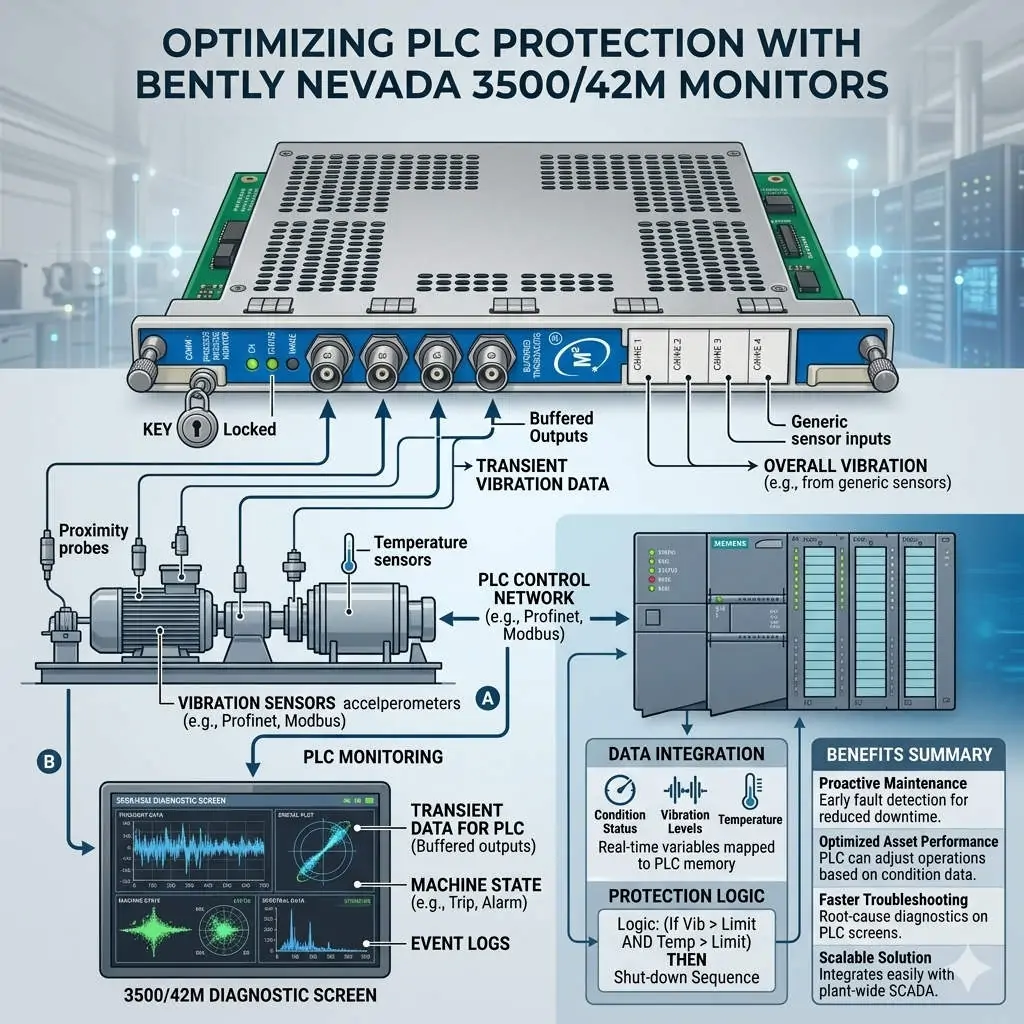
Optimizing PLC Protection with Bently Nevada 3500-42M Monitors

Optimizing PLC Protection with Bently Nevada 3500/42M Monitors

Optimizing Machinery Protection with Bently Nevada 3500/42M Proximitor Seismic Monitors

The Vital Role of 3500/42M in Industrial Automation

The Bently Nevada 3500/42M serves as a critical guardian for high-value rotating assets. It integrates multiple sensor inputs to facilitate precise alarm decisions across various industrial sectors. This module significantly enhances safety in oil and gas, petrochemical, and power generation environments. By reducing false trips, it ensures continuous production while maintaining strict safety standards. Consequently, plants can avoid the massive financial losses associated with unplanned downtime.

Optimizing PLC Protection with Bently Nevada 3500-42M Monitors

Optimizing PLC Protection with Bently Nevada 3500-42M Monitors

Advanced Boolean Logic for Tailored Control Systems

The 3500/42M supports sophisticated Boolean alarm logic, including OR, AND, and NOT configurations. Engineers use OR logic for early fault detection when any single bearing exceeds limits. Conversely, AND logic requires multiple simultaneous conditions, which effectively filters out transient noise during machine startup. Furthermore, NOT logic allows operators to suppress specific alarms during necessary maintenance intervals. These flexible configurations ensure that the monitor reacts only to genuine mechanical threats.

Enhancing Reliability Through Voting and Time Delays

Reliability improves further through the integration of time delays and channel voting behaviors. For instance, a 2-out-of-3 (2oo3) logic prevents a single faulty sensor from triggering a full system shutdown. This approach aligns perfectly with API 670 standards for machinery protection systems. As a result, the 3500/42M balances the need for sensitivity with the necessity of operational stability. Proper delay settings prevent nuisance trips caused by momentary process disturbances.

Strategic Multi-Channel Integration for Factory Automation

Each module processes both proximity and seismic inputs, allowing for comprehensive multi-channel correlation. Instead of viewing sensors in isolation, engineers can analyze radial and axial vibration together. This holistic view significantly improves the accuracy of fault diagnosis and predictive maintenance. Moreover, integrating these signals into a broader DCS or PLC network streamlines plant-wide monitoring. Precise data correlation extends equipment life by preventing both under-protection and unnecessary mechanical stress.

Best Practices for Field Commissioning and Maintenance

Successful deployment requires more than just hardware installation; it demands rigorous logic validation. During commissioning, experts at Powergear X Automation Limited recommend avoiding default OR logic for all shutdown parameters. Instead, use simulated signals to test the response of every logic gate before the actual startup. Additionally, ensure that maintenance bypasses are clearly visible on human-machine interfaces (HMI). Proper grounding and shielded cabling remain essential to prevent intermittent signals in high-vibration zones.

Author Insights: The Future of Machinery Protection

At Powergear X Automation Limited, we believe the 3500/42M represents a shift toward more intelligent protection. Modern industry reports from MarketsandMarkets suggest the vibration monitoring market will grow as AI integration increases. However, the fundamental reliability of hardware-based logic remains the gold standard for safety. We advise users to maintain strict firmware version control to ensure seamless backward compatibility. Investing in high-quality monitoring today prevents catastrophic mechanical failures tomorrow.

Industrial Solution Scenarios

  • Gas Turbine Protection: Use AND logic with 2oo3 voting to protect turbines from excessive vibration during load changes.
  • Remote Pumping Stations: Implement OR logic for early alerts to dispatch maintenance teams before a failure occurs.
  • Refinery Compressors: Combine NOT logic with digital inputs to safely calibrate probes without tripping the unit.

Technical Implementation Checklist

  • ✅ Verify firmware compatibility between the 3500/42M and the existing 3500 rack.
  • ✅ Use single-point grounding for all shielded cables to eliminate ground loops.
  • ✅ Configure “Alert” levels with OR logic for maximum sensitivity.
  • ✅ Configure “Danger” levels with AND logic to ensure high-integrity shutdowns.

Frequently Asked Questions (FAQ)

Q: How does the 3500/42M improve Mean Time Between Failures (MTBF)?
By using AND logic and voting, the system filters out “nuisance” data that would otherwise cause unnecessary wear from frequent startups and stops. This stabilization allows the machinery to operate within its design limits more consistently.

Q: Can I mix different sensor types on a single 3500/42M module?
Yes, the 42M is highly versatile. It can process signals from Proximitor sensors, velocity transducers, and accelerometers simultaneously, provided the configuration software is updated to match the specific transducer constants.

Q: What is the most common error during module replacement?
Failure to upload the specific configuration file from the old module often leads to incorrect logic behavior. Always back up your 3500 rack configuration using the Bently Nevada software before attempting a hardware swap.

For high-quality industrial spare parts and expert technical support, visit the official Powergear X Automation Limited website today.

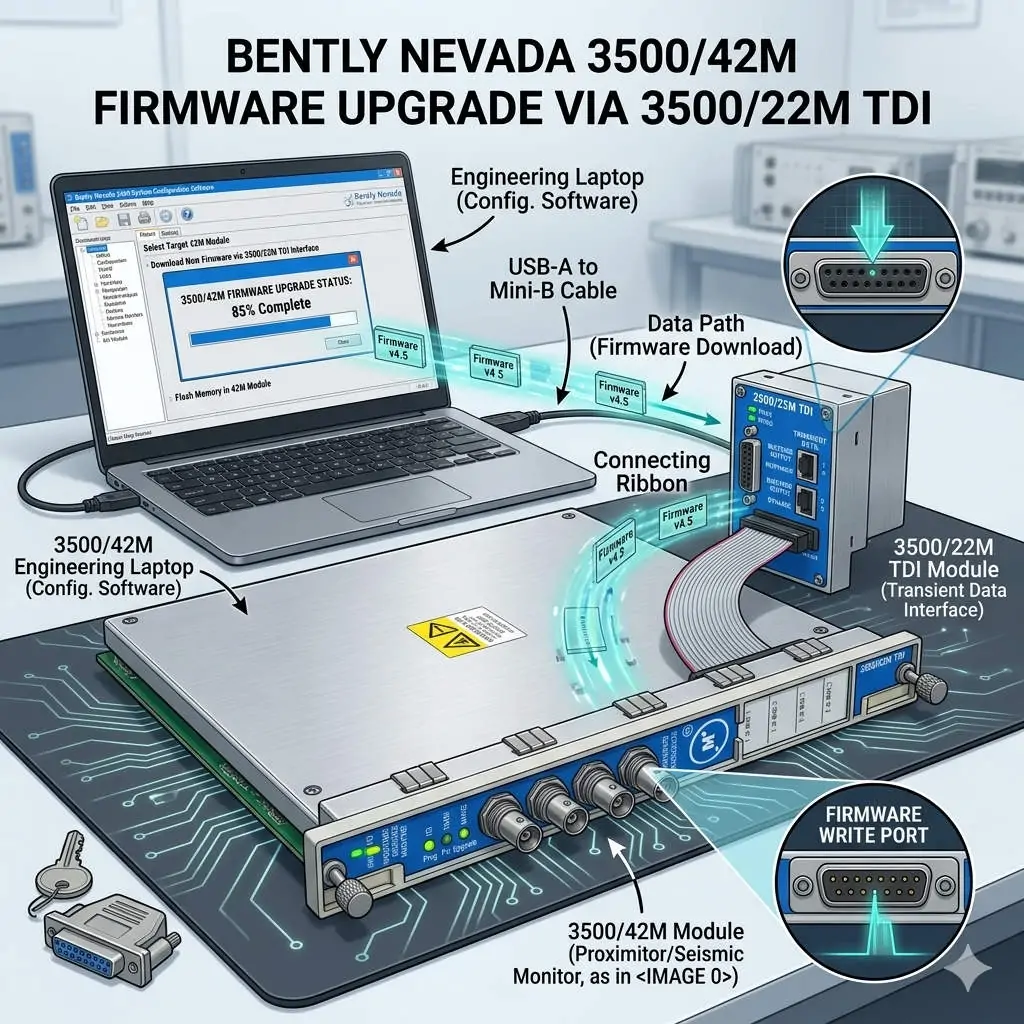
Bently Nevada 3500-42M Firmware Upgrade via 3500-22M TDI

Bently Nevada 3500/42M Firmware Upgrade via 3500/22M TDI

Seamless Firmware Upgrades for 3500/42M via the 3500/22M Communication Module

Enhancing Reliability in Machinery Protection Systems

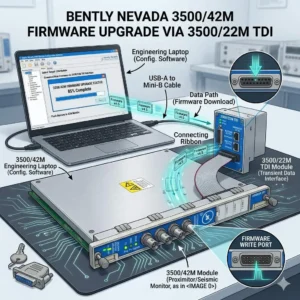
In the world of industrial automation, maintaining firmware consistency is vital for system health. The Bently Nevada 3500 series represents the gold standard for machinery protection. Specifically, the 3500/42M Proximitor/Seismic Monitor requires precise firmware to deliver accurate vibration diagnostics. By utilizing the 3500/22M Transient Data Interface (TDI) as a gateway, engineers can perform updates remotely. This method eliminates the need to remove hardware from the rack, ensuring continuous mechanical integrity.

Bently Nevada 3500-42M Firmware Upgrade via 3500-22M TDI

Bently Nevada 3500-42M Firmware Upgrade via 3500-22M TDI

Understanding the TDI Communication Gateway Architecture

The 3500/22M module serves as the primary bridge between the rack backplane and configuration software. It manages data traffic for both Ethernet and serial connections. During a firmware flash, the TDI module receives data packets and distributes them to the targeted 3500/42M monitor. This centralized architecture simplifies maintenance in complex factory automation environments. However, a stable network link is mandatory. Consequently, any communication dropout during the process could potentially corrupt the module memory.

Navigating Firmware Compatibility and Revision Control

Strict revision control defines successful Bently Nevada system management. Each monitor module must align with the rack’s overall firmware version. Mismatched versions often cause channel misinterpretation or alarm logic failures. Moreover, the configuration software version must support the specific firmware build. Powergear X Automation Limited experts recommend consulting the official “Firmware Compatibility Matrix” before starting. This proactive step prevents communication instability and ensures the DCS or PLC receives accurate data.

Strategic Scheduling for System Availability

Upgrading a single module typically takes between three and ten minutes. During this window, the 3500/42M module stops monitoring active vibration signals. This creates a temporary “blind spot” for critical rotating equipment like turbines or compressors. Therefore, engineers should only initiate upgrades during planned maintenance windows. Alternatively, perform updates while the machinery is in a standby state. Proper planning protects the assets while the control systems receive necessary security and feature patches.

Operational Best Practices for Safe Flashing

Field experience suggests that power stability is the most critical factor during firmware transfer. Voltage fluctuations can interrupt the write process and “brick” the hardware. In addition, avoid using high-latency connections like VPNs for firmware tasks. Local direct-cable connections offer the highest success rate. While the 3500 system supports hot-swapping, you must never reseat a module during an active flash. Following these technical guidelines ensures the longevity of your industrial hardware investment.

Industry Standards and Technical Insights

According to reports, the global machinery monitoring market is shifting toward digitalized maintenance. Standardizing firmware across your plant enhances diagnostic accuracy and audit readiness. For regulated sectors like petrochemicals, maintaining validated firmware levels is essential for compliance. At Powergear X Automation Limited, we believe that staying current with firmware is a cost-effective way to unlock advanced vibration analysis features without replacing physical modules.

Application Scenarios and Solutions

  • Oil & Gas Refineries: Use the 3500/22M to update monitors across large-scale compressor stations without entering hazardous zones.
  • Power Generation: Ensure turbine protection modules have the latest patches for improved transient data capture during start-up.
  • Water Treatment: Maintain high availability by upgrading backup pump monitors during low-demand periods.

Technical Execution Checklist

  • ✅ Verify the 3500/22M TDI is online and stable in the configuration software.
  • ✅ Confirm the target 3500/42M module slot is correctly identified.
  • ✅ Ensure the rack power supply is connected to a reliable UPS.
  • ✅ Back up the existing rack configuration before initiating any firmware changes.
  • ✅ Validate the module status and reload the configuration after the update finishes.

Expert Frequently Asked Questions

Q: Will my existing configuration be lost after a firmware upgrade?
Generally, the configuration remains, but firmware changes can sometimes alter memory mapping. We always recommend saving a copy of the rack configuration to your PC. After the upgrade, verify that all setpoints and delay timings remain unchanged.

Q: Can I upgrade multiple 3500/42M modules simultaneously?
Most configuration software allows for sequential updating. However, upgrading modules one by one is safer. This approach limits the “blind spot” to a single monitoring group at any given time, maintaining better overall rack protection.

Q: What should I do if the upgrade progress bar freezes?
Do not cycle power immediately. Wait at least 15 minutes to ensure no background processes are active. If the module remains unresponsive, check the TDI communication status. You may need to perform a “bootloader” recovery if the primary firmware image is corrupted.

For high-quality modules and expert technical support, visit the official Powergear X Automation Limited website to secure your system components.

Bently Nevada 3500-22M TDI Modbus TCP Integration Guide

Optimize Vibration Data with Bently Nevada 3500/22M Interface

Seamless Data Integration with the Bently Nevada 3500/22M Transient Data Interface

Bridging the Gap Between Vibration Monitoring and Plant Control

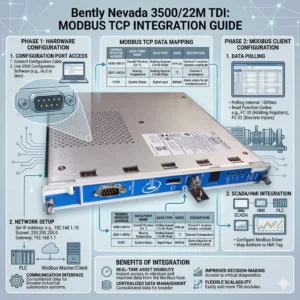
In high-stakes industries like oil and gas or power generation, communication compatibility often creates a technical bottleneck. The Bently Nevada 3500/22M Transient Data Interface (TDI) serves as the vital gateway between 3500 series machinery protection racks and external control systems. By facilitating reliable data extraction, this module allows operators to push critical machinery health insights directly into DCS or SCADA platforms. Consequently, plants can eliminate the need for complex custom middleware while maintaining high-fidelity asset management.

Bently Nevada 3500-22M TDI Modbus TCP Integration Guide

Bently Nevada 3500-22M TDI Modbus TCP Integration Guide

Technical Insights: Mastering Modbus TCP/IP Connectivity

The 3500/22M module utilizes Modbus TCP/IP protocols rather than traditional Modbus RTU serial connections. This shift to an Ethernet-based TCP/IP stack offers significant advantages for modern industrial automation. For instance, it provides higher data throughput and supports multi-client access for remote diagnostics. Therefore, integration with modern Ethernet-based DCS architectures becomes much simpler. However, legacy systems relying on RS-485 Modbus RTU will require an external protocol gateway to bridge the communication gap.

Optimizing Throughput and Reducing Network Latency

Engineers designed the 3500/22M to handle both transient and steady-state high-resolution data. Faster polling cycles through TCP improve real-time vibration monitoring and accelerate alarm response speeds. Nevertheless, heavy network congestion can introduce unwanted latency. To maintain performance, we recommend segmenting condition monitoring traffic via a dedicated VLAN. In our experience at Powergear X Automation Limited, delayed alarms often stem from overloaded plant networks rather than hardware failures within the 3500 rack itself.

System Architecture and Compliance with API 670 Standards

The 3500/22M functions as both a data concentrator and a communication interface for the entire rack. It interfaces with the internal backplane for data acquisition while providing external Ethernet ports for data export. This design effectively separates the deterministic protection system from the analytical monitoring network. As a result, the system maintains strict compliance with API 670 machinery protection standards. This separation ensures that network-level issues do not interfere with critical machine trip functions.

Installation Best Practices for Industrial Environments

Successful deployment of the 3500/22M requires a robust network and electrical design. You should never connect the module directly to a general office LAN. Instead, use industrial-grade switches and establish a dedicated VLAN to prevent broadcast storms. Furthermore, ensure the rack is properly grounded to mitigate electromagnetic interference (EMI). In turbine halls, high-current lines can create noise that leads to “ghost alarms” in the SCADA system if Ethernet cables lack proper shielding.

Evaluating Compatibility for Legacy Brownfield Projects

When upgrading older plants, buyers must verify rack firmware versions before procuring the 3500/22M. While the module is compatible with standard 3500 racks, older systems might not fully exploit TCP-based features. If your current control system is strictly Modbus RTU-dependent, budget for a high-quality industrial TCP-to-RTU converter. This proactive approach prevents unexpected integration costs from exceeding the hardware investment during the commissioning phase.

Expert Commentary from Powergear X Automation Limited

At Powergear X Automation Limited, we believe the 3500/22M is a prerequisite for any facility moving toward Industry 4.0 or digital transformation. The ability to stream high-density vibration data without serial bottlenecks is a game-changer for predictive maintenance. However, we urge engineers to prioritize network security and segmentation. As these interfaces bridge the gap between OT and IT, a secure, isolated communication layer is essential for long-term operational stability.

Application Scenarios and Strategic Solutions

  • Large Compressor Stations: Isolated condition monitoring traffic ensures that transient data does not saturate the primary control network.
  • Petrochemical Refining: Direct integration with Honeywell or Emerson DCS via Modbus TCP simplifies the asset management workflow.
  • Digital Power Plants: Utilizing the TDI for remote diagnostics allows off-site experts to analyze vibration signatures in real-time.

Technical Implementation Checklist

  • ✅ Verify SCADA support for Modbus TCP mapping before installation.
  • ✅ Use shielded Cat6 cables and maintain distance from high-voltage conduits.
  • ✅ Implement an industrial protocol gateway if RS-485 connectivity is mandatory.
  • ✅ Update rack firmware to the latest version to ensure full TDI feature support.

Frequently Asked Questions (FAQ)

Q: Can I use the 3500/22M to replace a 3500/20 Rack Interface Module?
Yes, the 3500/22M is the newer generation Transient Data Interface that provides enhanced Ethernet capabilities. However, you must verify that your configuration software is updated to support the 22M hardware profile to avoid configuration errors.

Q: Why does my SCADA system intermittently lose connection to the TDI?
This is frequently caused by ARP table overflows or broadcast traffic on a shared network. We recommend assigning a static IP address to the 3500/22M and placing it behind a managed industrial switch with IGMP snooping enabled.

Q: Does the 3500/22M support simultaneous connections to System 1 and a third-party PLC?
Yes, the module supports multiple socket connections. This allows Bently Nevada’s System 1 software to collect rich diagnostic data while your plant PLC polls basic alarm registers via Modbus TCP simultaneously.

For more technical specifications and high-performance automation modules, visit the official Powergear X Automation Limited website to view our latest inventory.

Bently Nevada 177230 Guide: RMS Velocity for Vibration Monitoring

Bently Nevada 177230 Guide: RMS Velocity for Vibration Monitoring

Optimizing Machine Health with Bently Nevada 177230 Seismic Transmitters

The Role of RMS Velocity in Modern Industrial Automation

The Bently Nevada 177230 Seismic Transmitter measures machine casing vibration to provide a stable 4–20 mA output. Unlike peak-value sensors, this device focuses on Root Mean Square (RMS) velocity. This distinction is vital because RMS reflects the true destructive energy within a mechanical system. Most DCS and PLC systems in factory automation rely on this steady signal for real-time monitoring.

Bently Nevada 177230 Guide: RMS Velocity for Vibration Monitoring

Alignment with ISO Vibration Severity Standards

Maintenance teams often use ISO 10816 or ISO 20816 to determine equipment health. These standards define vibration severity limits specifically in RMS units. Therefore, using the 177230 eliminates the need for manual mathematical conversions. This alignment ensures that your alarm and trip setpoints remain accurate and consistent across the plant.

Technical Advantages of Integrated Signal Conditioning

This transmitter integrates the seismic sensor and signal processor into a single, rugged housing. By filtering out transient high-frequency noise, it prevents the “spikes” that often trigger false alarms in peak-detecting systems. Consequently, operators experience fewer unnecessary shutdowns, which directly improves overall equipment effectiveness (OEE) in chemical processing and power generation.

Seamless Integration into DCS and PLC Networks

The 4–20 mA loop design makes the Bently Nevada 177230 highly compatible with existing control systems. The current-driven signal offers high immunity to electromagnetic interference (EMI), which is common in VFD-heavy environments. Furthermore, you can install these transmitters over long distances without losing signal integrity or accuracy.

Expert Tips for Mechanical Installation and Coupling

Proper mounting is the most overlooked factor in vibration monitoring. You must attach the transmitter to a rigid, flat surface as close to the bearing housing as possible. Poor coupling attenuates vibration energy and leads to undervalued RMS readings. Avoid mounting on thin covers or flexible brackets, as these create false resonance and distort data.

Managing Electrical Noise and Surge Protection

High-noise industrial environments require shielded twisted-pair cabling to ensure signal purity. You should ground the shield at only one end to prevent ground loops. For outdoor installations in the oil and gas sector, I highly recommend using external surge arresters to protect the internal circuitry from lightning or power surges.

Technical Excellence Summary

  • True RMS velocity output ensures compliance with ISO 10816 standards.
  • Onboard signal conditioning reduces false trips from transient vibration spikes.
  • Rugged 4–20 mA loop design supports long-distance, noise-immune transmission.
  • Direct compatibility with PLC and DCS simplifies control system architecture.
  • Compact form factor allows for installation in tight bearing housing spaces.

Author Insight by Powergear X Automation

In my experience, many facilities struggle with “nuisance trips” because they use peak-detecting sensors on aging equipment. Switching to an RMS-based system like the Bently Nevada 177230 provides a much smoother trending curve. It allows the maintenance team to see the gradual degradation of a bearing rather than reacting to every minor mechanical jar. If you are upgrading from legacy mechanical switches, this is the most cost-effective way to modernize your plant’s reliability program.

For more technical guides and high-quality automation components, visit the experts at Powergear X Automation.

Practical Application Scenarios

  • Centrifugal Pumps: Continuous monitoring of bearing housing vibration to prevent catastrophic seal failure.
  • Cooling Tower Fans: Detecting blade imbalances or gearbox wear in harsh, moisture-heavy environments.
  • Electric Motors: Providing early warning for stator eccentricity or rolling-element bearing defects.
  • Industrial Compressors: Monitoring high-speed rotation to ensure compliance with safety interlocking protocols.

Frequently Asked Questions (FAQ)

Q1: How do I verify if the transmitter is functioning correctly during commissioning?
Establish a baseline reading while the machine is running under normal, stable conditions. If the RMS value drifts significantly without a change in machine load, inspect the mounting torque first. Most “failures” are actually caused by loose mechanical coupling or improper cable grounding.

Q2: What is the biggest mistake to avoid when replacing a peak-detecting sensor?
Never copy your old alarm setpoints directly. Peak values are mathematically higher than RMS values (Peak ≈ 1.414 × RMS for pure sine waves). If you don’t recalculate your thresholds, your new system may be too “relaxed” and fail to trip during a genuine fault.

Q3: Can this transmitter be used in hazardous or explosive environments?
Yes, but you must select the specific model variant with the appropriate certifications (such as ATEX, IECEx, or CSA). Always verify the part number suffix to ensure the housing and electrical ratings match your local safety classification.

Bently Nevada 330500 Sensor Diagnostics for Industrial Automation

Bently Nevada 3500/42M Wiring & Configuration for 330500 Sensors

Integrating 330500 Proximitor Sensors with Bently Nevada 3500/42M Monitors

The Bently Nevada 3500 Series remains the global benchmark for machinery protection in industrial automation. Specifically, the 3500/42M Proximitor/Seismic Monitor serves as a critical bridge between physical hardware and digital insights. Connecting the 330500 (3300 XL Proximitor) sensor correctly is vital for monitoring high-speed rotating assets. This guide outlines the technical procedures and professional best practices for a seamless integration.

Bently Nevada 330500 Sensor Diagnostics for Industrial Automation

Core Components of the 3300 XL Proximitor System

The 330500 Proximitor is the “brain” of the 3300 XL 8mm transducer system. It converts the radio frequency (RF) signal from the probe into a usable voltage output. This system typically includes the proximity probe, an extension cable, and the Proximitor sensor itself. Because these components are calibrated together, mixing different lengths or brands can lead to significant linearity errors in your data.

Technical Capabilities of the 3500/42M Module

The 3500/42M is a versatile four-channel module designed for diverse factory automation environments. It processes signals for radial vibration, axial position, and even eccentricity. In my experience at Powergear X Automation, we often see users overlook the module’s programmable nature. This flexibility allows it to adapt to various transducers, but it requires precise software configuration to ensure machine safety.

Step-by-Step Wiring for Reliable Signal Integrity

Proper wiring prevents signal interference and ensures the longevity of your control systems. Most Bently Nevada systems follow a standard three-wire color code, though you should always verify with the specific datasheet.

Connect Power: Link the module’s -24 VDC terminal to the Proximitor’s power input (usually the red wire).

Attach Signal: Route the white signal wire to the designated channel input on the 3500/42M.

Establish Common: Connect the black common wire to the COM terminal to complete the circuit.

Grounding and Shielding for Industrial Environments

Electrical noise is the primary enemy of precision vibration monitoring. You must ground the cable shield at the 3500 rack end only. This prevents ground loops which cause erratic readings. Furthermore, always run sensor cables through dedicated conduits. Separation from high-voltage power lines is essential for maintaining a clean signal-to-noise ratio.

Software Configuration and Calibration Procedures

Physical wiring is only half the battle; the software must match the hardware. Use the 3500 Rack Configuration Software to set the sensor type to “3300 XL 8 mm.” Ensure the scale factor reflects the standard 200 mV/mil (7.87 V/mm). If these parameters are incorrect, your alarms will not trigger during a genuine mechanical fault, risking catastrophic equipment failure.

Professional Commissioning and Field Validation

Testing is the final hurdle before live operation. We recommend verifying the “Gap Voltage” while the machine is at rest. A healthy gap typically reads around -10 VDC. If the voltage is near 0 or -24 VDC, you likely have a wiring fault or a probe clearance issue. Documenting these initial values creates a baseline for all future predictive maintenance efforts.

Author Insights from Powergear X Automation

At Powergear X Automation, we observe a growing trend toward integrating 3500 systems with broader DCS and IoT platforms. While the 3500/42M provides hardware-level protection, the real value lies in the data it generates. We suggest always using genuine Bently Nevada components to maintain system certification and ensure the highest level of E-E-A-T (Experience, Expertise, Authoritativeness, and Trustworthiness) in your maintenance strategy.

Technical Best Practices Checklist

  • ✅ Use calibrated torque wrenches for probe mounting to avoid housing damage.
  • ✅ Verify that extension cable lengths match the Proximitor’s specific calibration (e.g., 5m or 9m).
  • ✅ Inspect BNC connectors for moisture or debris before final assembly.
  • ✅ Label every wire clearly at both ends to simplify future troubleshooting.
  • ✅ Confirm that the Proximitor mounting plate is electrically isolated from the machine frame.

Solutions for Common Installation Scenarios

Scenario: High Temperature

Recommended Action: Use specialized high-temp extension cables and ceramic-tipped probes.

Scenario: Long Distance

Recommended Action: Ensure the total loop resistance does not exceed the 3500/42M limits.

Scenario: Corrosive Area

Recommended Action: Install Proximitors inside NEMA 4X or IP66 rated stainless steel enclosures.

For high-quality components and expert technical support for your next project, visit Powergear X Automation to explore our comprehensive inventory of monitoring solutions.

Frequently Asked Questions (FAQ)

Q: Can I use a 3300 XL probe with an older 7200 series Proximitor?

A: No. The internal circuitry and RF frequencies differ between generations. Mixing components leads to non-linear output and will compromise your machinery protection system’s accuracy.

Q: Why is my gap voltage reading -24V constantly after installation?

A: This usually indicates an “Open Circuit.” Based on field experience, check for a snapped extension cable or a loose connection at the Proximitor terminal block.

Q: How often should I recalibrate the 3500/42M and 330500 system?

A: Industry standards like API 670 suggest a full loop check every 18 to 24 months. However, verify the calibration anytime you replace a probe or extension cable.

Bently Nevada 330500 Velomitor: Seismic Sensor Guide

How 330500 Velomitor Sensors Improve Machinery Protection

Core Capabilities of the 330500 Velomitor Sensor

The 330500 Velomitor is a high-performance piezoelectric transducer designed for rugged environments. It integrates internal signal conditioning to simplify data acquisition. This design allows the sensor to provide a standardized velocity output. Therefore, it integrates seamlessly with PLC, DCS, and dedicated Bently Nevada monitoring racks.

Bently Nevada 330500 Velomitor: Seismic Sensor Guide

The Physics of Seismic Vibration Measurement

This sensor operates on the inertial measurement principle. When you mount the Velomitor to a machine casing, the housing moves with the vibration. However, the internal seismic mass remains relatively stationary due to its own inertia. This relative displacement creates mechanical stress on the sensing element. In my experience at Powergear X Automation, this seismic approach provides the most stable readings for high-frequency machinery faults.

Inside the Piezoelectric Sensing Technology

The heart of the 330500 contains a specialized piezoelectric crystal. Mechanical force from the seismic mass deforms this crystal, generating a proportional electrical charge. This raw charge represents acceleration. However, most maintenance professionals prefer velocity measurements for diagnosing bearing health. As a result, the Velomitor performs internal integration to deliver a velocity signal directly.

Integrated Electronics and Signal Processing

Unlike older passive sensors, the 330500 features onboard signal conditioning. These electronics convert the high-impedance charge into a low-impedance voltage signal. This process minimizes electrical noise interference over long cable runs. Furthermore, the internal integration ensures consistent calibration across different monitoring platforms. This reliability makes it a top choice for factory automation systems globally.

Why Velocity Measurements Drive Machine Health

Industry standards often define machinery severity in terms of RMS velocity. Velocity correlates strongly with the fatigue and destructive energy present in a rotating machine. For example, a high-velocity reading usually indicates imbalance or misalignment. Moreover, measuring velocity helps technicians identify early-stage rolling element bearing wear before catastrophic failure occurs.

Comparing Casing Vibration to Proximity Probes

A common question in control systems design is whether to use proximity probes or Velomitors. Proximity probes measure the gap between the probe tip and the shaft. In contrast, the Velomitor measures how much the machine housing vibrates. For machines with rolling element bearings, casing vibration is the superior diagnostic indicator. However, for large turbomachinery with fluid-film bearings, engineers often use both sensor types.

Technical Highlights and Specifications

To ensure optimal performance, consider these technical requirements:

  • Mounting: Use a rigid, flat surface for accurate high-frequency transmission.
  • Frequency Range: Typical response covers 4.5 Hz to 5,000 Hz.
  • Environment: The hermetically sealed stainless steel housing resists moisture.
  • Output: Standardized voltage output facilitates easy integration with DCS.
  • Cabling: Use shielded twisted-pair cables to prevent electromagnetic interference.

Expert Analysis by Powergear X Automation

From our perspective at Powergear X Automation, the 330500 Velomitor represents a shift toward decentralized signal processing. By integrating the integrator into the sensor head, Bently Nevada reduces the risk of signal degradation. We often recommend this sensor for “balance-of-plant” assets. These include pumps, fans, and motors that lack sophisticated monitoring systems.

Real-World Application Scenarios

  • Centrifugal Pump Protection: Detects cavitation and bearing defects in real-time.
  • Cooling Tower Fans: Monitors for blade imbalance and gearbox degradation.
  • Electric Motor Diagnostics: Identifies rotor bar issues and end-winding vibration.
  • Gearbox Monitoring: Tracks gear mesh frequencies to prevent unexpected downtime.

For more insights into optimizing your industrial monitoring systems, visit the experts at Powergear X Automation. We provide the technical components and expertise to keep your facility running efficiently.

Frequently Asked Questions (FAQ)

Q1: Can I mount the 330500 Velomitor in any orientation?
Yes, the sensor functions in any orientation. However, you must align the sensitive axis with the direction of the vibration you wish to measure. We typically recommend horizontal and vertical mounting for a complete diagnostic profile.

Q2: What is the most common cause of inaccurate readings with this sensor?
In our experience, improper mounting is the primary culprit. If the sensor is loose or mounted on a flexible bracket, it will resonate. This resonance creates “ghost” peaks in the data that do not reflect actual machine health.

Q3: Does the 330500 require a special power supply?
It typically requires a constant current source, often provided by the monitoring system. If you are connecting it to a standard PLC, you may need a signal conditioner or an interface module to provide the necessary excitation.

Bently Nevada 177230 vs 990: Which Vibration Transmitter Bes

Industrial Vibration Monitoring: Comparing Bently Nevada 177230 & 990

177230 vs. 990: Selecting the Right Vibration Transmitter for Your Application

Choosing between the Bently Nevada 177230 seismic transmitter and the 990 proximity-based system is a fundamental decision in machinery protection. This choice dictates whether you monitor the machine’s structure or its rotating shaft—two different data sets that inform distinct maintenance actions. Understanding their core technologies and optimal applications is essential for implementing an effective, reliable condition monitoring strategy in industrial automation.

Bently Nevada 177230 vs 990: Which Vibration Transmitter Bes

Core Technology: Absolute Casing Vibration vs. Relative Shaft Displacement

The Bently Nevada 177230 is an absolute seismic velocity transmitter. It measures how much the machine’s casing or structure is shaking, providing a velocity output (in/s or mm/s) that directly correlates with mechanical force and fatigue. The Bently Nevada 990 is a relative displacement system. It conditions the signal from an external 3300 NSv proximity probe to measure the dynamic motion of the shaft relative to its bearing housing, reported in mils or microns of displacement.

System Architecture: Integrated vs. Multi-Component

This is a key differentiator in complexity and potential failure points. The 177230 is a self-contained, loop-powered unit. It integrates the sensor, signal conditioning, and 4-20 mA transmitter into one hardened housing. The 990 System requires three separate components: the 3300 NSv proximity probe, an extension cable, and the 990 transmitter module. This adds complexity but is necessary for measuring shaft position.

Frequency Response & Fault Detection Capabilities

The frequency range determines which faults you can detect. The 177230 has a broad frequency response (4.5 Hz to 1,000 Hz), making it sensitive to a wide range of faults from low-speed imbalance to high-frequency bearing and gear mesh issues. The 990 system, using a standard proximity probe, is optimized for lower frequencies relevant to shaft dynamics (typically 0 to 1,000 Hz), excelling at detecting oil whirl, misalignment, and unbalance in machines with fluid-film bearings.

Installation & Commissioning: Simplicity vs. Precision

Installation effort differs drastically. The 177230 requires a simple stud mount to a clean, flat spot on the casing. Wiring involves connecting the 2-wire 4-20 mA loop to a PLC. The 990 system demands precision: the probe must be installed in a drilled and tapped hole or a mounting bracket, with the gap set accurately (e.g., 1.0 mm / 40 mils) using a micrometer. This requires more skilled labor and time.

Diagnostic Output: Trending vs. Advanced Analysis

Both provide a 4-20 mA output for trending and alarming in a DCS. However, the 177230 often includes a buffered raw vibration signal accessible via a test connector. This allows for detailed spectral analysis with a portable collector. The 990 provides a conditioned displacement signal but is primarily designed for overall level trending. For root-cause diagnosis, the 177230’s velocity signal is often more directly useful for a wider range of machinery.

Expert Insight: Matching Technology to Asset Criticality

At Powergear X Automation, we base the choice on bearing type and criticality. For critical machines with fluid-film bearings (turbines, large compressors), shaft relative vibration (990 system) is non-negotiable per API 670. For the vast majority of balance-of-plant assets with rolling element bearings (pumps, motors, fans), casing vibration measured by the 177230 is not just sufficient; it’s more cost-effective and reliable. The 177230’s integrated design eliminates the #1 cause of proximity system faults: cabling and connector issues.

Technical Comparison Table

FeatureBently Nevada 177230Bently Nevada 990 System
Measurement TypeAbsolute Casing Vibration (Velocity)Relative Shaft Displacement
Primary Output4-20 mA (Velocity), Buffered Signal4-20 mA (Displacement)
Key ComponentIntegrated Piezoelectric Sensor3300 NSv Proximity Probe + Transmitter
Installation FocusRigid casing mountPrec probe gap to shaft
Optimal Machine TypeAssets with rolling element bearings; motors, pumps, fansMachines with fluid-film bearings; turbines, compressors, large pumps
ISO Standard ReferenceISO 10816 (Casing Vibration)API 670 / ISO 7919 (Shaft Vibration)

Application Case: Plant-Wide Pump Monitoring Retrofit

A chemical plant had 40 critical process pumps with failing 2-wire vibration switches. They needed reliable 4-20 mA trends for their DCS. Using 990 systems was cost-prohibitive. They retrofitted with Bently Nevada 177230 transmitters. Installation was fast: weld a pad, mount the sensor, connect the loop. The DCS now receives stable velocity trends. Within 6 months, the system identified 3 pumps with rising vibration, enabling planned bearing replacements. The project achieved full ROI in 10 months through prevented failures.

Application Case: Turbine Shift from Periodic to Continuous Monitoring

A small steam turbine (3,500 RPM) was monitored only by monthly route-based data collection. The site wanted continuous protection. They installed a Bently Nevada 990 system with two proximity probes (X & Y direction) at the turbine’s outboard bearing. The 4-20 mA output fed into the plant’s PLC for alarm generation. During a startup, the system detected a sudden shift in shaft centerline position, indicating a potential bearing wipe. The turbine was stopped immediately. Inspection confirmed a lube oil blockage—the 990 system prevented a $250,000 bearing failure.

Selection Guide: Key Decision Factors

Choose the Bently Nevada 177230 Seismic Transmitter if:
– You need to monitor motors, pumps, fans, or gearboxes with rolling element bearings.
– Your primary goal is overall machine health trending and alarm generation in the DCS.
– You want to minimize installation cost, complexity, and long-term cable/connector maintenance.
– The environment is harsh (moisture, corrosion) and benefits from a fully sealed, integrated unit.

Choose the Bently Nevada 990 Proximity System if:
– You are monitoring critical turbomachinery (turbines, compressors) with fluid-film bearings.
– API 670 or similar standards mandate shaft relative vibration measurement.
– You need to monitor shaft position, eccentricity, and dynamic orbit for rotor dynamics analysis.
– The asset is sufficiently critical to justify the higher installation and component cost.

Frequently Asked Questions (FAQ)

Can the 4-20 mA output from these transmitters be used for automatic machine shutdown?

Yes, but with caution. The 4-20 mA signal can be wired to a PLC or a shutdown relay. However, for Safety Instrumented Functions (SIF), a dedicated safety-rated vibration monitor (like a 3500 system) is typically required. The transmitters are best for continuous monitoring and alarm generation.

Does the 177230 require external power?

No, it is loop-powered. The 4-20 mA signal loop itself provides the operating power (typically 12-30 VDC). This simplifies wiring, as only two wires are needed for both power and signal.

What happens if the proximity probe in a 990 system fails?

The 990 transmitter will typically drive its 4-20 mA output to a fault state (usually >20 mA or <4 mA), triggering an alarm in the DCS. However, diagnosing whether the fault is in the probe, cable, or transmitter requires additional troubleshooting, a disadvantage compared to the all-in-one 177230.

Can I get frequency spectrum data from these transmitters?

The 177230’s buffered velocity output allows you to connect a portable analyzer for spectrum collection. The standard 990 system provides only the overall 4-20 mA displacement value; for spectrum analysis of shaft vibration, you would need a separate monitor with dynamic signal capture capabilities.

Which option is better for very low-speed machinery (below 100 RPM)?

For very low speeds, the 177230 is generally better. Its velocity output remains strong down to 4.5 Hz (270 RPM). A proximity system (990) may struggle at very low speeds because the displacement signal amplitude becomes very small and susceptible to noise. Special low-frequency seismic sensors are available for speeds below 4.5 Hz.

For expert assistance in selecting and implementing the right vibration monitoring solution for your assets, contact the application engineers at Powergear X Automation.

Back to Top
Product has been added to your cart