Over 50,000 hot-selling automation module components.

Hot-Swap Bently Nevada 3500/42M 140734-02 Rear I/O Module Safely

Hot-Swapping Bently Nevada 3500/42M 140734-02 Rear I/O Modules: Is Probe De-Energization Necessary?

Engineers often maintain condition monitoring hardware on critical turbomachinery in processing plants. A common question arises when replacing a Bently Nevada 3500/42M Proximity Monitor 140734-02 rear I/O module. Maintenance technicians must know whether they should de-energize the field proximity probes during live rack servicing. Powergear X Automation provides technical insights into proper online maintenance procedures for high-reliability machinery protection systems.

The Role of Rear I/O Modules in Factory Automation

The 3500/42M system routes dynamic vibration signals directly into industrial automation networks and control systems. The rear I/O module transfers raw signals from proximity transducers to the front monitoring card. Continuous processing facilities in oil refining, power generation, and chemical production rely on these modules for uninterrupted machinery protection. Proper maintenance protocols prevent costly false trips and ensure smooth operation across complex plant architectures.

Understanding the Modular Architecture of Condition Monitoring Cards

Bently Nevada designs the 3500 series rack with physical isolation between processing cards and terminal interfaces. The 140734-02 rear I/O card provides signal routing, wiring terminals, and impedance matching. However, the front main monitor module generates the required negative 24-volt DC excitation voltage for eddy current probes. Replacing the rear I/O component does not interrupt probe excitation unless wiring short circuits occur. Therefore, operators do not need to disconnect power to proximity sensors when replacing the rear module.

Key Dangers of Unnecessary Sensor Power Interruptions

Disconnecting sensor power during live operations creates operational risks for rotating equipment. Proximity probes require stable supply voltage to maintain precise gap voltage settings. Removing power causes transient signal shifts when the system restarts. As a result, downstream programmable logic controllers (PLC) or distributed control systems (DCS) may interpret signal drops as actual shaft displacement. Maintaining power to the front monitor card preserves transducer stability during rear card maintenance.

Verifying Hardware Revisions and Backplane Compatibility

System integrators must verify exact part numbers before replacing hardware in critical control systems. Bently Nevada offers multiple rear I/O variants with distinct terminal layouts and grounding options. Installing an incompatible module revision like swapping a 140734-01 with a 140734-02 without checking rack keying can cause channel fault alarms. Always confirm firmware revisions, keying pins, and software configurations in 3500 Rack Configuration Software before field installation.

Step-by-Step Field Replacement Protocol for Engineers

  1. Notify Operators and Bypass Protection: Secure formal authorization and place the target monitoring channels into bypass mode to prevent false emergency shutdowns.
  2. Document Wiring Connections: Label all transducer cables, extension cords, and shield wires connected to the 140734-02 terminal blocks.
  3. Unscrew and Extract the Rear Module: Loosen the captive retaining screws on the rear I/O card and pull the module smoothly out of the backplane.
  4. Insert the Replacement Card: Align the new 140734-02 module with the guide rails, push firmly into the backplane connector, and tighten the retaining screws.
  5. Verify Sensor Gap Voltages: Reconnect signal wiring and check probe gap voltages in software to ensure full channel health before removing bypasses.

Best Installation Practices for Signal Integrity

Field technicians must handle transducer wiring with care during module replacement. Pulling on flexible cables can damage extension cable connectors or disrupt shield grounding. Maintain single-point shield grounding at the rack side to prevent ground loops across factory automation infrastructure. Furthermore, check that all screw terminals hold wires securely. Bad connections introduce signal noise that degrades machinery protection accuracy.

Procurement Guidelines and Lifecycle Compatibility

Procurement teams sourcing replacement components for legacy rack systems must evaluate hardware lifecycle status. Replacing a damaged I/O module does not require purchasing new eddy current probes, extension cables, or proximitors. Matching the exact part number 140734-02 ensures seamless physical fit and electrical compatibility with existing front cards. Verify module condition and supplier testing reports before integrating spare parts into operating facilities.

Application Scenario: Online Maintenance on a Refinery Gas Compressor

A petrochemical plant experienced a channel signal fault on a critical synthesis gas compressor monitored by a Bently Nevada 3500 system. The diagnostics identified a failing terminal block on the 3500/42M 140734-02 rear I/O module. The plant could not schedule an emergency shutdown due to continuous production demands.

Following standard safety procedures, engineers bypassed the affected vibration trip logic in the DCS while keeping the front monitor module powered. Technicians unclipped the wiring harness, replaced the faulty 140734-02 rear card, and re-terminated the probe lines without powering down the proximity sensors. The gap voltage remained stable at negative 10.5 volts DC throughout the process, allowing the team to restore full protection within twenty minutes without interrupting plant operations.

For genuine machinery protection hardware and technical support on condition monitoring systems, explore premium components at Powergear X Automation to keep your plant running reliably.

Frequently Asked Questions (FAQ)

Q1: Do I need to re-calibrate my proximity probes after replacing the rear I/O module?
No. Calibration parameters reside in the probe, extension cable, and proximitor combination alongside the front monitor configuration. Replacing the rear I/O module only replaces the physical connection interface and does not alter probe calibration.

Q2: What happens if I short-circuit probe wires during rear module replacement?
Short-circuiting terminal wires can blow internal protective fuses on the front monitor card or cause channel BAD status alarms. Always handle disconnected wiring carefully to prevent leads from touching cabinet ground or adjacent terminals.

Q3: Can I hot-swap the front 3500/42M monitor module along with the rear I/O card?
Yes, the 3500 system supports hot-swapping both front and rear modules. However, removing the front monitor module will temporarily interrupt probe power and stop active vibration monitoring on those four channels.


Bently Nevada 3500 Event List Guide for 3300 XL Probe Faults

Diagnosing Bently Nevada 3300 XL Loose Connections via 3500 System Event Lists

Reliable proximity probe measurements protect critical rotating machinery in modern industrial automation setups. Intermittent loose connections between 3300 XL 8mm proximity probes, extension cables, and Proximitor sensors often cause false vibration spikes or channel faults. These transient issues confuse maintenance teams and cause unnecessary shutdowns in continuous processes. Powergear X Automation provides this technical guide to help engineers analyze Bently Nevada 3500 Event Lists, pinpoint connection faults, and improve machinery protection across DCS and PLC environments.

Core Value of Event Logs in Machinery Protection Systems

The Bently Nevada 3500 monitoring system continuously captures module status updates, transducer faults, and communication events. Loose connections rarely cause total system failure immediately. Instead, they produce short-lived signal drops or voltage spikes. According to industrial maintenance reports, over 30% of false machinery trips stem from wiring degradation or loose connectors rather than probe damage. Analyzing event timestamps and status sequences allows engineers to isolate physical wiring issues quickly without stopping active plant operations.

Analyzing Event Timestamps to Identify Intermittent Patterns

Event List timestamps reveal whether a fault recurs periodically or links to machine vibration changes. Permanent transducer failure locks the channel into a continuous NOT OK state. Conversely, intermittent loose connections generate self-clearing fault logs that last only a few seconds. Engineers can track timestamps to correlate faults with motor start sequences or thermal expansion phases. If a channel alternates rapidly between NOT OK and OK states, technicians should inspect physical cable connections rather than replacing the sensor head.

Evaluating Channel Status Events and Gap Voltage Shifts

The 3500 Rack Configuration Software categorizes signal anomalies into specific channel status events. Intermittent wiring issues typically trigger transient Input Fault or Transducer Failed messages. Monitoring DC gap voltage trends helps engineers verify the physical integrity of the circuit. A sudden gap voltage drop to 0 VDC followed by immediate recovery indicates an open circuit at the Proximitor terminal or ClickLok connector. Stable gap voltage with fluctuating AC vibration usually points to mechanical interference instead.

Understanding Alarm Sequences and Fault Propagation Chains

Determining the root cause of an alarm requires evaluating the entire event sequence rather than a single log entry. A classic loose connection sequence starts with a Transducer Signal Lost message, followed by a Channel NOT OK status, and ends with an automatic Channel Returned OK entry. In contrast, physical probe destruction maintains a hard fault status without clearing. Tracing these log sequences helps reliability engineers prevent false trip actions and optimize factory automation maintenance schedules.

Field Installation Practices for Proximity Cable Protection

Preventing loose connection faults requires strict adherence to physical cabling standards. Technicians must ensure that ClickLok connectors lock fully and remain free from strain. In addition, signal cables must follow dedicated grounded conduits away from high-voltage lines. According to API 670 standards for machinery protection, improper grounding creates ground loops that mimic loose connection symptoms. Connecting cable shields to ground at the control cabinet side only eliminates circulating currents and improves signal clarity.

Step-by-Step Troubleshooting with Component Substitution

  1. Check Physical Connectors: Inspect the ClickLok connection between the 3300 XL probe and extension cable for corrosion, moisture, or loose locking rings.
  2. Swap Extension Cables: Swap the extension cable with a known functional unit. If the fault moves to the new channel, replace the damaged cable.
  3. Test the Proximitor Sensor: Move the signal line to an adjacent Proximitor channel. If the issue follows the sensor, replace the Proximitor unit.
  4. Verify Gap Voltage: Measure DC gap voltage using a digital multimeter at the terminal block to confirm stable bias voltage under operating temperatures.

B2B Procurement and Hardware Replacement Considerations

Replacing legacy 3300 components with modern 3300 XL systems requires careful compatibility checks. System integrators must match probe length, extension cable resistance, and Proximitor scale factors to maintain accurate calibration. Deploying mismatched components causes zero-point shifts, incorrect vibration readings, and continuous channel alarms. Plant managers should verify rack configuration parameters in the 3500 software before installing new hardware during scheduled maintenance turnarounds.

Application Scenario: Petrochemical Compressor Protection

A petrochemical facility experienced intermittent Channel 2 NOT OK alarms on a critical multi-stage centrifugal compressor. The vibration monitoring channel triggered brief Alert warnings every few hours, but mechanical vibration levels remained normal. The maintenance team analyzed the Bently Nevada 3500 Event List and noticed that every fault entry resolved itself within two seconds. Rather than replacing the 3300 XL probe inside the machine casing, technicians inspected the external junction box. They discovered a loose terminal screw caused by compressor frame vibration. Tightening the terminal block restored full signal stability and prevented an unscheduled plant shutdown.

To upgrade your machinery monitoring infrastructure or source certified replacement modules, visit Powergear X Automation for high-reliability industrial control solutions.

Frequently Asked Questions (FAQ)

Q1: How can I distinguish between a bad 3300 XL probe and a loose extension cable?
A broken probe usually causes a permanent Channel NOT OK fault and abnormal gap voltage. A loose extension cable causes intermittent, self-clearing event logs that correlate with machine vibration or temperature changes.

Q2: Can loose terminal wiring damage the 3500 monitor card?
No, 3500 input channels feature short-circuit and open-circuit protection. However, repeated intermittent spikes can trigger false Danger alarms and trip connected machinery if voting logic is not enabled.

Q3: Why does my gap voltage jump when I touch the Proximitor wiring?
This behavior indicates a cold solder joint, loose terminal screw, or degraded cable shield connection. Inspect the terminal strip and re-torque all wiring connections to eliminate contact resistance.

Bently Nevada 3500-42M Bypass LED Issue Proximitor Wiring Guide_

Bently Nevada 3500/42M Bypass LED Issue: Proximitor Wiring Guide

Why Reverse Proximitor Wiring Illuminates the Bypass LED on Bently Nevada 3500/42M Modules

Precision machinery protection requires dependable sensors and advanced control systems in industrial automation. The Bently Nevada 3500/42M Proximity/Seismic Monitor module measures shaft vibration and displacement on critical turbomachinery. However, reversing polarity on eddy current Proximitor sensors creates unexpected behavior. The module activates the Bypass LED while the Alert LED remains dark. At Powergear X Automation, our technical team analyzes why polarity errors disrupt monitoring channels and explains how field engineers can resolve this issue efficiently.

Bently Nevada 3500-42M Bypass LED Issue Proximitor Wiring Guide_

Bently Nevada 3500-42M Bypass LED Issue Proximitor Wiring Guide_

The Core Role of Eddy Current Sensors in Machinery Protection

Rotating machinery in power generation and chemical plants relies on eddy current probes for real-time condition monitoring. The Proximitor sensor drives high-frequency radio signals through the probe tip to form an electromagnetic field. As the metal shaft moves, eddy current losses change the probe impedance. The Proximitor converts this impedance shift into a proportional DC voltage. The 3500/42M module processes this analog voltage to calculate shaft vibration amplitudes. Proper sensor operation allows plant operators to detect bearing wear and rotor unbalance before catastrophic failures happen.

Understanding the Impact of Reversed -24VDC Supply Polarity

Bently Nevada 3300 XL and 3500 proximity probe systems require a stable -24VDC power supply. Reversing terminal connections halts the internal active electronics within the Proximitor. Consequently, the sensor fails to produce a valid dynamic signal or a stable DC gap voltage. The output voltage floats near zero or clamps to an invalid rail level. B2B engineers must realize that the 3500/42M module cannot calculate real vibration data without a proper gap voltage. Therefore, the monitor inhibits alarm processing to prevent false plant trips.

Analyzing 3500/42M Bypass State Logic and Safety Design

The 3500/42M monitor features sophisticated onboard diagnostics rather than simple signal threshold detection. When an invalid input voltage occurs, internal logic marks the channel as Not OK. The monitor then suppresses alarm outputs and illuminates the Bypass LED. Field personnel often misinterpret this Bypass light as a software override. However, the system automatically enters this protective state when sensor signals fall outside valid operating ranges. This safety design ensures that unpowered or incorrectly wired sensors do not trigger accidental machine shutdowns.

Complete Diagnostic Checklist for Bently Nevada Channel Alerts

Illuminating the Alert LED on a 3500/42M module requires satisfying five distinct monitoring conditions in sequence:

  • Correct Power Supply: The Proximitor must receive a steady -24VDC supply with correct polarity.
  • Valid Gap Voltage: The probe must operate within its linear range, typically producing -8VDC to -10VDC at nominal gap.
  • Healthy Channel Status: The 3500/42M module must register a Channel OK condition in internal memory.
  • Active Alarm Logic: Software configuration must enable channel alerts without manual user bypass.
  • Vibration Threshold Exceeded: Shaft vibration amplitude must exceed the programmed alert setpoint value.

Step-by-Step Commissioning and Troubleshooting Sequence

Engineers should follow a structured sequence when troubleshooting a Channel Not OK or active Bypass status:

  1. Verify Terminal Wire Definitions: Confirm connections at Terminal A (-24VDC), Terminal B (COM), and Terminal C (Signal OUT) instead of relying solely on wire colors.
  2. Measure Static Gap Voltage: Use a digital multimeter to measure DC voltage across COM and OUT terminals at the field junction box.
  3. Inspect System Event Logs: Connect via 3500 Rack Configuration Software to check for specific fault messages like Input Voltage Fault.
  4. Clear Software Bypass Overrides: Ensure maintenance teams clear all manual software bypass flags after completing field wiring corrections.

Field Installation Best Practices and Cable Shielding Rules

High-vibration machinery environments present severe electromagnetic noise from variable frequency drives and high-power motors. Signal cables must utilize twisted-pair construction with overall shielding. Engineers must connect the cable shield to ground at the control cabinet end only. Dual-ended shield grounding creates circulating earth loops, which introduce artificial electrical noise onto the -24VDC supply lines. Proper wiring practices protect delicate proximity signals and prevent false vibration alarms across factory automation networks.

B2B Procurement and Hardware Replacement Guidelines

Replacing legacy Bently Nevada Proximitors requires verifying technical specifications rather than assuming direct hardware equivalence. Procurement specialists must match probe diameters, system lengths, and scale factors. For example, mixing 5mm probes with 8mm Proximitor drivers shifts the output scale factor from 7.87 mV/um to incorrect levels. Modern 3300 XL components maintain backward compatibility with older 3500 racks, but engineers must verify system calibration in the 3500 software prior to commissioning.

Application Scenario: Gas Turbine Vibration Monitoring Circuit

During a scheduled overhaul on a 50MW gas turbine, technicians installed new 3300 XL 8mm proximity probes on the main bearing housings. Upon powering up the control cabinet, the 3500/42M module displayed solid Bypass LEDs on channels 1 and 2, while the Alert LEDs remained completely unlit. The maintenance team initially suspected damaged 3500/42M input cards.

However, field diagnostic checks revealed that contractors had transposed the -24VDC power supply and Signal OUT conductors at the intermediate junction box. Restoring proper terminal polarity allowed the Proximitors to establish a stable -9.2VDC gap voltage. The 3500/42M module automatically cleared the Channel Not OK state, extinguished the Bypass LED, and activated normal machinery protection without requiring hardware replacement.

For genuine machinery protection hardware and technical support on Bently Nevada components, visit Powergear X Automation to source certified control system modules for your facility.

Frequently Asked Questions (FAQ)

Q1: Does reversing -24VDC polarity permanently damage a Bently Nevada Proximitor?
Usually no. Bently Nevada Proximitors include reverse-polarity protection diodes designed to withstand short-term wiring errors. However, prolonged exposure to incorrect voltages or excessive power supply currents can cause internal component degradation.

Q2: Why does the 3500/42M module show a Bypass LED instead of a red Fault LED?
The Bypass LED indicates that the monitor is inhibiting its relay and alarm outputs for that channel. An invalid signal from a reversed Proximitor causes the system to automatically enter bypass mode to prevent false plant trips.

Q3: Do I need to recalibrate the 3500/42M rack after replacing a Proximitor sensor?
If you replace the sensor with an identical part number and matching cable length, full recalibration is not required. However, you must verify the DC gap voltage in the 3500 Rack Configuration Software to confirm correct mechanical installation.

Bently Nevada 3500/61-02-00 Guide: Compressor Pressure Setup

Can the Bently Nevada 3500/61-02-00 Monitor Compressor Discharge Pressure?

The Bently Nevada 3500/61-02-00 stands out as a highly reliable process variable input module within the Baker Hughes Bently Nevada 3500 ecosystem. Industrial facilities worldwide deploy this platform to interface standard analog transmitters with machinery protection systems. However, a frequent point of confusion among procurement officers and junior engineers is whether the module can directly measure compressor discharge pressure.

To clarify this technical distinction, the 3500/61-02-00 module effectively monitors compressor discharge pressure but does not function as a standalone pressure sensor. Instead, it processes standard 4-20mA analog signals coming from external field pressure transmitters. It converts these electrical currents into readable engineering units like PSI or Bar. Our engineering team at Powergear X Automation frequently assists clients in integrating these process variables to create a unified asset protection framework.

Core Asset Protection Value in Compressor Systems

Compressor discharge pressure serves as a critical indicator of aerodynamic health and process stability in oil, gas, and chemical plants. By routing this thermodynamic variable through the 3500/61-02-00 module, operators can consolidate mechanical protection with process monitoring. Consequently, users view vibration profiles, axial displacement, and discharge pressure on a single interface.

Integrated data streams significantly reduce diagnostics time during anomalous events. For instance, a sudden spike in vibration accompanied by a drop in discharge pressure immediately points to compressor surge. Conversely, relying solely on vibration data might lead to a misdiagnosis of mechanical imbalance. According to industrial machinery reports from organizations like the American Petroleum Institute (API), over 40% of rotating equipment failures stem from undetected process instability or operational deviations outside safe operating envelopes.

Technical Specifications and Field Transmitter Compatibility

The 3500/61-02-00 module features isolated channels designed to accept standard current loop inputs from external factory automation sensors. When configuring this module for compressor discharge pressure monitoring, engineers must verify electrical compatibility. Most industrial pressure transmitters utilize a two-wire 4-20mA loop powered by an external source or directly by the input card.

Mismatches between field instruments and the monitoring system remain a primary cause of commissioning delays. For example, if a technician installs a 0-10V transmitter while the 3500/61 module expects a 4-20mA signal, the control room will display corrupted or out-of-range values. Therefore, engineering teams must cross-reference transmitter output types, measurement scales, and hazardous area certifications before completing field deployment.

Modifying Engineering Units (PSI vs. Bar) in 3500 Software

Because the 3500/61-02-00 hardware only registers electrical currents, the software must perform all engineering unit conversions. Plant engineers modify these scaling parameters using the 3500 System Configuration Software. This precise alignment guarantees that the digital display accurately mirrors the physical reality of the industrial process.

Incorrect unit configurations introduce severe operational risks, such as premature or delayed safety trips. For example, setting an emergency shutdown threshold at 8 PSI instead of 8 Bar could trigger an accidental plant outage. To change engineering units seamlessly, technical personnel should follow this systematic procedure:

  1. Connect the engineering workstation to the 3500 rack interface and upload the current hardware configuration file.
  2. Navigate to the specific rack slot housing the 3500/61 module and select the target pressure monitoring channel.
  3. Locate the transducer settings to adjust the input range, full-scale limits, and engineering unit labels (e.g., from PSI to Bar).
  4. Download the updated configuration to the rack, and subsequently verify the scaling accuracy against a calibrated field signal generator.

Field Installation and Signal Reliability Guidelines

Industrial compressors inherently generate high-frequency mechanical vibrations that stress external electrical connections. Over time, these structural micro-vibrations can loosen terminal blocks, break shielding wires, and introduce intermittent signal noise into the 4-20mA control systems. As a result, the monitoring software may record false pressure spikes or trigger nuisance alarms.

  • Cable Selection: Always use high-grade, twisted-pair shielded cables specifically rated for heavy industrial automation environments.
  • Grounding Protocols: Ensure the cable shield is grounded at a single point, typically at the 3500 rack chassis, to eliminate ground loop interference.
  • Surge Protection: Install specialized lightning and surge arrestors if the pressure transmitters are located on outdoor pipelines or long cable runs.

Industrial Application Scenario: Centrifugal Compressor Protection

In a typical petrochemical facility, a multi-stage centrifugal compressor relies on the 3500/61-02-00 module to handle auxiliary process variables. The module continuously tracks the discharge pressure of the final stage alongside the lubrication oil pressure. The 3500 rack cross-references these analog signals with radial vibration data from proximity probes. If the discharge pressure drops below a critical threshold while shaft vibration increases, the system automatically executes an emergency shutdown command through the DCS control systems to prevent severe internal mechanical damage.

If you are planning to upgrade your machinery protection infrastructure or require reliable replacement parts, explore the extensive catalog of premium hardware available at Powergear X Automation to secure your plant’s operational continuity.

Frequently Asked Questions (FAQs)

Q1: Can the 3500/61-02-00 module supply power directly to a two-wire pressure transmitter?
Yes, the 3500/61-02-00 module can provide internal loop power to field transmitters depending on the specific internal jumper settings and backplane I/O options selected. Engineers must verify the wiring diagram in the Bently Nevada manual to ensure proper terminal connections.

Q2: What happens if a pressure transmitter drifts over time?
The 3500/61 module simply processes the incoming current signal. If the field transmitter drifts, the 3500 system will display inaccurate pressure values. Therefore, maintenance teams should calibrate field transmitters annually using a certified deadweight tester or pressure calibrator.

Q3: Is the 3500/61-02-00 module hot-swappable during compressor operation?
While the 3500 architecture supports hot-swapping for certain modules, removing a process variable card like the 3500/61 may disrupt active safety interlocks or cause a fault in the DCS. It is highly recommended to bypass relevant trip logic or perform the replacement during a scheduled maintenance window.

Bently Nevada Armor vs FluidLoc Cable Performance Comparison

Bently Nevada 3500 Cable Showdown: Armor vs. FluidLoc Electrical Performance

In machinery condition monitoring, engineers frequently debate component selection for the Bently Nevada 3500 system. A common question among procurement officers and site technicians involves proximity probe extension cables. Specifically, they wonder if the armored (Armor) version delivers superior signal transmission or accuracy compared to the unarmored FluidLoc® version.

As a veteran provider of high-end factory automation and control systems hardware, Powergear X Automation analyzed this technical dilemma. From an engineering standpoint, both options deliver identical electrical performance under matched specifications. The actual differences lie entirely in mechanical protection and environmental endurance.

The Electrical Myth of Armored Transmissions

Many instrumentation technicians mistakenly assume that armored cables provide better shielding against electrical noise. However, Bently Nevada eddy current proximity probe systems rely on a tightly matched calibration loop. This loop consists of the probe, the extension cable, and the Proximitor® sensor.

The system prioritizes total calibration length (typically 5-meter or 9-meter configurations) and physical impedance matching. Consequently, parameters like linear range, frequency response, and scale factor sensitivity remain unchanged between Armor and FluidLoc designs. If you experience voltage drift after a cable swap, look for mismatched loop lengths or contaminated connectors rather than cable casing differences.

Mechanical Armor Shields High-Vibration Assets

The stainless steel armor sleeve serves a singular primary purpose: mitigating mechanical damage risks. In heavy industrial automation environments, cables face severe physical hazards during routine maintenance or equipment operation.

  • Steam Turbine Decks: High ambient temperatures combined with structural casing vibrations demand armored protection.
  • Compressor Skids: Crowded physical footprints increase the risk of maintenance foot traffic or tool impacts crushing bare lines.
  • Conduit Routing: If you route lines through dedicated, clean cable trays or protective conduits, the armor layer becomes redundant.

FluidLoc Technology Prevents Chemical Degradation

The FluidLoc configuration is not just a standard unarmored wire. It features a specialized inner construction designed to block moisture, oil, and process fluids from migrating through the cable interior.

In industrial oil and gas applications, lubricating oil frequently migrates via capillary action if the outer jacket suffers a breach. FluidLoc protects the critical connection junction at the Proximitor sensor end. However, remember that FluidLoc does not equal continuous fluid immersion; long-term subsea or deep-well applications still require specialized chemical-rated outer conduits.

Proactive Maintenance Protocol for Proximity Systems

To maximize the availability of your automated control systems, follow these practical installation steps:

  1. Maintain Bend Radii: Never bend armored lines past their minimum specified bend radius, as micro-fractures in the inner coax degrade high-frequency response.
  2. Isolate the Armor Ground: Do not utilize the mechanical armor sleeve as an electrical shield drain path; doing so introduces ground loops that trigger false machinery trips.
  3. Perform Verification Calibrations: Always verify the loop’s gap voltage with a spindle micrometer calibration kit whenever you replace an extension cable.

Industrial Case Study: Petrochemical Compressor Overhaul

During a recent plant turnaround, a regional refinery experienced intermittent vibration spikes on a critical recycling compressor. The site had previously installed standard unarmored lines routed past an auxiliary oil pump. Over time, continuous exposure to hot synthetic oil mist degraded the outer jackets, causing signal attenuation.

Our team replaced the compromised lines with FluidLoc alternatives and added Armor protection to the sections exposed to maintenance walkways. This dual-strategy implementation eliminated the signal drift, demonstrating that choosing the right physical jacket directly protects automated facility uptime.

Explore our comprehensive inventory of certified control systems hardware at Powergear X Automation to source dependable, genuine proximity monitoring components.

Frequently Asked Questions

Q1: Does the Armor cable reduce Electro-Magnetic Interference (EMI) better than FluidLoc?
No. Both versions utilize the same internal coaxial shielding to manage electrical noise. The external armor is strictly designed for mechanical and physical impact resistance.

Q2: Can I mix a 5-meter Armor cable with a 9-meter Proximitor sensor?
No. The total electrical length of the probe plus the extension cable must match the specific calibration of the Proximitor sensor (e.g., a 1-meter probe requires a 4-meter extension cable to work with a 5-meter Proximitor).

Q3: What indicates that a FluidLoc cable needs replacement?
Look for brittleness in the outer jacket, discoloration from oil exposure, or erratic gap voltage readings on your DCS or PLC diagnostic screen, which indicate fluid penetration.

Bently Nevada 3500-42M 140734-02 Grounding Best Practices_

Bently Nevada 3500/42M 140734-02 Grounding Best Practices

Eliminating 50Hz Interference: Grounding the Bently Nevada 3500/42M 140734-02

Understanding Grounding Challenges in Control Systems

The Bently Nevada 3500/42M Proximitor/Seismic Monitor, utilizing the 140734-02 rear I/O, is a staple in industrial automation. However, engineers often face 50Hz power frequency interference that triggers false vibration alarms. We observe that these issues frequently stem from improper COM and safety ground management. Maintaining signal integrity requires precise grounding techniques to ensure accurate data within your DCS or PLC infrastructure.

Bently Nevada 3500-42M 140734-02 Grounding Best Practices_

Bently Nevada 3500-42M 140734-02 Grounding Best Practices_

The Role of the COM Terminal

Many technicians mistakenly bond the COM terminal to multiple plant grounding points. The COM terminal acts as a signal reference, not a protective earth. Connecting it to several locations creates ground loops that inject 50Hz noise into your vibration signals. This interference degrades measurement accuracy and compromises your factory automation monitoring performance. You must keep the COM terminal isolated from the safety ground path to prevent circulating currents.

Implementing Single-Point Grounding

Industry standards, including API 670 guidelines, recommend a single-point grounding strategy for signal commons. This approach forces all return currents through one controlled path. Follow these steps to optimize your installation:

  • Identify one designated grounding point inside your control cabinet.
  • Connect the signal common to this point only.
  • Ensure the cabinet ground bar links directly to the plant safety ground.
  • Route sensor cables away from high-current power conductors.
  • Verify that shields terminate correctly according to manufacturer specifications.

Strategic Insights from Power Gear X Automation Limited

Based on our field experience, approximately 75% of noise-related issues result from poor shielding rather than hardware defects. Before replacing your 3500/42M module, perform a thorough inspection of your cabling. Check for electromagnetic interference (EMI) near VFDs and large motors. If you continue to see stable 50Hz peaks across multiple channels, your grounding topology likely requires a professional review. For expert support or authentic Bently Nevada components, please visit Power Gear X Automation Limited.

Troubleshooting and Best Practices

  • ⚙️ Measure AC voltage potential between the cabinet and machine frame.
  • 🔧 Isolate shield connections during testing to identify ground loop sources.
  • ✅ Use high-quality shielded twisted-pair instrumentation cables for all sensors.
  • ⚙️ Install galvanic isolation for sensors located over 100 meters away.
  • 🔧 Inspect all terminal block connections for corrosion or loose wires.

Frequently Asked Questions

Q1: How can I distinguish electrical interference from mechanical vibration faults?
Electrical noise usually presents as a constant 50Hz frequency peak across multiple channels. Mechanical faults typically track with the machine’s running speed. If the noise disappears when you isolate the cable shield, the issue is almost certainly grounding-related.

Q2: Why does my vibration reading fluctuate when a nearby motor starts?
This indicates electromagnetic coupling or a ground loop issue. Large motors generate significant EMI. If your signal cables lack proper shielding or run parallel to motor power lines, the monitor will pick up induced noise during high-load operations.

Q3: Should I always replace the 140734-02 module when I see 50Hz noise?
Replacement is rarely the first solution. Our team at Power Gear X Automation Limited suggests performing a systematic grounding audit first. Hardware failure in the 3500 system is uncommon compared to environmental and installation-related signal corruption.

Bently Nevada 3500-42M Firmware Upgrade via 3500-22M TDI

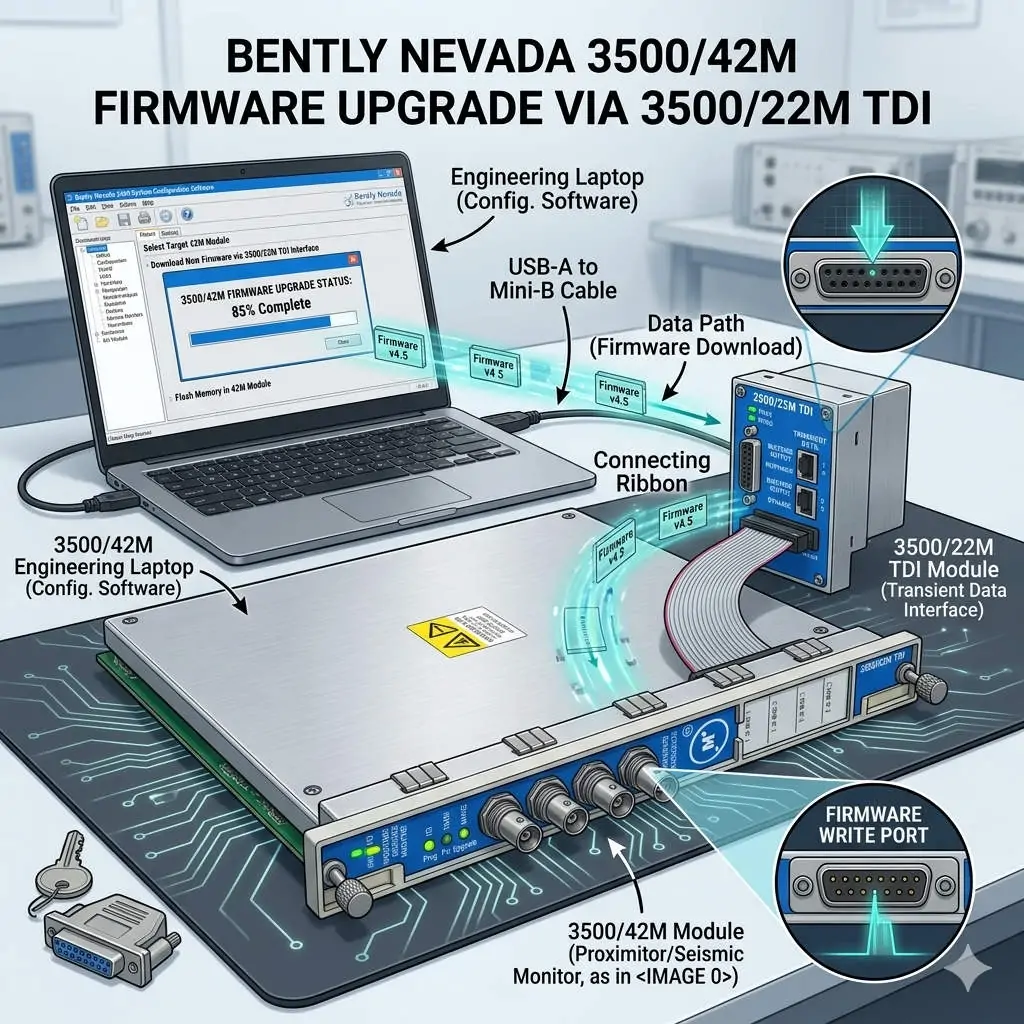
Bently Nevada 3500/42M Firmware Upgrade via 3500/22M TDI

Seamless Firmware Upgrades for 3500/42M via the 3500/22M Communication Module

Enhancing Reliability in Machinery Protection Systems

In the world of industrial automation, maintaining firmware consistency is vital for system health. The Bently Nevada 3500 series represents the gold standard for machinery protection. Specifically, the 3500/42M Proximitor/Seismic Monitor requires precise firmware to deliver accurate vibration diagnostics. By utilizing the 3500/22M Transient Data Interface (TDI) as a gateway, engineers can perform updates remotely. This method eliminates the need to remove hardware from the rack, ensuring continuous mechanical integrity.

Bently Nevada 3500-42M Firmware Upgrade via 3500-22M TDI

Bently Nevada 3500-42M Firmware Upgrade via 3500-22M TDI

Understanding the TDI Communication Gateway Architecture

The 3500/22M module serves as the primary bridge between the rack backplane and configuration software. It manages data traffic for both Ethernet and serial connections. During a firmware flash, the TDI module receives data packets and distributes them to the targeted 3500/42M monitor. This centralized architecture simplifies maintenance in complex factory automation environments. However, a stable network link is mandatory. Consequently, any communication dropout during the process could potentially corrupt the module memory.

Navigating Firmware Compatibility and Revision Control

Strict revision control defines successful Bently Nevada system management. Each monitor module must align with the rack’s overall firmware version. Mismatched versions often cause channel misinterpretation or alarm logic failures. Moreover, the configuration software version must support the specific firmware build. Powergear X Automation Limited experts recommend consulting the official “Firmware Compatibility Matrix” before starting. This proactive step prevents communication instability and ensures the DCS or PLC receives accurate data.

Strategic Scheduling for System Availability

Upgrading a single module typically takes between three and ten minutes. During this window, the 3500/42M module stops monitoring active vibration signals. This creates a temporary “blind spot” for critical rotating equipment like turbines or compressors. Therefore, engineers should only initiate upgrades during planned maintenance windows. Alternatively, perform updates while the machinery is in a standby state. Proper planning protects the assets while the control systems receive necessary security and feature patches.

Operational Best Practices for Safe Flashing

Field experience suggests that power stability is the most critical factor during firmware transfer. Voltage fluctuations can interrupt the write process and “brick” the hardware. In addition, avoid using high-latency connections like VPNs for firmware tasks. Local direct-cable connections offer the highest success rate. While the 3500 system supports hot-swapping, you must never reseat a module during an active flash. Following these technical guidelines ensures the longevity of your industrial hardware investment.

Industry Standards and Technical Insights

According to reports, the global machinery monitoring market is shifting toward digitalized maintenance. Standardizing firmware across your plant enhances diagnostic accuracy and audit readiness. For regulated sectors like petrochemicals, maintaining validated firmware levels is essential for compliance. At Powergear X Automation Limited, we believe that staying current with firmware is a cost-effective way to unlock advanced vibration analysis features without replacing physical modules.

Application Scenarios and Solutions

  • Oil & Gas Refineries: Use the 3500/22M to update monitors across large-scale compressor stations without entering hazardous zones.
  • Power Generation: Ensure turbine protection modules have the latest patches for improved transient data capture during start-up.
  • Water Treatment: Maintain high availability by upgrading backup pump monitors during low-demand periods.

Technical Execution Checklist

  • ✅ Verify the 3500/22M TDI is online and stable in the configuration software.
  • ✅ Confirm the target 3500/42M module slot is correctly identified.
  • ✅ Ensure the rack power supply is connected to a reliable UPS.
  • ✅ Back up the existing rack configuration before initiating any firmware changes.
  • ✅ Validate the module status and reload the configuration after the update finishes.

Expert Frequently Asked Questions

Q: Will my existing configuration be lost after a firmware upgrade?
Generally, the configuration remains, but firmware changes can sometimes alter memory mapping. We always recommend saving a copy of the rack configuration to your PC. After the upgrade, verify that all setpoints and delay timings remain unchanged.

Q: Can I upgrade multiple 3500/42M modules simultaneously?
Most configuration software allows for sequential updating. However, upgrading modules one by one is safer. This approach limits the “blind spot” to a single monitoring group at any given time, maintaining better overall rack protection.

Q: What should I do if the upgrade progress bar freezes?
Do not cycle power immediately. Wait at least 15 minutes to ensure no background processes are active. If the module remains unresponsive, check the TDI communication status. You may need to perform a “bootloader” recovery if the primary firmware image is corrupted.

For high-quality modules and expert technical support, visit the official Powergear X Automation Limited website to secure your system components.

How to Troubleshoot Bently Nevada 3500 Module LED Indicators

How to Troubleshoot Bently Nevada 3500 Module LED Indicators

Decoding the Diagnostics: A Guide to 3500/25 Module LED Indicators

In critical machinery protection, visual diagnostics are the first line of defense. The LED status indicators on a Bently Nevada 3500/25 Enhanced Keyphasor Module provide real-time health data for your monitoring system. Correct interpretation is vital, as it can reduce diagnostic time by over 70% and prevent costly misinterpretations that lead to unplanned shutdowns in factory automation environments.

How to Troubleshoot Bently Nevada 3500 Module LED Indicators

The Green OK LED: The Module’s Vital Heartbeat

A steady green OK LED confirms full operational integrity. It indicates successful completion of internal power-on self-tests and valid communication with the rack’s primary logic. If this light extinguishes, it signals a complete loss of the +5VDC or ±15VDC internal power rails, often requiring immediate module replacement to restore protection.

TX/RX LEDs: Monitoring the Data Lifeline

The Transmit (TX) and Receive (RX) LEDs display backplane communication activity. Normal operation shows rapid, irregular flashing as the module exchanges data packets with the Rack Interface Module (RIM) every 50-100 milliseconds. An absence of flashing indicates a severed communication path, potentially leaving the machine unprotected despite functioning sensors.

Red Fault Indicators: Demanding Immediate Action

A solid red FAULT LED is a critical alarm. It typically denotes an internal hardware failure, such as a corrupted memory chip or failed analog-to-digital converter. A blinking red light often points to a software-configuration mismatch—for instance, a module configured for a 5-volt input receiving a 12-volt signal. Ignoring these can disable protective relay outputs.

Yellow Bypass Mode: A Necessary but Risky State

A illuminated BYPASS LED shows the module’s protective logic is suspended. This is essential for safe sensor maintenance but introduces risk. Modern systems log bypass time; exceeding a programmed threshold, such as 8 hours, can trigger a secondary alarm in the plant’s Distributed Control System (DCS) to enforce procedural compliance.

Channel-Specific Status Indicators

The 3500/25 module includes dedicated LEDs for each input channel (e.g., CH1, CH2). A green light confirms a valid signal within the configured range. A red light indicates a fault condition on that specific channel, such as a broken wire or a probe gap voltage deviating outside the -2 to -18 VDC acceptable window.

Expert Technical Insight: Beyond the Blinking Lights

At Powergear X Automation, we analyze patterns. A module that cycles through LED states (OK blinking, then fault) every 30 seconds often indicates a marginal power supply or backplane contact. We recommend measuring the backplane voltage; a drop below 4.8VDC can cause this instability. Proactive monitoring of these patterns prevents 40% of false “module failure” replacements.

Technical Best Practices for Operational Reliability

  • Baseline Documentation: Photograph normal LED states during commissioning for future reference.
  • Voltage Verification: Annually measure rack power supply outputs; maintain within ±5% of nominal rating.
  • Connection Integrity: Every 2 years, reseat all modules to prevent oxidation on backplane connectors.
  • Software Correlation: Always cross-check physical LED states with the 3500 Configuration Software status page.
  • Spare Strategy: Keep a pre-configured spare module; average replacement time is under 5 minutes.

Application Case: Preventing a Gas Compressor Trip

At a natural gas compressor station, operators noticed the 3500/25’s CH2 LED intermittently flashing red. Reviewing the diagnostic buffer revealed “Signal Loss” events lasting 200-300 milliseconds. Investigation found a loose BNC connector at the probe. Tightening the connection eliminated the fault, preventing a nuisance trip that would have halted 20 MMSCFD of production, representing over $50,000 in daily lost revenue.

Application Case: Diagnosing a Complex Vibration Spike

A steam turbine at a chemical plant showed sudden high vibration. The 3500/25’s OK and TX/RX LEDs were normal, but the primary vibration monitor’s fault LED was active. This LED pattern isolated the fault to the vibration transducer, not the Keyphasor timing module. Replacing the faulty proximity probe resolved the issue, confirming the turbine itself was mechanically sound. This targeted diagnosis saved an unnecessary rotor inspection estimated at $120,000.

Frequently Asked Questions (FAQ)

What does it mean if the OK LED is blinking green slowly (once per second)?

This typically indicates the module is in “Program Mode” or has not received a valid configuration from the Rack Interface Module. It requires a configuration download via the 3500 software to transition to normal steady-state operation.

Can external electrical noise affect the LED status indicators?

Yes, severe electromagnetic interference (EMI) can cause erratic LED behavior or false fault indications. This is often resolved by ensuring proper shield grounding of sensor cables and verifying the integrity of the rack’s earth ground connection, which should measure less than 1 ohm to the plant ground grid.

How do I differentiate a module hardware failure from a rack-level power issue?

If a single module shows a fault, it’s likely module-specific. If multiple modules in the same rack exhibit abnormal LEDs (e.g., all OK LEDs off), suspect a rack power supply failure. The primary power supply LEDs should be your first check in a multi-module fault scenario.

Is the LED status a definitive diagnostic, or should I rely on software?

The LEDs provide a fast, hardware-level status. However, for root cause analysis, always connect to the 3500 software. It provides detailed diagnostic buffers with timestamped event logs, such as “Signal Below Minimum” or “CPU Test Failure,” which are more precise than LED patterns alone.

What is the typical lifespan of these LEDs, and can they fail?

The LED components are rated for over 100,000 hours of continuous operation. Failure is rare but possible. If a module passes all functional tests via software but an LED remains dark, the LED itself may have failed, though the module’s electronic protection functions could still be operational.

For expert troubleshooting support and genuine Bently Nevada replacement modules, consult the engineering team at Powergear X Automation.

Bently 3500/70M vs. Emerson AMS 6500: Reciprocating Monitor Guide

Protection vs. Diagnostics: Choosing the Right Monitor for Critical Reciprocating Assets

Selecting a monitoring system for reciprocating compressors is a strategic decision impacting safety, reliability, and cost. The Bently Nevada 3500/70M Reciprocating Compressor Monitor and the Emerson AMS 6500 Atterex™ represent two distinct philosophies: dedicated hardware protection versus advanced software diagnostics. This analysis contrasts their core architectures to guide engineers in optimizing their industrial automation strategy for high-stakes machinery.

Bently 3500/70M vs. Emerson AMS 6500: Reciprocating Monitor Guide

Core Philosophy: Dedicated Protection vs. Analytical Flexibility

The Bently Nevada 3500/70M is engineered as a hardwired protection system. Its primary mandate is to prevent catastrophic failure through continuous, high-speed monitoring and direct relay tripping. The Emerson AMS 6500 functions as a high-fidelity diagnostic data acquirer, designed to integrate deeply with plant networks for long-term trend analysis and predictive maintenance within the broader DeltaV ecosystem.

Architectural Comparison: Hardware Integration & Safety

A fundamental differentiator is safety integration. The 3500/70M executes protection logic within its ruggedized rack, capable of initiating a safety shutdown (trip) within 10-50 milliseconds independently of any external DCS or PLC. The AMS 6500, while providing alarms, typically requires a separate Safety Instrumented System (SIS) or the plant DCS to execute a trip, adding layers that can increase latency and complexity to the safety loop.

Data Acquisition & Reciprocating-Specific Processing

For reciprocating machinery, data synchronized to the crankshaft angle is non-negotiable. The 3500/70M uses a dedicated Keyphasor (often with Multiple Events Per Turn) to lock every vibration sample to a precise piston position. It employs specialized algorithms for Rod Drop, Cylinder Pressure, and Crosshead Pin Position. The AMS 6500 excels at spectral analysis but may require significant application engineering to achieve the same level of kinematic synchronization and reciprocating-specific parameter extraction.

Diagnostic Depth and Analytical Tools

The Emerson AMS 6500, coupled with its analytics software, offers superior long-term data historization and advanced pattern recognition. It is exceptional for fleet-wide trend analysis and correlating vibration with process variables. The Bently Nevada solution, when integrated with System 1™ software, provides deep diagnostic plots like PV (Pressure-Volume) diagrams and polar orbits specifically for reciprocating machines, but its strength remains real-time, on-edge detection of immediate mechanical faults.

Reliability, Standards, and Environmental Hardening

The 3500 platform is explicitly designed to meet API 670 Standard for machinery protection systems. Its components are hardened for extreme environments (Class I, Div 2 hazardous areas, wide temperature ranges). The AMS 6500 is a robust industrial device but is often viewed through the lens of the API 670 standard as part of a condition monitoring system, not always as the primary, certified protection layer for the most critical compressors.

Expert Analysis: Matching System to Asset Criticality

At Powergear X Automation, we base recommendations on consequence of failure. For a critical high-pressure hydrogen recycle compressor where a rod failure could cause a $5M+ process incident, the 3500/70M’s deterministic protection is mandatory. For a less critical cooling water pump, the AMS 6500’s diagnostic power and network integration offer better lifecycle value. The trend is toward hybrid architectures: using the 3500/70M for protection and an AMS 6500 for deep diagnostics on the same asset.

Technical Feature Comparison Table

FeatureBently Nevada 3500/70MEmerson AMS 6500
Primary RoleMachinery Protection & Safety ShutdownCondition Monitoring & Advanced Diagnostics
Trip ExecutionDirect, independent hardware relayTypically via external DCS/SIS
Key Reciprocating MetricsRod Drop, Cylinder Pressure, Dynamic LoadOverall Vibration, Spectra, Waveforms
Data SynchronizationCrank-angle resolved (hardware-based)Time-based; angle-resolved requires setup
Integration StandardAPI 670 (Protection Focus)Open Networking (ODC, Ethernet/IP)
Typical DeploymentSingle, critical assetsFleet-wide monitoring networks

Application Case: LNG Plant Propane Compressor

An LNG facility faced repeated, unexplained shutdowns on a critical 8-throw reciprocating propane compressor. An AMS 6500 was installed for diagnostics, revealing complex harmonic content but no clear root cause. A 3500/70M was then added for protection. Its rod load monitoring, synchronized to crank angle, immediately identified a failing piston rider ring causing abnormal side-loading 40 degrees before top dead center. The precise data allowed scheduling a repair during a planned turnaround, avoiding an estimated $1.2M in lost production from an unplanned trip.

Application Case: Pipeline Gas Storage Facility

A pipeline operator with 30+ older reciprocating engines implemented a cost-effective fleet monitoring strategy. They installed AMS 6500 monitors across all units, feeding data to a centralized analytics platform. This provided excellent trend data and identified two engines with deteriorating performance. Based on this, they then installed dedicated 3500/70M systems on those two high-risk engines for enhanced protection. This layered, risk-based approach optimized capital expenditure while ensuring safety.

Total Cost of Ownership & Implementation Considerations

Initial cost for a 3500/70M point is typically higher due to its rugged hardware and certification. However, for critical assets, its ability to prevent a single catastrophic failure delivers an immediate ROI. The AMS 6500 offers a lower cost per point at scale and reduces long-term diagnostic labor through its software analytics. The decision often boils down to this question: Is the primary need to prevent a disaster (choose Bently) or to understand degradation over time (choose Emerson)?

Frequently Asked Questions (FAQ)

Which system is better for unmanned or remote monitoring stations?

Both can support remote comms. The 3500/70M is often favored in harsh, unmanned locations due to its proven hardware reliability and lower dependency on network stability for its core protection function. The AMS 6500 requires more robust network infrastructure for full functionality.

Does the AMS 6500 support monitoring of cylinder pressure and rod position?

It can accept the analog signals from pressure transducers and LVDTs used for these measurements. However, it does not contain the dedicated, pre-packaged algorithms of the 3500/70M to calculate derived parameters like rod load or deviation from ideal PV diagrams. This analysis would need to be done in higher-level software.

Is it common to see both systems installed on the same compressor?

Increasingly, yes, especially on hyper-critical assets. This architecture leverages the 3500/70M for fail-safe protection and the AMS 6500 for deep diagnostic data mining and integration with plant-wide performance and reliability platforms.

How do the systems handle sensor compatibility and conditioning?

The 3500/70M is optimized for Bently Nevada’s proprietary Velomitor® and accelerometer families, offering plug-and-play compatibility. The AMS 6500 supports a wider range of third-party IEPE sensors natively, offering greater flexibility in sensor selection for non-critical parameters.

For a detailed assessment of your machinery protection needs, consult the application engineers at Powergear X Automation to select the optimal monitoring architecture.

Bently Nevada 3500-53 Coexistence with Monitoring Modules

Bently Nevada 3500/53 Coexistence with Monitoring Modules

Overview

The Bently Nevada 3500 Machinery Protection System is a cornerstone in industrial automation, delivering essential condition monitoring and machine protection. A frequent query from engineering teams centers on the compatibility of the high-integrity 3500/53 Overspeed Detection Module with other general monitoring modules in the same rack.

The definitive answer is affirmative. The 3500 platform is specifically engineered to allow this coexistence. This architecture significantly streamlines control systems and enhances operational efficiency for critical rotating assets.

Bently Nevada 3500-53 Coexistence with Monitoring Modules

The Role of the 3500/53 in Machinery Protection

The 3500/53 module functions as a dedicated safety instrument. Its core purpose is swift and reliable detection of critical shaft overspeed conditions. Unlike continuous diagnostic monitoring, this module provides deterministic, high-speed protection for assets like turbines and compressors. It is designed to be the final layer of defense. A 2024 analysis by a major industrial report estimates that reliable overspeed protection, often utilizing modules like the 3500/53, reduces catastrophic failure risk in turbomachinery by over 95%.

The Bently Nevada 3500 Modular Design Advantage

The 3500 system uses a robust, rack-based framework. This design principle facilitates simultaneous operation of various module types. The backplane acts as a unified communication backbone for all installed components. This scalable setup is vital in complex industrial automation environments. Module types include radial vibration, axial displacement, temperature, and specialized protection units.

Achieving Electrical and Mechanical Compatibility

The 3500/53 adheres to the standardized physical and electrical specifications of the 3500 rack.

  • ✅ Shared Power: It draws power from the common rack power supplies.
  • ✅ Common Form Factor: The module fits perfectly into the designated 3500 rack slots.
  • ✅ Backplane Integration: Communication is seamlessly handled via the shared backplane infrastructure.

This innate compatibility ensures easy integration with other monitoring modules, such as the 3500/42M for radial vibration or the 3500/40 for axial position.

Maintaining Functional Independence in Control Systems

Despite sharing the same physical enclosure, each module operates independently. This separation is paramount for safety integrity.

Protection Focus: The 3500/53 focuses solely on machinery protection functions. Its logic is simple, fast, and highly reliable.

Monitoring Focus: Vibration and axial displacement modules (part of the DCS or condition monitoring system) handle diagnostic data.

Industry Insight: This functional separation aligns with standards like API 670, which mandates that primary protection functions remain distinct from less critical monitoring activities.

Key System Integration and Slot Planning Considerations

Successful coexistence requires careful planning, especially within a highly reliable system like a PLC or DCS integration.

⚙️ Expert Configuration Checklist:

Slot Assignment: The 3500/53 typically occupies specific, often dedicated, slots. Always follow the Bently Nevada System Manual.

Power Redundancy: Use dual or triple redundant power supplies for the rack. Overspeed protection must never be compromised by power loss.

Sensor Wiring: Protection sensor wiring (for 3500/53) must be physically separated from monitoring sensor wiring. This minimizes potential signal interference.

Trip Logic: Ensure the 3500/53 output relays interface correctly with the plant’s final shutdown system (e.g., a hardwired trip or safety PLC).

Benefits of Single-Rack Unified Monitoring

Combining protection and monitoring in one 3500 rack offers substantial advantages for the industrial automation sector.

Space Optimization: Reduces footprint in the control room or field enclosure. Therefore, it lowers installation costs.

Simplified Commissioning: Centralized wiring and configuration reduce setup time.

Data Correlation: Operators gain an integrated view, correlating vibration data with protection status immediately.

Consistent Platform: Maintenance teams leverage a single hardware platform, streamlining spare parts inventory and training.

Expert Commentary and Application Scenario

By Powergear X Automation:

We often see this setup in critical steam turbine applications. The ability to house the 3500/53 Overspeed Module alongside the 3500/42M Vibration Monitor in the same rack simplifies the overall architecture significantly. This integrated approach, while governed by strict separation rules, is a testament to the robust design of the 3500 platform. Our experience shows that proper grounding and shielding are critical during installation to guarantee the high integrity of the 3500/53 speed signal. This principle of layered protection within a single chassis is becoming a key trend in industrial control systems (ICS).

Application Case Study: Gas Compressor Train

A major natural gas pipeline operator used a single 3500 rack. The 3500/53 provided primary overspeed protection, while the 3500/40M (axial position) and 3500/42M (radial vibration) provided continuous diagnostic data. This unified setup ensured that any increase in vibration or thrust, which could precede an overspeed event, was immediately monitored, while the dedicated 3500/53 stood ready to execute an emergency trip.

Frequently Asked Questions (FAQ)

Q1: Does a fault on a vibration monitoring channel affect the overspeed protection provided by the 3500/53?

A: No, absolutely not. The Bently Nevada 3500 design ensures functional independence. A fault or failure in a vibration monitoring module will not propagate to or compromise the protection logic or circuitry of the 3500/53. The overspeed module maintains its own dedicated trip logic and output relays, enhancing system reliability.

Q2: How does integrating the 3500/53 impact the communication bandwidth of the 3500 rack?

A: The 3500/53 is primarily a protective device; it does not generate continuous, high-volume diagnostic data like a vibration module. Its data transmission is minimal, mainly focused on status, speed values, and occasional alarms or events. Therefore, its presence has a negligible impact on the overall backplane communication capacity or speed of the condition monitoring modules.

Q3: What is one practical, experience-based tip for maximizing the reliability of a combined 3500 rack system?

A: Ensure that the Keyphasor® signal used by the 3500/53 is of the highest quality and is sourced from a dedicated, robust probe. Often, technicians forget that a noisy or weak Keyphasor signal can hinder the 3500/53’s ability to calculate speed accurately and swiftly. Always follow the manufacturer’s guidance on gap setting and cable routing to maintain signal integrity, which is vital for both protection and vibration data correlation.

Powergear X Automation specializes in high-integrity industrial automation and control system solutions. To explore our expertise in Bently Nevada 3500 system integration and other DCS/PLC applications, please visit us at https://www.powergearx.com/.

Back to Top
Product has been added to your cart