Over 50,000 hot-selling automation module components.
ABB CI856 Guide Connecting S800 and S900 IO SystemsABB CI856 Guide Connecting S800 and S900 IO Systems

CI856 PROFIBUS Interface: Integrating Hazardous Area S900 I/O

Integrating ABB S800 and S900 I/O: The Strategic Role of the CI856 Interface

Modern industrial automation demands flexibility across diverse process environments. The ABB CI856 Communication Interface stands as a robust bridge for the AC 800M controller. It enables seamless communication between high-density standard I/O and intrinsically safe remote modules. By acting as a PROFIBUS DP master, the CI856 streamlines complex system architectures. This article explores how this module integrates different I/O generations while maintaining high operational reliability.
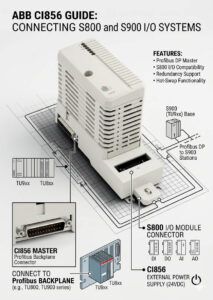
ABB CI856 Guide Connecting S800 and S900 IO SystemsABB CI856 Guide Connecting S800 and S900 IO Systems

ABB CI856 Guide Connecting S800 and S900 IO Systems

Functional Overview of the CI856 PROFIBUS Master

The CI856 serves as a specialized PROFIBUS DP-V1 master interface for the ABB 800xA system. It connects the AC 800M controller to distributed I/O stations over a digital bus. This module handles cyclic data exchange for real-time control and acyclic data for advanced diagnostics. Consequently, engineers can monitor the health of field devices without interrupting the main process loop. Its hardware design supports high-speed transmission, which is vital for fast-acting control systems.

Bridging S800 and S900 I/O Systems

One major advantage of the CI856 is its ability to host both S800 and S900 I/O simultaneously. S800 I/O typically serves standard process areas with high-density requirements. In contrast, S900 I/O provides intrinsic safety for hazardous zones like refineries. The CI856 allows these two distinct systems to coexist on a single PROFIBUS segment. Therefore, plants can manage centralized control logic while meeting varied safety and protection standards.

Technical Principles of PROFIBUS DP-V1 Integration

Effective integration relies on the PROFIBUS DP-V1 protocol and standardized GSD files. The CI856 manages the communication timing and node addressing for all connected slaves. However, mixed topologies require careful consideration of segment loading and signal termination. Engineers must ensure that the total node count stays within ABB’s recommended limits. Furthermore, firmware alignment between the master and slave modules remains critical for diagnostic transparency. Improper GSD configuration often leads to “missing slave” errors during commissioning.

Hazardous Area Deployment and Intrinsic Safety

The synergy between the CI856 and S900 I/O is crucial for factory automation in explosive atmospheres. S900 modules are specifically designed for Zone 1 and Zone 2 applications. The CI856 transmits data from these hazardous areas back to the safe-area controller. This setup eliminates the need for expensive, bulky traditional safety barriers. As a result, the overall system footprint decreases while maintaining compliance with international ATEX and IECEx standards.

Selection Criteria and Key Differences

When choosing between S800 and S900 I/O for a CI856 segment, the environment is the primary factor. S800 modules offer modularity and cost-efficiency for non-hazardous indoor utility rooms. Meanwhile, S900 modules offer ruggedized protection and galvanic isolation for outdoor or chemical process skids. Additionally, engineers must evaluate the communication cycle time requirements. High node counts on a single CI856 may increase latency, affecting high-speed PID loops.

Best Practices for Installation and Maintenance

  • Segment Testing: Validate PROFIBUS voltage levels before connecting all remote stations.
  • ⚙️ Firmware Alignment: Ensure GSD files and module firmware are consistent across the network.
  • 🔧 Grounding Control: Ground cable shields only at designated points to prevent ground loops.
  • 📏 Bending Radius: Maintain proper cable curves at cabinet entries to avoid signal reflection.

Expert Implementation Insights from Powergear X Automation Limited

At Powergear X Automation Limited, we have observed that shielding issues cause 60% of field bus failures. We recommend using industrial-grade PROFIBUS connectors with integrated termination switches. Furthermore, maintenance teams should avoid routing communication cables parallel to high-power VFD lines. For brownfield upgrades, always verify that your CI856 firmware supports the specific revisions of your legacy S800 stations. For more technical support and genuine ABB parts, explore our solutions at https://www.powergearx.com/.

Real-World Application Scenarios

  • Refinery Modernization: Integrating old S800 racks with new S900 intrinsically safe islands for tank farm expansion.
  • Pharmaceutical Production: Managing standard HVAC control (S800) and solvent dosing (S900) under one AC 800M controller.
  • Offshore Platforms: Utilizing S900 I/O for compact, remote process skids connected via the CI856 to reduce cabling weight.

Frequently Asked Questions (FAQ)

1. Can a single CI856 segment support a mix of standard and hazardous area I/O?
Yes, but the physical segments usually require a DP/IS coupler or barrier to maintain the electrical isolation required for S900 intrinsically safe nodes.

2. What is the most common cause of “Slave Missing” alarms on CI856?
Most failures stem from incorrect termination or damaged PROFIBUS cables. Using a bus analyzer can quickly pinpoint reflections or low signal voltage.

3. Is the CI856 compatible with non-ABB PROFIBUS DP slaves?
Generally, yes. Since it follows the standard PROFIBUS DP-V1 protocol, it can communicate with third-party devices if the correct GSD files are imported into the ABB 800xA engineering tool.

Honeywell CC-PFB401 Compatibility with Third-Party Profibus Slaves

Honeywell CC-PFB401 Compatibility with Third-Party Profibus Slaves

Connecting Honeywell CC-PFB401 to Non-Siemens Third-Party Profibus Slaves

Expanding Industrial Connectivity Beyond Vendor Lock-In

The Honeywell CC-PFB401 Profibus interface module offers significant flexibility for modern industrial automation systems. It allows Honeywell Experion DCS platforms to communicate with diverse third-party slave devices. By supporting the universal Profibus-DP standard, this module eliminates strict vendor lock-in. Engineers can integrate specialized analyzers, drives, and legacy equipment from various regional suppliers. However, successful integration requires more than just physical connectivity; it demands strict adherence to protocol standards.

Honeywell CC-PFB401 Compatibility with Third-Party Profibus Slaves

Ensuring Stability via Profibus-DP Compliance

The CC-PFB401 functions as a DP Master to manage cyclic data exchange. Communication remains stable if third-party slaves strictly follow EN 50170 or IEC 61158 standards. Nevertheless, some low-cost devices may deviate from these timing requirements. These minor deviations often lead to intermittent “ghost” communication losses in the field. Therefore, we recommend verifying the certification level of any slave device before deployment. Certified devices ensure predictable behavior under various network loads and diagnostic conditions.

The Critical Role of GSD File Integration

Every Profibus slave requires a General Station Description (GSD) file for proper identification. The CC-PFB401 uses these files to define I/O sizes, baud rates, and diagnostic parameters. A high-quality GSD file ensures accurate data mapping within the Honeywell Control Builder. In practice, poorly written files often contain incorrect byte alignments or missing diagnostic entries. Engineers must often adjust these files manually to resolve startup sequence issues. Always validate the GSD file in a test environment before live system integration.

Optimizing Network Cycle Time and Bus Load

Profibus networks are highly sensitive to the total node count and bus configuration. Adding slow-responding third-party slaves can increase the overall network cycle time. This delay directly impacts the responsiveness of your critical control loops. In high-speed applications like burner management, even a few milliseconds of latency matter. As a result, engineers must balance the baud rate against the total cable distance. Proper segment planning prevents bus overloading and maintains high system stability.

Field Tips for Installation and Maintenance

Physical layer issues account for the majority of Profibus communication failures. High-EMI environments in refineries require 360-degree shield grounding at all connectors. You must avoid “pigtail grounding,” as it acts as an antenna for noise. Additionally, ensure that termination resistors exist only at both ends of a segment. Duplicate addressing is another frequent cause of initial startup failures. Always check the default factory address of new third-party devices before installation.

Powergear X Automation: Strategic Engineering Perspective

At Powergear X Automation, we view the CC-PFB401 as a powerful tool for heterogeneous integration. While “plug-and-play” is the goal, engineering discipline remains the key to long-term uptime. We suggest performing a Factory Acceptance Test (FAT) for any new third-party hardware. This proactive approach identifies compatibility issues before they reach the plant floor. If you prioritize reliability, always select PI-certified slaves for your mission-critical process units.

Best Practices for Third-Party Integration

  • ✅ Confirm the slave device supports Profibus-DP V0 or V1 standards.
  • ✅ Download the latest GSD file version directly from the manufacturer.
  • ✅ Use high-quality, certified Profibus connectors with built-in inductors.
  • ✅ Verify termination switches are active only at the segment ends.
  • ✅ Perform a bench test to validate I/O mapping accuracy.
  • ✅ Keep the total number of nodes per segment below recommended limits.

Industrial Solution Scenarios

  • Specialized Analyzers: Integrating third-party gas chromatographs into the Honeywell DCS.
  • Variable Speed Drives: Controlling non-Siemens VFDs for energy-efficient pump operations.
  • Legacy System Expansion: Adding new I/O blocks to existing Profibus segments during plant upgrades.

Frequently Asked Questions (FAQ)

Q1: What should I do if the CC-PFB401 cannot find a new slave device?

First, verify the Profibus address on the slave hardware matches the DCS configuration. Check the physical cabling and ensure the termination resistors have power. If the device is still missing, use a bus analyzer to check for signal reflections or noise.

Q2: How do I choose between different third-party slaves for a critical loop?

Prioritize devices with official Profibus International (PI) certification. Ask the vendor for reference projects involving Honeywell Experion systems. A device with a proven track record in similar DCS environments reduces your integration risk significantly.

Q3: Can the CC-PFB401 handle both Siemens and non-Siemens slaves simultaneously?

Yes, the module can manage a mixed network of various manufacturers on the same segment. However, ensure the baud rate is compatible with the slowest device on the bus. Consistently high-quality cabling is essential when mixing hardware brands to maintain signal integrity.

Explore our full range of industrial communication solutions at Powergear X Automation for expert support.

ABB CI840A Guide: Optimizing CEX-Bus and PROFIBUS DP Integration

ABB CI840A Guide: Optimizing CEX-Bus and PROFIBUS DP Integration

Optimizing Industrial Connectivity with the ABB CI840A PROFIBUS Interface

The Vital Role of CI840A in AC 800M Architectures

The ABB CI840A serves as a high-performance communication interface for the AC 800M controller series. It bridges the internal controller logic with external PROFIBUS DP field devices. In industries like petrochemicals and pharmaceuticals, this module ensures seamless data flow. By offloading communication tasks, the CI840A allows the CPU to focus on critical control logic. Consequently, users achieve higher system availability and better integration of remote I/O and drives.

ABB CI840A Guide: Optimizing CEX-Bus and PROFIBUS DP Integration

CEX-Bus vs. ModuleBus: Defining Backplane Performance

A common misconception involves the mounting of the CI840A. Unlike standard S800 I/O modules, the CI840A utilizes the CEX-Bus backplane. The CEX-Bus is a dedicated high-speed expansion bus for communication interfaces. In contrast, the ModuleBus handles internal I/O cluster data. By using the CEX-Bus, the CI840A operates independently of local I/O scans. Therefore, adding fieldbus devices does not degrade the execution speed of the controller.

Leveraging PROFIBUS DP-V1 for Enhanced Diagnostics

The CI840A supports the advanced PROFIBUS DP-V1 protocol for acyclic communication. This capability is essential for modern intelligent asset management. It allows engineers to read device parameters and diagnostic data remotely. In large-scale manufacturing, this means maintenance teams can identify faults without manual inspections. Moreover, supporting DP-V1 ensures compatibility with complex instruments like valve positioners. As a result, downtime significantly decreases during unplanned events.

Ensuring Deterministic Data Exchange in Complex Systems

Reliability in industrial automation depends on deterministic communication. The CI840A manages data exchanges via a strict schedule on the CEX-Bus. This design isolates the control loop from network fluctuations. Even if the PROFIBUS network experiences high traffic, the PID loops remain stable. At Powergear X Automation, we believe this isolation is the cornerstone of a robust DCS. It prevents field-level noise from affecting the core processing integrity.

Field-Proven Installation and Maintenance Tips

Proper installation is non-negotiable for long-term communication stability. Many connectivity issues stem from physical layer errors rather than software bugs. Engineers must verify that the CI840A sits securely in a valid CEX-Bus slot. Additionally, shielding and termination require meticulous attention during commissioning. In high-interference environments, poor grounding often leads to random node dropouts. Always follow 360-degree shielding practices to protect the integrity of the DP signal.

Powergear X Automation: Strategic Engineering Insights

From our perspective at Powergear X Automation, the CI840A remains a premium choice for legacy and modern systems. While Ethernet-based protocols are rising, PROFIBUS remains a global standard for reliability. We recommend segmenting your network if you exceed 60 nodes on a single interface. Adding a second CI840A reduces the load and simplifies troubleshooting. Always prioritize bus health over maximum node count to ensure a future-proof automation environment.

Technical Implementation Key Points

  • ✅ Verify the module is in a CEX-Bus expansion slot.
  • ✅ Enable terminating resistors only at the segment ends.
  • ✅ Use PROFIBUS-certified cables for all field connections.
  • ✅ Implement 360-degree shielding in high-EMI environments.
  • ✅ Confirm GSD file compatibility with Control Builder versions.
  • ✅ Monitor bus cycle times to prevent data latency.

Solution Scenarios for CI840A Deployment

  • Chemical Processing: Managing large arrays of smart valves and pressure transmitters.
  • Oil and Gas: Linking remote I/O stations over long distances using fiber optics.
  • Discrete Manufacturing: Coordinating high-speed motor drives across a production line.

Frequently Asked Questions (FAQ)

Q1: Why won’t my AC 800M controller recognize the CI840A after installation?

Ensure the module is in a CEX-Bus slot rather than a ModuleBus rack. Also, check the hardware configuration in your engineering software. The firmware version of the CI840A must match the system’s library requirements.

Q2: When is it necessary to add a second CI840A module to a controller?

Consider an additional module if your network exceeds 80 nodes or 500 meters. High traffic from complex drives also warrants segmentation. Distributing the load improves bus responsiveness and system reliability.

Q3: How do I resolve intermittent “Node Lost” errors on the PROFIBUS line?

Check the physical termination resistors at the first and last nodes. Inspect the grounding of the cable shields for ground loops or noise. Often, a single faulty connector can disrupt the entire communication segment.

For more expert advice and high-quality industrial components, visit the Powergear X Automation website today.

Does ABB CI857K01 3BSE018144R1 Support Cross-Subnet Routing

Does ABB CI857K01 3BSE018144R1 Support Cross-Subnet Routing

Network Architecture Guide for ABB CI857K01 (3BSE018144R1) PROFIBUS Interfaces

The Role of CI857K01 in Industrial Automation Networks

The ABB CI857K01 (3BSE018144R1) functions as a dedicated PROFIBUS DP master for AC 800M controllers. It connects high-speed field devices to the central DCS in complex environments like chemical processing. Engineers often face challenges when designing multi-subnet architectures for large-scale factory automation. Understanding whether this module handles cross-subnet traffic is essential for system integrity. At Powergear X Automation, we emphasize correct network segmentation to ensure deterministic control performance.

Does ABB CI857K01 3BSE018144R1 Support Cross-Subnet Routing

Understanding the Limits of PROFIBUS Layer Communication

The CI857K01 operates primarily at the fieldbus level rather than the Ethernet routing layer. Consequently, it cannot route traffic between different IP subnets directly. PROFIBUS DP utilizes a master-slave protocol that stays local to its physical segment. If your automation strategy involves segmented Ethernet networks, the CI857K01 requires external support for routing. Therefore, engineers must use controller-level Ethernet ports or industrial routers to bridge separate network domains.

Ensuring Determinism in Complex Control Systems

Maintaining millisecond-level scan cycles is critical for stable industrial processes. Inserting generic gateways between PROFIBUS segments often introduces unacceptable communication jitter. Moreover, improper routing can trigger frequent DP slave timeout alarms. Our field experience shows that keeping PROFIBUS local to the controller maintains the best system health. As a result, users avoid intermittent device dropouts that typically plague poorly planned multi-subnet installations.

Implementing Efficient Cross-Subnet Strategies

Modern industrial automation relies on structured communication layers for security and performance. To achieve cross-subnet data exchange, engineers should utilize Industrial Layer-3 switches. Alternatively, dedicated protocol gateways can facilitate integration with third-party PLC systems. This approach separates the deterministic fieldbus traffic from higher-level supervisory data. Consequently, the CI857K01 focuses purely on high-speed device management while the Ethernet backbone handles broader connectivity.

Powergear X Automation Technical Insights

At Powergear X Automation, we view the CI857K01 as a robust workhorse for PROFIBUS integration. However, it is not a “magic box” for complex IP routing challenges. We often see engineers struggle with noise issues that they mistake for routing errors. Always prioritize high-quality shielded cabling and proper termination resistors in high-EMI environments. Proper physical layer maintenance often resolves 90% of perceived “network configuration” problems in the field.

Critical Installation and Hardware Checklist

  • ✅ Confirm the controller IP subnet before starting configuration.
  • ✅ Use shielded PROFIBUS cables to block electromagnetic interference.
  • ✅ Ensure grounding occurs at only one end of the cable.
  • ✅ Verify that all segment termination resistors are active.
  • ✅ Plan Engineering Workstation access paths during the design phase.
  • ✅ Keep PROFIBUS segments local to the master controller.

Industrial Solution Scenarios

  • Refinery Operations: Linking remote I/O stations to central AC 800M controllers.
  • Chemical Processing: Managing smart valve positioners and flow meters over PROFIBUS.
  • Manufacturing Lines: Integrating variable speed drives into a unified DCS environment.

Frequently Asked Questions

Q1: Does the CI857K01 need a special driver for multi-subnet access?

No software driver can turn the CI857K01 into an IP router. You must manage IP-level communication via the AC 800M Ethernet ports. The CI857K01 only manages the PROFIBUS protocol stack locally.

Q2: How do I choose between the CI857K01 and a PROFINET interface?

Choose the CI857K01 if you have existing PROFIBUS DP infrastructure or legacy field devices. For new greenfield projects requiring native Ethernet connectivity, PROFINET interfaces might offer easier subnet integration.

Q3: What is the most common cause of CI857K01 communication failure?

In our experience, physical layer faults cause most issues. Incorrect termination or damaged cable shielding usually triggers “Device Failure” messages. Always check the physical bus before reconfiguring the network routing settings.

For more expert guidance and high-quality industrial modules, visit the Powergear X Automation website. We provide the technical components and insights needed to keep your plant running efficiently.

Back to Top
Product has been added to your cart