Seamless Firmware Upgrades for 3500/42M via the 3500/22M Communication Module
Enhancing Reliability in Machinery Protection Systems
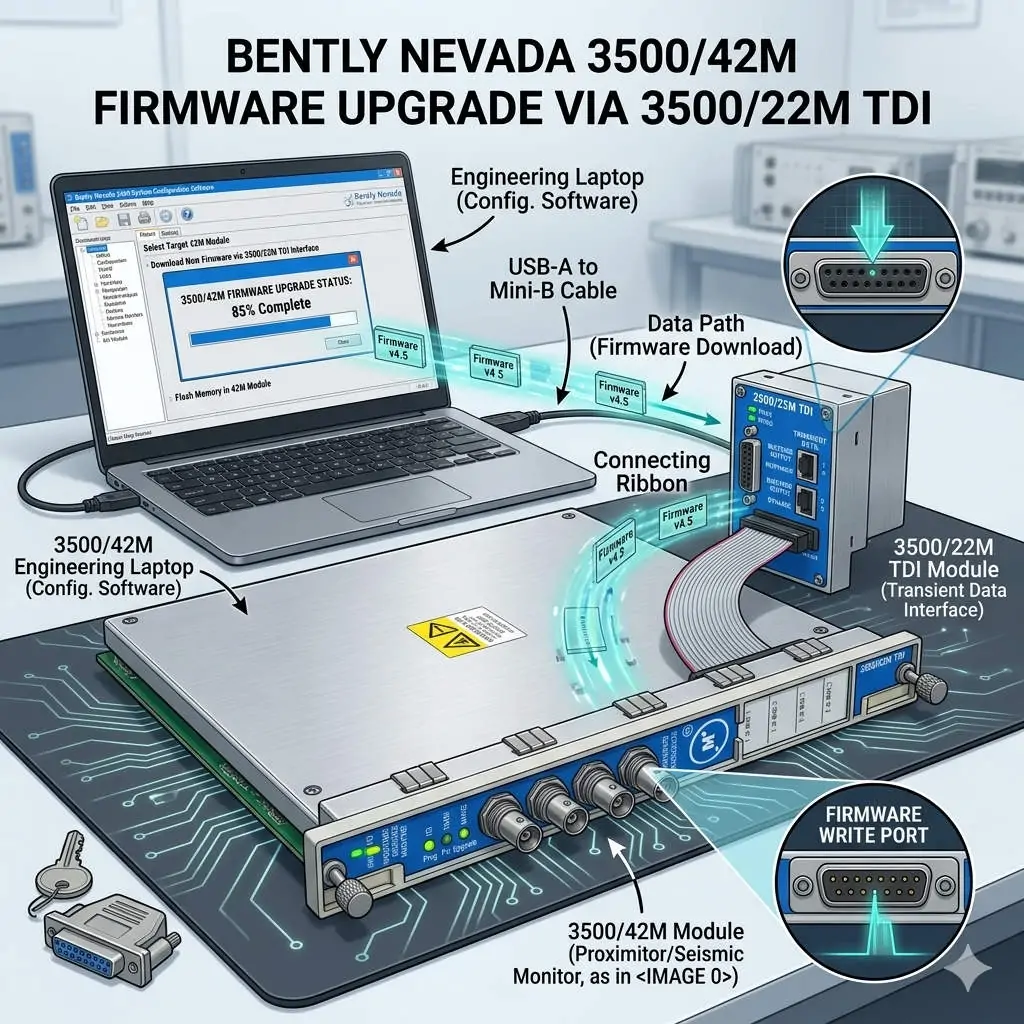
In the world of industrial automation, maintaining firmware consistency is vital for system health. The Bently Nevada 3500 series represents the gold standard for machinery protection. Specifically, the 3500/42M Proximitor/Seismic Monitor requires precise firmware to deliver accurate vibration diagnostics. By utilizing the 3500/22M Transient Data Interface (TDI) as a gateway, engineers can perform updates remotely. This method eliminates the need to remove hardware from the rack, ensuring continuous mechanical integrity.
Bently Nevada 3500-42M Firmware Upgrade via 3500-22M TDI
Understanding the TDI Communication Gateway Architecture
The 3500/22M module serves as the primary bridge between the rack backplane and configuration software. It manages data traffic for both Ethernet and serial connections. During a firmware flash, the TDI module receives data packets and distributes them to the targeted 3500/42M monitor. This centralized architecture simplifies maintenance in complex factory automation environments. However, a stable network link is mandatory. Consequently, any communication dropout during the process could potentially corrupt the module memory.
Navigating Firmware Compatibility and Revision Control
Strict revision control defines successful Bently Nevada system management. Each monitor module must align with the rack’s overall firmware version. Mismatched versions often cause channel misinterpretation or alarm logic failures. Moreover, the configuration software version must support the specific firmware build. Powergear X Automation Limited experts recommend consulting the official “Firmware Compatibility Matrix” before starting. This proactive step prevents communication instability and ensures the DCS or PLC receives accurate data.
Strategic Scheduling for System Availability
Upgrading a single module typically takes between three and ten minutes. During this window, the 3500/42M module stops monitoring active vibration signals. This creates a temporary “blind spot” for critical rotating equipment like turbines or compressors. Therefore, engineers should only initiate upgrades during planned maintenance windows. Alternatively, perform updates while the machinery is in a standby state. Proper planning protects the assets while the control systems receive necessary security and feature patches.
Operational Best Practices for Safe Flashing
Field experience suggests that power stability is the most critical factor during firmware transfer. Voltage fluctuations can interrupt the write process and “brick” the hardware. In addition, avoid using high-latency connections like VPNs for firmware tasks. Local direct-cable connections offer the highest success rate. While the 3500 system supports hot-swapping, you must never reseat a module during an active flash. Following these technical guidelines ensures the longevity of your industrial hardware investment.
Industry Standards and Technical Insights
According to reports, the global machinery monitoring market is shifting toward digitalized maintenance. Standardizing firmware across your plant enhances diagnostic accuracy and audit readiness. For regulated sectors like petrochemicals, maintaining validated firmware levels is essential for compliance. At Powergear X Automation Limited, we believe that staying current with firmware is a cost-effective way to unlock advanced vibration analysis features without replacing physical modules.
Application Scenarios and Solutions
- Oil & Gas Refineries: Use the 3500/22M to update monitors across large-scale compressor stations without entering hazardous zones.
- Power Generation: Ensure turbine protection modules have the latest patches for improved transient data capture during start-up.
- Water Treatment: Maintain high availability by upgrading backup pump monitors during low-demand periods.
Technical Execution Checklist
- ✅ Verify the 3500/22M TDI is online and stable in the configuration software.
- ✅ Confirm the target 3500/42M module slot is correctly identified.
- ✅ Ensure the rack power supply is connected to a reliable UPS.
- ✅ Back up the existing rack configuration before initiating any firmware changes.
- ✅ Validate the module status and reload the configuration after the update finishes.
Expert Frequently Asked Questions
Q: Will my existing configuration be lost after a firmware upgrade?
Generally, the configuration remains, but firmware changes can sometimes alter memory mapping. We always recommend saving a copy of the rack configuration to your PC. After the upgrade, verify that all setpoints and delay timings remain unchanged.
Q: Can I upgrade multiple 3500/42M modules simultaneously?
Most configuration software allows for sequential updating. However, upgrading modules one by one is safer. This approach limits the “blind spot” to a single monitoring group at any given time, maintaining better overall rack protection.
Q: What should I do if the upgrade progress bar freezes?
Do not cycle power immediately. Wait at least 15 minutes to ensure no background processes are active. If the module remains unresponsive, check the TDI communication status. You may need to perform a “bootloader” recovery if the primary firmware image is corrupted.
For high-quality modules and expert technical support, visit the official Powergear X Automation Limited website to secure your system components.