
Over 50,000 hot-selling automation module components.
Emerson SS4303T01 Online Replacement Guide DeltaV Maintenance

Emerson SS4303T01 Online Replacement Guide | DeltaV Maintenance

Is Online Replacement of the Emerson SS4303T01 Safe for Active Control Systems?

Industrial automation relies on continuous uptime. In modern DCS environments, the ability to maintain hardware without halting production is a critical operational requirement. The Emerson SS4303T01 module is a central component in DeltaV architectures. While engineers often discuss its “hot-swap” capabilities, successful online replacement requires a deep understanding of system redundancy and environmental risks. This article explores the technical nuances of servicing this hardware in live environments.

Emerson SS4303T01 Online Replacement Guide DeltaV Maintenance

Emerson SS4303T01 Online Replacement Guide DeltaV Maintenance

Understanding the Functional Role of the SS4303T01 in DCS

The SS4303T01 serves as a vital communication or power interface within the Emerson DeltaV ecosystem. It facilitates data flow between the controller and I/O subsystems. In high-stakes industries like oil and gas or pharmaceuticals, this module ensures that process variables reach the control logic without latency. Its design prioritizes high availability. However, the hardware works within a complex backplane. Therefore, its performance depends on the integrity of the entire carrier assembly.

The Mechanics of Redundancy and Hot-Swapping Logic

True hot-swapping is only possible when the system maintains a redundant state. Before you remove an active SS4303T01, you must verify that the secondary communication path is fully synchronized. If the redundant partner is offline or degraded, pulling the module will trigger a system trip. Active diagnostics tools in the DeltaV explorer provide real-time health checks. We recommend confirming “Good” status across all communication nodes. Moreover, you should check for “Standby Ready” indicators to ensure a seamless transition during the physical swap.

Evaluating Physical Risks During Online Maintenance

Physical factors often cause more failures than software logic. In older plants, the carrier connectors may suffer from oxidation or mechanical fatigue. Inserting a new module into a worn backplane can create intermittent “ghost” faults. These faults are difficult to troubleshoot because they appear randomly under different thermal loads. Additionally, electrostatic discharge (ESD) remains a silent killer of industrial electronics. Always use grounded wrist straps. As a result, you protect the sensitive CMOS components inside the replacement unit from latent damage.

Strategic Considerations

When sourcing specialized hardware like the SS4303T01, reliability is the primary keyword for procurement officers. Market data indicates that nearly 40% of unplanned downtime in factory automation stems from improper maintenance of aged components. Adhering to ISA environmental standards ensures your hardware lasts its full lifecycle. Furthermore, engineers should prioritize original equipment to avoid firmware mismatches. For high-quality components and expert technical support, professionals often turn to trusted distributors like Powergear X Automation Limited.

Operational Guidelines for Field Engineers

  • ✅ Pre-Maintenance Audit: Verify the redundancy synchronization status in the DeltaV Diagnostics shell.
  • ⚙️ Environmental Check: Ensure the cabinet temperature is within limits to prevent thermal shock to the new module.
  • 🔧 Mechanical Precision: Align the module carefully with the carrier guides to avoid bending backplane pins.
  • 📊 Post-Installation Monitoring: Observe the LED indicators and system logs for at least 15 minutes after the swap.

Expert Insight from Powergear X Automation Limited

At Powergear X Automation Limited, we have observed that many “module failures” are actually infrastructure issues. We suggest that maintenance teams inspect cabinet grounding every six months. Poor grounding creates electrical noise that mimics hardware faults. If you are looking to optimize your spare parts inventory or need guidance on legacy system compatibility, explore our comprehensive catalog at https://www.powergearx.com/ for reliable automation solutions.

Application Scenario: Refinery Distillation Column

In a refinery setting, a distillation column must run for years without interruption. If a communication module fails, the SS4303T01 allows the maintenance team to restore redundancy while the column remains in a steady state. By following a strict MOC (Management of Change) protocol, the team replaces the faulty unit during a scheduled “low-activity” shift. This strategy eliminates the risk of a $500,000 production loss associated with an emergency shutdown.

Frequently Asked Questions (FAQ)

Q1: Can I replace the module if the “Active” light is blinking?
A: A blinking light usually indicates a synchronization process or a diagnostic warning. You should never pull the module until the redundancy status is confirmed as “Stable” and “Standby” in the software.

Q2: Does the new module require a firmware download after insertion?
A: In most DeltaV versions, the controller automatically detects the hardware revision. However, if the version mismatch is significant, you may need to perform a “Partial Download” to align the firmware.

Q3: What is the biggest cause of failure after an online swap?
A: Most post-replacement failures are due to improper seating in the carrier or latent ESD damage. Ensure the module is firmly locked and that you are using proper anti-static procedures.
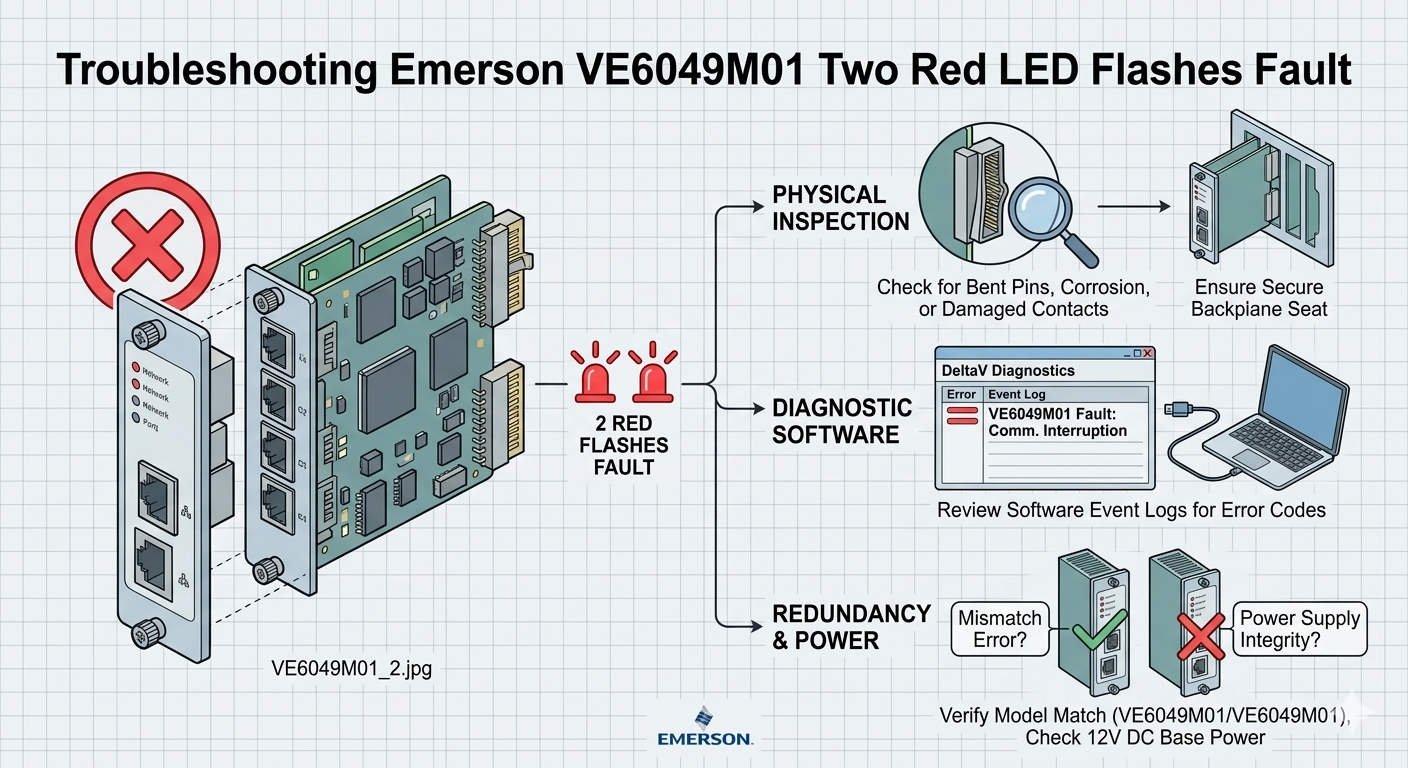
Troubleshooting Emerson VE6049M01 Two Red LED Flashes Fault

Troubleshooting Emerson VE6049M01 Two Red LED Flashes Fault

Troubleshooting the Emerson VE6049M01: Understanding the “Two Red LED Flashes” Fault

In the world of industrial automation, clear diagnostics save time and money. The Emerson VE6049M01 interface module serves as a critical link in the DeltaV DCS ecosystem. However, maintenance teams often encounter a specific fault signal: two repeating red LED flashes. This visual alarm indicates a hardware initialization failure or a self-test error. Understanding the root causes of this pattern helps engineers avoid unnecessary downtime in continuous-process environments.

Troubleshooting Emerson VE6049M01 Two Red LED Flashes Fault

Troubleshooting Emerson VE6049M01 Two Red LED Flashes Fault

The Functional Role of VE6049M01 in Factory Automation

The VE6049M01 provides essential communication between DeltaV controllers and I/O subsystems. It manages high-speed data exchange required for real-time control logic. As a result, any failure in this module can impact refinery safety or chemical batch quality. Industries such as oil & gas and power generation rely on this hardware for its high availability. The module translates complex electrical signals into actionable data for the DCS.

Technical Analysis of Initialization Faults and Power Stability

Voltage quality plays a decisive role in module startup. The VE6049M01 requires a clean 24VDC supply to initialize its internal logic successfully. Excessive ripple or transient sags during boot-up often trigger the two-flash red LED error. Standard multimeters might show a steady 24V reading. However, only an oscilloscope can reveal the high-frequency noise that disrupts sensitive electronics. Therefore, checking power quality is the first step in effective troubleshooting.

Backplane Integrity and Mechanical Communication Failures

Mechanical issues frequently mimic electronic hardware failures in industrial control systems. A two-flash red LED often signals that the module cannot communicate with the carrier backplane. Oxidation on gold edge connectors or bent pins can interrupt data packets. Moreover, constant vibration in compressor houses or offshore platforms may loosen the module seating. Engineers should inspect the physical connection before assuming the module is defective. Re-seating the module often clears the fault immediately.

Firmware Compatibility in Modern Distributed Control Systems

Compatibility issues often arise during phased plant modernization projects. Newer VE6049M01 hardware might not communicate correctly with legacy DeltaV software revisions. If the controller firmware does not recognize the module’s revision, the initialization self-test will fail. This mismatch presents as a persistent diagnostic alarm. Maintenance teams must verify the Emerson compatibility matrix before installing replacement units. Alignment between software and hardware ensures long-term system stability.

Best Practices for Installation and Maintenance

  • ✅ Verify Load Voltage: Test the 24VDC supply while the system is under full load.
  • ⚙️ Confirm Seating: Ensure the module clicks firmly into the carrier slot.
  • 🔧 Inspect Pins: Use a magnifying tool to check for bent or oxidized backplane connectors.
  • 📊 Check Software: Cross-reference firmware versions in the DeltaV explorer.

Expert Insights from Powergear X Automation Limited

At Powergear X Automation Limited, we observe that nearly 30% of “failed” modules are actually victims of poor infrastructure. Issues like grounding loops and aging power supplies create phantom faults. We recommend a “swap-test” method. Move the suspect module to a known-good carrier slot to isolate the problem. If the fault persists, only then should you proceed with procurement. For genuine Emerson components and technical consultation, visit our official site at https://www.powergearx.com/.

Application Scenario: Chemical Plant Power Disturbance

Consider a chemical plant experiencing intermittent “Two Red Flash” alarms on their VE6049M01 modules. After investigating, engineers found that large motor starts were causing momentary voltage sags. These sags didn’t trip the breakers but confused the module’s startup logic. By installing a dedicated power conditioner for the DeltaV cabinet, the plant eliminated the alarms. This solution saved thousands of dollars compared to replacing multiple interface modules.

Frequently Asked Questions (FAQ)

Q1: Does the “Two Red Flash” pattern always mean the hardware is broken?
A: Not necessarily. In our experience, this pattern frequently stems from external factors like backplane communication loss or poor power quality rather than internal circuitry failure.

Q2: Can I perform a hot-swap on the VE6049M01 while the process is running?
A: While DeltaV supports hot-swapping, you must first verify redundancy status. Pulling a module without a healthy backup can trigger a fail-safe shutdown of the entire I/O rack.

Q3: Why does the module work sometimes after a cold restart?
A: Initialization depends on timing and voltage levels. A cold restart might provide a slightly cleaner startup sequence, allowing the module to bypass a marginal self-test failure temporarily.

Emerson VE4035S2B1 Guide Installation and DCS Integration

Emerson VE4035S2B1 Guide: Installation and DCS Integration

Resolving “Offline” Status in Emerson DeltaV VE4035S2B1 Interface Modules

Critical Value of Stable I/O Communication in DCS Environments

In high-stakes industries like oil and gas or pharmaceuticals, a single “Offline” status in DeltaV Explorer can halt production. The Emerson DeltaV VE4035S2B1 serves as a vital bridge for data exchange within the Distributed Control System (DCS). When this module loses its software handshake, the controller cannot process field signals. Consequently, maintaining a “Live” state is essential for deterministic control and preventing expensive cascading alarms across the facility.

Emerson VE4035S2B1 Guide Installation and DCS Integration

Emerson VE4035S2B1 Guide Installation and DCS Integration

Understanding Backplane Communication and Physical Integrity

The VE4035S2B1 communicates via a high-speed backplane within the DeltaV carrier system. If the module appears offline, it usually signals a disruption in the cyclic data exchange. According to industry reports from groups like the International Society of Automation (ISA), physical connectivity remains a leading cause of system downtime. Oxidation on terminal connectors or slight misalignments often break these sensitive communication paths. As a result, PID loops may enter safe states or revert to manual mode.

The Importance of Configuration Alignment and Node Matching

Digital configuration must perfectly mirror the physical hardware setup for successful module activation. The DeltaV system verifies the slot position, node assignment, and module type during the boot sequence. However, engineers frequently overlook the “Auto-Sense” step after replacing hardware. If the software configuration does not match the physical slot, the module remains stuck in an offline state. Therefore, proper software binding is just as critical as the hardware itself for industrial automation reliability.

Power Supply Stability and Electrical Sensitivity

The VE4035S2B1 module requires a highly stable 24VDC power bus to initialize correctly. Power dips or electrical noise in high-load cabinets can cause initialization failures. While the hardware may appear powered on, the internal processor might fail to complete its handshake with the controller. In our experience at Powergear X Automation Limited, we recommend dedicated power supplies for I/O banks to minimize interference. Stable voltage prevents intermittent offline events during heavy system startups.

Proven Maintenance Procedures for Rapid Recovery

Restoring an offline module requires a systematic approach to identify the root cause quickly. Follow these professional steps to ensure system health:

  • ✅ Confirm the module is fully seated and locked in the carrier slot.
  • ✅ Inspect the terminal blocks for bent pins or loose wiring connections.
  • ✅ Perform an “Auto-Sense I/O” operation within DeltaV Explorer.
  • ✅ Download the updated configuration to the controller to refresh the binding.
  • ✅ Review the system event logs for specific communication or hardware fault codes.

Expert Commentary from Powergear X Automation Limited

At Powergear X Automation Limited, we believe that preventive maintenance is the best defense against DCS failures. The VE4035S2B1 is a robust component, yet it relies heavily on the environment around it. We often see modules replaced unnecessarily when a simple re-seating or configuration refresh would suffice. As factory automation moves toward more complex architectures, understanding these fundamental handshakes becomes a competitive advantage for maintenance teams.

Application Scenarios and Industry Solutions

  • Chemical Processing: Prevents missing field signals from triggering emergency interlocks in volatile environments.
  • Pharmaceutical Manufacturing: Ensures compliance and data integrity by maintaining constant I/O synchronization.
  • Refinery Operations: Supports redundant controller architectures by providing reliable interface points for critical sensors.

Frequently Asked Questions (FAQ)

Q: How can I distinguish between a hardware failure and a configuration error?
Observe the status LEDs on the front of the VE4035S2B1. If the LEDs show a normal green sequence but the software says “Offline,” the issue is almost certainly configuration-based. A total lack of LED activity usually indicates a dead module or power failure.

Q: Can firmware mismatches keep my module from going online?
Yes. If the controller firmware version is significantly newer or older than the module revision, the handshake may fail. Always check the Emerson DeltaV compatibility matrix when integrating newer hardware into an legacy system.

Q: Is it safe to “hot-swap” the VE4035S2B1 while the system is running?
While DeltaV supports hot-swapping most I/O modules, you should always check the specific carrier and module documentation first. Removing a module during active control will trigger a fault, so ensure your loops are in a safe state before proceeding.

For high-quality spare parts and technical support for your control systems, please visit the official Powergear X Automation Limited website today.

Back to Top
Product has been added to your cart