
Over 50,000 hot-selling automation module components.
Bently Nevada 3500-42M Firmware Upgrade via 3500-22M TDI

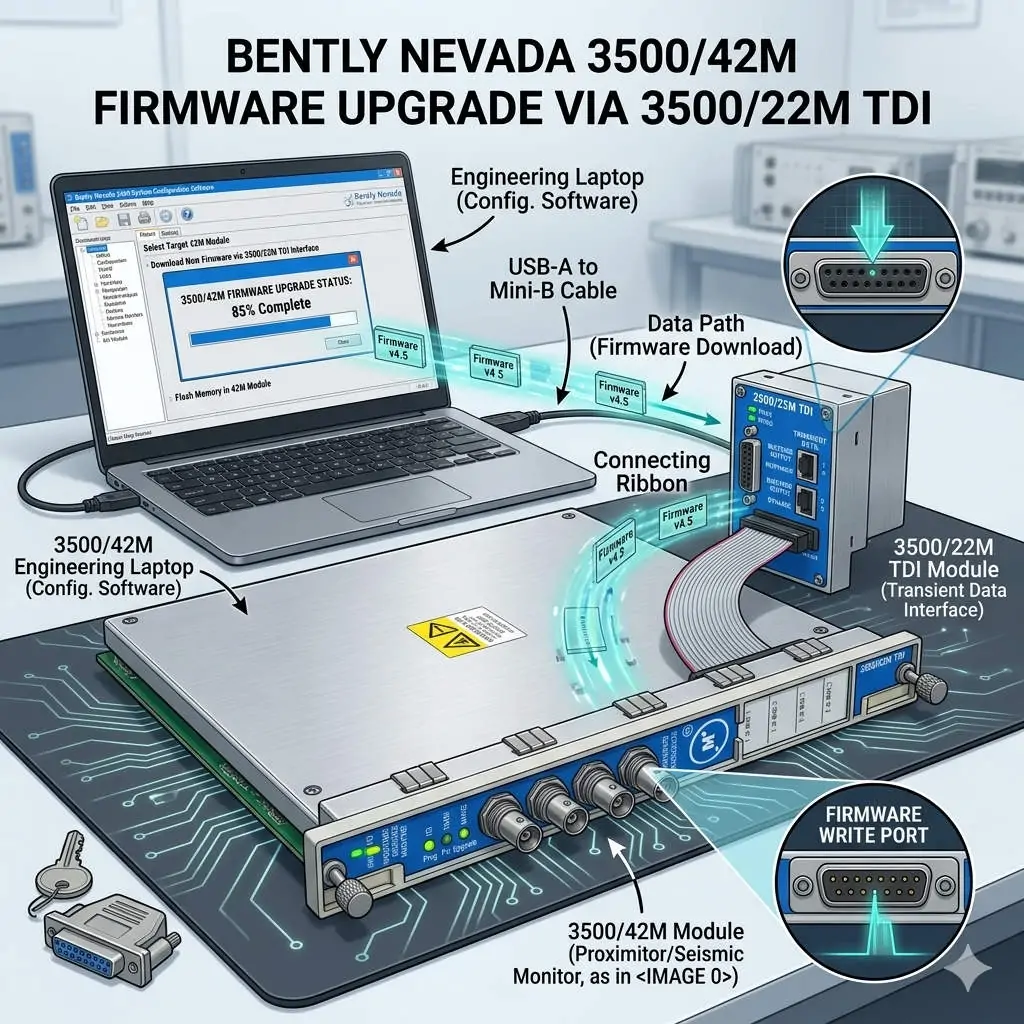
Bently Nevada 3500/42M Firmware Upgrade via 3500/22M TDI

Seamless Firmware Upgrades for 3500/42M via the 3500/22M Communication Module

Enhancing Reliability in Machinery Protection Systems

In the world of industrial automation, maintaining firmware consistency is vital for system health. The Bently Nevada 3500 series represents the gold standard for machinery protection. Specifically, the 3500/42M Proximitor/Seismic Monitor requires precise firmware to deliver accurate vibration diagnostics. By utilizing the 3500/22M Transient Data Interface (TDI) as a gateway, engineers can perform updates remotely. This method eliminates the need to remove hardware from the rack, ensuring continuous mechanical integrity.
Bently Nevada 3500-42M Firmware Upgrade via 3500-22M TDI

Bently Nevada 3500-42M Firmware Upgrade via 3500-22M TDI

Understanding the TDI Communication Gateway Architecture

The 3500/22M module serves as the primary bridge between the rack backplane and configuration software. It manages data traffic for both Ethernet and serial connections. During a firmware flash, the TDI module receives data packets and distributes them to the targeted 3500/42M monitor. This centralized architecture simplifies maintenance in complex factory automation environments. However, a stable network link is mandatory. Consequently, any communication dropout during the process could potentially corrupt the module memory.

Navigating Firmware Compatibility and Revision Control

Strict revision control defines successful Bently Nevada system management. Each monitor module must align with the rack’s overall firmware version. Mismatched versions often cause channel misinterpretation or alarm logic failures. Moreover, the configuration software version must support the specific firmware build. Powergear X Automation Limited experts recommend consulting the official “Firmware Compatibility Matrix” before starting. This proactive step prevents communication instability and ensures the DCS or PLC receives accurate data.

Strategic Scheduling for System Availability

Upgrading a single module typically takes between three and ten minutes. During this window, the 3500/42M module stops monitoring active vibration signals. This creates a temporary “blind spot” for critical rotating equipment like turbines or compressors. Therefore, engineers should only initiate upgrades during planned maintenance windows. Alternatively, perform updates while the machinery is in a standby state. Proper planning protects the assets while the control systems receive necessary security and feature patches.

Operational Best Practices for Safe Flashing

Field experience suggests that power stability is the most critical factor during firmware transfer. Voltage fluctuations can interrupt the write process and “brick” the hardware. In addition, avoid using high-latency connections like VPNs for firmware tasks. Local direct-cable connections offer the highest success rate. While the 3500 system supports hot-swapping, you must never reseat a module during an active flash. Following these technical guidelines ensures the longevity of your industrial hardware investment.

Industry Standards and Technical Insights

According to reports, the global machinery monitoring market is shifting toward digitalized maintenance. Standardizing firmware across your plant enhances diagnostic accuracy and audit readiness. For regulated sectors like petrochemicals, maintaining validated firmware levels is essential for compliance. At Powergear X Automation Limited, we believe that staying current with firmware is a cost-effective way to unlock advanced vibration analysis features without replacing physical modules.

Application Scenarios and Solutions

  • Oil & Gas Refineries: Use the 3500/22M to update monitors across large-scale compressor stations without entering hazardous zones.
  • Power Generation: Ensure turbine protection modules have the latest patches for improved transient data capture during start-up.
  • Water Treatment: Maintain high availability by upgrading backup pump monitors during low-demand periods.

Technical Execution Checklist

  • ✅ Verify the 3500/22M TDI is online and stable in the configuration software.
  • ✅ Confirm the target 3500/42M module slot is correctly identified.
  • ✅ Ensure the rack power supply is connected to a reliable UPS.
  • ✅ Back up the existing rack configuration before initiating any firmware changes.
  • ✅ Validate the module status and reload the configuration after the update finishes.

Expert Frequently Asked Questions

Q: Will my existing configuration be lost after a firmware upgrade?
Generally, the configuration remains, but firmware changes can sometimes alter memory mapping. We always recommend saving a copy of the rack configuration to your PC. After the upgrade, verify that all setpoints and delay timings remain unchanged.

Q: Can I upgrade multiple 3500/42M modules simultaneously?
Most configuration software allows for sequential updating. However, upgrading modules one by one is safer. This approach limits the “blind spot” to a single monitoring group at any given time, maintaining better overall rack protection.

Q: What should I do if the upgrade progress bar freezes?
Do not cycle power immediately. Wait at least 15 minutes to ensure no background processes are active. If the module remains unresponsive, check the TDI communication status. You may need to perform a “bootloader” recovery if the primary firmware image is corrupted.

For high-quality modules and expert technical support, visit the official Powergear X Automation Limited website to secure your system components.

Bently Nevada 3500-22M TDI Modbus TCP Integration Guide

Optimize Vibration Data with Bently Nevada 3500/22M Interface

Seamless Data Integration with the Bently Nevada 3500/22M Transient Data Interface

Bridging the Gap Between Vibration Monitoring and Plant Control

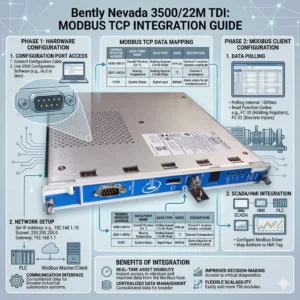
In high-stakes industries like oil and gas or power generation, communication compatibility often creates a technical bottleneck. The Bently Nevada 3500/22M Transient Data Interface (TDI) serves as the vital gateway between 3500 series machinery protection racks and external control systems. By facilitating reliable data extraction, this module allows operators to push critical machinery health insights directly into DCS or SCADA platforms. Consequently, plants can eliminate the need for complex custom middleware while maintaining high-fidelity asset management.

Bently Nevada 3500-22M TDI Modbus TCP Integration Guide

Bently Nevada 3500-22M TDI Modbus TCP Integration Guide

Technical Insights: Mastering Modbus TCP/IP Connectivity

The 3500/22M module utilizes Modbus TCP/IP protocols rather than traditional Modbus RTU serial connections. This shift to an Ethernet-based TCP/IP stack offers significant advantages for modern industrial automation. For instance, it provides higher data throughput and supports multi-client access for remote diagnostics. Therefore, integration with modern Ethernet-based DCS architectures becomes much simpler. However, legacy systems relying on RS-485 Modbus RTU will require an external protocol gateway to bridge the communication gap.

Optimizing Throughput and Reducing Network Latency

Engineers designed the 3500/22M to handle both transient and steady-state high-resolution data. Faster polling cycles through TCP improve real-time vibration monitoring and accelerate alarm response speeds. Nevertheless, heavy network congestion can introduce unwanted latency. To maintain performance, we recommend segmenting condition monitoring traffic via a dedicated VLAN. In our experience at Powergear X Automation Limited, delayed alarms often stem from overloaded plant networks rather than hardware failures within the 3500 rack itself.

System Architecture and Compliance with API 670 Standards

The 3500/22M functions as both a data concentrator and a communication interface for the entire rack. It interfaces with the internal backplane for data acquisition while providing external Ethernet ports for data export. This design effectively separates the deterministic protection system from the analytical monitoring network. As a result, the system maintains strict compliance with API 670 machinery protection standards. This separation ensures that network-level issues do not interfere with critical machine trip functions.

Installation Best Practices for Industrial Environments

Successful deployment of the 3500/22M requires a robust network and electrical design. You should never connect the module directly to a general office LAN. Instead, use industrial-grade switches and establish a dedicated VLAN to prevent broadcast storms. Furthermore, ensure the rack is properly grounded to mitigate electromagnetic interference (EMI). In turbine halls, high-current lines can create noise that leads to “ghost alarms” in the SCADA system if Ethernet cables lack proper shielding.

Evaluating Compatibility for Legacy Brownfield Projects

When upgrading older plants, buyers must verify rack firmware versions before procuring the 3500/22M. While the module is compatible with standard 3500 racks, older systems might not fully exploit TCP-based features. If your current control system is strictly Modbus RTU-dependent, budget for a high-quality industrial TCP-to-RTU converter. This proactive approach prevents unexpected integration costs from exceeding the hardware investment during the commissioning phase.

Expert Commentary from Powergear X Automation Limited

At Powergear X Automation Limited, we believe the 3500/22M is a prerequisite for any facility moving toward Industry 4.0 or digital transformation. The ability to stream high-density vibration data without serial bottlenecks is a game-changer for predictive maintenance. However, we urge engineers to prioritize network security and segmentation. As these interfaces bridge the gap between OT and IT, a secure, isolated communication layer is essential for long-term operational stability.

Application Scenarios and Strategic Solutions

  • Large Compressor Stations: Isolated condition monitoring traffic ensures that transient data does not saturate the primary control network.
  • Petrochemical Refining: Direct integration with Honeywell or Emerson DCS via Modbus TCP simplifies the asset management workflow.
  • Digital Power Plants: Utilizing the TDI for remote diagnostics allows off-site experts to analyze vibration signatures in real-time.

Technical Implementation Checklist

  • ✅ Verify SCADA support for Modbus TCP mapping before installation.
  • ✅ Use shielded Cat6 cables and maintain distance from high-voltage conduits.
  • ✅ Implement an industrial protocol gateway if RS-485 connectivity is mandatory.
  • ✅ Update rack firmware to the latest version to ensure full TDI feature support.

Frequently Asked Questions (FAQ)

Q: Can I use the 3500/22M to replace a 3500/20 Rack Interface Module?
Yes, the 3500/22M is the newer generation Transient Data Interface that provides enhanced Ethernet capabilities. However, you must verify that your configuration software is updated to support the 22M hardware profile to avoid configuration errors.

Q: Why does my SCADA system intermittently lose connection to the TDI?
This is frequently caused by ARP table overflows or broadcast traffic on a shared network. We recommend assigning a static IP address to the 3500/22M and placing it behind a managed industrial switch with IGMP snooping enabled.

Q: Does the 3500/22M support simultaneous connections to System 1 and a third-party PLC?
Yes, the module supports multiple socket connections. This allows Bently Nevada’s System 1 software to collect rich diagnostic data while your plant PLC polls basic alarm registers via Modbus TCP simultaneously.

For more technical specifications and high-performance automation modules, visit the official Powergear X Automation Limited website to view our latest inventory.

Back to Top
Product has been added to your cart