Over 50,000 hot-selling automation module components.

Bently Nevada 3300 XL Proximitor Power Wiring Hazards

Will a +24VDC Misconnection Burn Your Bently Nevada 3300 XL 8mm Proximitor?

In heavy industrial environments, machinery protection systems serve as the ultimate defense line for multi-million dollar rotating assets. The Baker Hughes Bently Nevada 3300 XL 8mm Proximitor Sensor plays a vital role in these systems. This sensor monitors critical parameters like shaft vibration and thrust position on steam turbines, centrifugal compressors, and large pumps. However, this specialized sensor utilizes a negative -24VDC power supply. This negative voltage architecture differs completely from the standard positive +24VDC supply found in most factory automation setups. Consequently, field technicians frequently ask: What happens if we accidentally connect a positive +24VDC line to this negative-powered sensor?

At Powergear X Automation, we analyze this common wiring hazard from a practical field engineering perspective. If you are looking to purchase or upgrade your industrial control system components safely, please explore our comprehensive product catalog at Powergear X Automation.

The Risk of Thermal Damage in Reversed Polarity Scenarios

Yes, connecting a +24VDC supply directly to a Bently Nevada 3300 XL 8mm Proximitor Sensor carries a extremely high risk of permanent component damage. The internal circuitry of the Proximitor uses a negative voltage design where the positive terminal functions as the system common ground (COM). If you apply a positive +24VDC potential to the -24VDC supply terminal, you reverse the polarity across the entire internal circuit board.

Many standard industrial sensors feature robust reverse-polarity protection diodes. However, Bently Nevada proximitors prioritize high-frequency response and analog signal precision over general-purpose protection. Consequently, keeping a reversed positive voltage connected for more than a few seconds will cause overheating, eventually burning out sensitive internal components like input-stage transistors or op-amps.

Understanding the Negative -24VDC Legacy in Vibration Monitoring

To understand this unique design, we must look back at the history of industrial control systems and electronic instrumentation. Early operational amplifiers and high-speed analog circuits achieved superior stability and lower noise floors using negative voltage rails. Because eddy current sensors detect sub-micron shaft movements, minimizing signal noise is absolutely paramount.

By standardizing on a -24VDC rail, Bently Nevada isolates fragile dynamic signals from the common electrical noise generated by positive-rail factory automation equipment. Therefore, this negative supply arrangement ensures that high-frequency shaft vibrations are transmitted cleanly over long distances to the Bently Nevada 3500 rack without signal degradation.

Analyzing Signal Precision and Critical Protection Actions

The 3300 XL 8mm Proximitor outputs a continuous analog voltage proportional to the distance between the probe tip and the target shaft. Usually, this output scale operates at 7.87 V/mm (200 mV/mil). If the power supply experiences instabilities or wiring faults, the output voltage might drift.

In turbomachinery monitoring, a drifting signal can cause catastrophic consequences. For instance, a false high vibration reading might trigger an emergency trip, costing a petrochemical plant hundreds of thousands of dollars in lost production. Conversely, if the signal fails entirely due to a burned-out sensor, the system cannot detect an actual shaft rub, risking severe mechanical failure. Thus, securing a clean and stable -24VDC source is crucial for plant safety.

How Environmental Stresses Compound Electrical Faults

Proximitor sensors rarely operate in clean, climate-controlled environments. Instead, they sit in local enclosures mounted directly on hot turbine decks, exposed to high ambient temperatures, relentless mechanical vibrations, and oily atmospheres. Over time, constant thermal expansion and physical vibrations can loosen terminal screws, crack wire insulation, or damage shielding cables.

When wiring becomes loose, intermittent short circuits or ground loops can occur. If field technicians attempt troubleshooting without verifying power polarities on their multimeters, they can easily cross-wire the positive-rail PLC lines with the negative-rail sensor lines during a rushed turnaround.

Field Installation and Preventative Maintenance Procedures

To prevent costly damage to your vibration monitoring loops, we suggest implementing the following safety steps during commissioning and maintenance:

  • Verify Before Connecting: Always use a calibrated digital multimeter to measure the potential between the terminal wires before connecting them to the Proximitor. Ensure the supply line reads -24VDC relative to the COM terminal.
  • Use Dedicated Color Coding: Never assume standard wire colors like red represent positive lines. Implement distinct wire labels or jacket colors specifically for negative DC voltage distribution inside your junction boxes.
  • Implement Proper Isolation: If your facility only provides standard +24VDC power, install high-quality, DIN-rail mounted DC-to-DC converters to step down and invert the voltage safely.
  • Secure Shield Grounding: Connect the outer shield of the coaxial extension cable to the instrument ground at the monitor rack side only. This prevents ground loop currents from interfering with the analog signal.

Industrial Scenario: Resolving Power Discrepancies in Upgrades

Consider a chemical plant replacing its legacy distributed control systems (DCS). The new cabinet utilizes modern +24VDC power supplies for all field transmitters. To integrate the existing Bently Nevada 3300 XL loop, the engineering team cannot simply tap into the main +24VDC bus. Instead, they must install a dedicated isolated power converter module to generate the stable, clean -24VDC rail required by the proximitors. Taking this step ensures compatibility and protects the entire sensor chain from overvoltage failures.

Frequently Asked Questions (FAQs)

Q1: Can I use a standard 24V DC power supply by just swapping the positive and negative leads?
No. A standard power supply outputting +24VDC relative to ground cannot be simply reversed if its negative terminal is internally tied to the chassis or earth ground. Doing so will cause a direct short circuit. You must use a dedicated, isolated DC-to-DC converter designed to output a true negative voltage.

Q2: What are the immediate signs that a 3300 XL Proximitor has burned out?
A damaged proximitor typically stops modulating its output voltage entirely. The output voltage pin will either read 0V or peg to the limit (near the positive rail), and the Bently Nevada 3500 monitor will display a “NOT OK” status light accompanied by a channel bypass alarm.

Q3: Can 8mm and 11mm proximitor systems share the same power supply?
Yes, as long as both systems require -24VDC and the power supply can handle the total current draw. However, you must never mix the physical 8mm and 11mm probes or extension cables, as they have different electrical properties and calibration scales.

Bently Nevada 3500/61-02-00 Guide: Compressor Pressure Setup

Can the Bently Nevada 3500/61-02-00 Monitor Compressor Discharge Pressure?

The Bently Nevada 3500/61-02-00 stands out as a highly reliable process variable input module within the Baker Hughes Bently Nevada 3500 ecosystem. Industrial facilities worldwide deploy this platform to interface standard analog transmitters with machinery protection systems. However, a frequent point of confusion among procurement officers and junior engineers is whether the module can directly measure compressor discharge pressure.

To clarify this technical distinction, the 3500/61-02-00 module effectively monitors compressor discharge pressure but does not function as a standalone pressure sensor. Instead, it processes standard 4-20mA analog signals coming from external field pressure transmitters. It converts these electrical currents into readable engineering units like PSI or Bar. Our engineering team at Powergear X Automation frequently assists clients in integrating these process variables to create a unified asset protection framework.

Core Asset Protection Value in Compressor Systems

Compressor discharge pressure serves as a critical indicator of aerodynamic health and process stability in oil, gas, and chemical plants. By routing this thermodynamic variable through the 3500/61-02-00 module, operators can consolidate mechanical protection with process monitoring. Consequently, users view vibration profiles, axial displacement, and discharge pressure on a single interface.

Integrated data streams significantly reduce diagnostics time during anomalous events. For instance, a sudden spike in vibration accompanied by a drop in discharge pressure immediately points to compressor surge. Conversely, relying solely on vibration data might lead to a misdiagnosis of mechanical imbalance. According to industrial machinery reports from organizations like the American Petroleum Institute (API), over 40% of rotating equipment failures stem from undetected process instability or operational deviations outside safe operating envelopes.

Technical Specifications and Field Transmitter Compatibility

The 3500/61-02-00 module features isolated channels designed to accept standard current loop inputs from external factory automation sensors. When configuring this module for compressor discharge pressure monitoring, engineers must verify electrical compatibility. Most industrial pressure transmitters utilize a two-wire 4-20mA loop powered by an external source or directly by the input card.

Mismatches between field instruments and the monitoring system remain a primary cause of commissioning delays. For example, if a technician installs a 0-10V transmitter while the 3500/61 module expects a 4-20mA signal, the control room will display corrupted or out-of-range values. Therefore, engineering teams must cross-reference transmitter output types, measurement scales, and hazardous area certifications before completing field deployment.

Modifying Engineering Units (PSI vs. Bar) in 3500 Software

Because the 3500/61-02-00 hardware only registers electrical currents, the software must perform all engineering unit conversions. Plant engineers modify these scaling parameters using the 3500 System Configuration Software. This precise alignment guarantees that the digital display accurately mirrors the physical reality of the industrial process.

Incorrect unit configurations introduce severe operational risks, such as premature or delayed safety trips. For example, setting an emergency shutdown threshold at 8 PSI instead of 8 Bar could trigger an accidental plant outage. To change engineering units seamlessly, technical personnel should follow this systematic procedure:

  1. Connect the engineering workstation to the 3500 rack interface and upload the current hardware configuration file.
  2. Navigate to the specific rack slot housing the 3500/61 module and select the target pressure monitoring channel.
  3. Locate the transducer settings to adjust the input range, full-scale limits, and engineering unit labels (e.g., from PSI to Bar).
  4. Download the updated configuration to the rack, and subsequently verify the scaling accuracy against a calibrated field signal generator.

Field Installation and Signal Reliability Guidelines

Industrial compressors inherently generate high-frequency mechanical vibrations that stress external electrical connections. Over time, these structural micro-vibrations can loosen terminal blocks, break shielding wires, and introduce intermittent signal noise into the 4-20mA control systems. As a result, the monitoring software may record false pressure spikes or trigger nuisance alarms.

  • Cable Selection: Always use high-grade, twisted-pair shielded cables specifically rated for heavy industrial automation environments.
  • Grounding Protocols: Ensure the cable shield is grounded at a single point, typically at the 3500 rack chassis, to eliminate ground loop interference.
  • Surge Protection: Install specialized lightning and surge arrestors if the pressure transmitters are located on outdoor pipelines or long cable runs.

Industrial Application Scenario: Centrifugal Compressor Protection

In a typical petrochemical facility, a multi-stage centrifugal compressor relies on the 3500/61-02-00 module to handle auxiliary process variables. The module continuously tracks the discharge pressure of the final stage alongside the lubrication oil pressure. The 3500 rack cross-references these analog signals with radial vibration data from proximity probes. If the discharge pressure drops below a critical threshold while shaft vibration increases, the system automatically executes an emergency shutdown command through the DCS control systems to prevent severe internal mechanical damage.

If you are planning to upgrade your machinery protection infrastructure or require reliable replacement parts, explore the extensive catalog of premium hardware available at Powergear X Automation to secure your plant’s operational continuity.

Frequently Asked Questions (FAQs)

Q1: Can the 3500/61-02-00 module supply power directly to a two-wire pressure transmitter?
Yes, the 3500/61-02-00 module can provide internal loop power to field transmitters depending on the specific internal jumper settings and backplane I/O options selected. Engineers must verify the wiring diagram in the Bently Nevada manual to ensure proper terminal connections.

Q2: What happens if a pressure transmitter drifts over time?
The 3500/61 module simply processes the incoming current signal. If the field transmitter drifts, the 3500 system will display inaccurate pressure values. Therefore, maintenance teams should calibrate field transmitters annually using a certified deadweight tester or pressure calibrator.

Q3: Is the 3500/61-02-00 module hot-swappable during compressor operation?
While the 3500 architecture supports hot-swapping for certain modules, removing a process variable card like the 3500/61 may disrupt active safety interlocks or cause a fault in the DCS. It is highly recommended to bypass relevant trip logic or perform the replacement during a scheduled maintenance window.

Bently Nevada Armor vs FluidLoc Cable Performance Comparison

Bently Nevada 3500 Cable Showdown: Armor vs. FluidLoc Electrical Performance

In machinery condition monitoring, engineers frequently debate component selection for the Bently Nevada 3500 system. A common question among procurement officers and site technicians involves proximity probe extension cables. Specifically, they wonder if the armored (Armor) version delivers superior signal transmission or accuracy compared to the unarmored FluidLoc® version.

As a veteran provider of high-end factory automation and control systems hardware, Powergear X Automation analyzed this technical dilemma. From an engineering standpoint, both options deliver identical electrical performance under matched specifications. The actual differences lie entirely in mechanical protection and environmental endurance.

The Electrical Myth of Armored Transmissions

Many instrumentation technicians mistakenly assume that armored cables provide better shielding against electrical noise. However, Bently Nevada eddy current proximity probe systems rely on a tightly matched calibration loop. This loop consists of the probe, the extension cable, and the Proximitor® sensor.

The system prioritizes total calibration length (typically 5-meter or 9-meter configurations) and physical impedance matching. Consequently, parameters like linear range, frequency response, and scale factor sensitivity remain unchanged between Armor and FluidLoc designs. If you experience voltage drift after a cable swap, look for mismatched loop lengths or contaminated connectors rather than cable casing differences.

Mechanical Armor Shields High-Vibration Assets

The stainless steel armor sleeve serves a singular primary purpose: mitigating mechanical damage risks. In heavy industrial automation environments, cables face severe physical hazards during routine maintenance or equipment operation.

  • Steam Turbine Decks: High ambient temperatures combined with structural casing vibrations demand armored protection.
  • Compressor Skids: Crowded physical footprints increase the risk of maintenance foot traffic or tool impacts crushing bare lines.
  • Conduit Routing: If you route lines through dedicated, clean cable trays or protective conduits, the armor layer becomes redundant.

FluidLoc Technology Prevents Chemical Degradation

The FluidLoc configuration is not just a standard unarmored wire. It features a specialized inner construction designed to block moisture, oil, and process fluids from migrating through the cable interior.

In industrial oil and gas applications, lubricating oil frequently migrates via capillary action if the outer jacket suffers a breach. FluidLoc protects the critical connection junction at the Proximitor sensor end. However, remember that FluidLoc does not equal continuous fluid immersion; long-term subsea or deep-well applications still require specialized chemical-rated outer conduits.

Proactive Maintenance Protocol for Proximity Systems

To maximize the availability of your automated control systems, follow these practical installation steps:

  1. Maintain Bend Radii: Never bend armored lines past their minimum specified bend radius, as micro-fractures in the inner coax degrade high-frequency response.
  2. Isolate the Armor Ground: Do not utilize the mechanical armor sleeve as an electrical shield drain path; doing so introduces ground loops that trigger false machinery trips.
  3. Perform Verification Calibrations: Always verify the loop’s gap voltage with a spindle micrometer calibration kit whenever you replace an extension cable.

Industrial Case Study: Petrochemical Compressor Overhaul

During a recent plant turnaround, a regional refinery experienced intermittent vibration spikes on a critical recycling compressor. The site had previously installed standard unarmored lines routed past an auxiliary oil pump. Over time, continuous exposure to hot synthetic oil mist degraded the outer jackets, causing signal attenuation.

Our team replaced the compromised lines with FluidLoc alternatives and added Armor protection to the sections exposed to maintenance walkways. This dual-strategy implementation eliminated the signal drift, demonstrating that choosing the right physical jacket directly protects automated facility uptime.

Explore our comprehensive inventory of certified control systems hardware at Powergear X Automation to source dependable, genuine proximity monitoring components.

Frequently Asked Questions

Q1: Does the Armor cable reduce Electro-Magnetic Interference (EMI) better than FluidLoc?
No. Both versions utilize the same internal coaxial shielding to manage electrical noise. The external armor is strictly designed for mechanical and physical impact resistance.

Q2: Can I mix a 5-meter Armor cable with a 9-meter Proximitor sensor?
No. The total electrical length of the probe plus the extension cable must match the specific calibration of the Proximitor sensor (e.g., a 1-meter probe requires a 4-meter extension cable to work with a 5-meter Proximitor).

Q3: What indicates that a FluidLoc cable needs replacement?
Look for brittleness in the outer jacket, discoloration from oil exposure, or erratic gap voltage readings on your DCS or PLC diagnostic screen, which indicate fluid penetration.

ABB DCS 07 MK 92 Troubleshooting: Resolving Serial Data Loss

How to Resolve ASCII Packet Loss on the 07 MK 92 Serial Communication Board

During the onsite commissioning of ABB Distributed Control Systems (DCS), engineers frequently encounter serial communication issues. Specifically, ASCII data packet loss on the 07 MK 92 communication module represents a classic yet commonly misdiagnosed problem. Many field technicians immediately assume that modifying the onboard hardware flow control (RTS/CTS) jumpers will fix the issue. However, practical field experience reveals that this hardware adjustment is not always necessary or correct.

Modifying onboard jumpers is only effective when both communicating devices actively utilize hardware handshaking. If the host computer or the connected third-party subsystem uses no flow control or XON/XOFF software flow control, changing jumpers can completely disrupt transmission. Therefore, seasoned engineers must first verify the communication protocol, serial parameters, and peer device configurations before altering physical hardware.

The Vital Role of Serial Communication in Industrial Automation

The 07 MK 92 serial communication board serves as a crucial bridge within modern factory automation environments. It connects robust ABB DCS networks with programmable logic controllers (PLCs), smart instruments, gas analyzers, barcode scanners, and industrial printers. In continuous manufacturing sectors like oil and gas, chemical processing, and pharmaceuticals, these boards facilitate vital data acquisition and alarm transmission.

When industrial control systems transmit large volumes of periodic ASCII strings, serial stability directly impacts data integrity. Reliable data transfer ensures accurate batch records, precise process monitoring, and seamless Manufacturing Execution System (MES) integration. Consequently, optimizing software configurations, managing buffer parameters, and setting appropriate baud rates prove far more effective than blindly increasing raw communication speeds.

Technical Deep Dive into RTS/CTS Hardware Flow Control

The 07 MK 92 module provides robust support for RTS/CTS hardware handshaking, but this feature requires strict end-to-end synchronization. In industrial automation, hardware flow control prevents receiver buffer overflow during heavy data bursts. This mechanism is critical when communicating with older PLCs or peripheral microcontrollers that possess limited processing power. If the communication software is set to “No Flow Control” while the board enforces RTS/CTS, the transmission line will freeze or drop packets intermittently.

Powergear X Automation Expert Insight: Our field data indicates that the majority of ABB DCS connections to weigh scales, flowmeters, and drives rely on “None” (no flow control). Hardware handshaking is typically reserved for dedicated industrial PCs or legacy server interfaces. Therefore, troubleshooting should always begin with software handshaking diagnostics rather than physical board manipulation.

Baud Rate Management and Buffer Capacities

High communication speeds increase data throughput but place strict demands on system buffer management. For instance, a standard speed of 9600 bps offers excellent noise immunity and compatibility across legacy factory networks. Higher rates like 19200 bps or 38400 bps support faster updates but risk buffer overruns if the controller scan cycle lags. A common misconception in the field is that higher baud rates reduce packet loss; in reality, excessive speeds often worsen the problem.

When handling long ASCII telegrams exceeding 200 bytes, technicians should closely evaluate the following technical parameters:

  • The exact transmission interval configured in the PLC application logic.
  • The allocated buffer size of the receiving serial port.
  • The presence of proper delay timers between consecutive data packets.
  • The alignment of handshaking configurations across both devices.

Ensuring ASCII Protocol Compatibility in DCS Networks

The 07 MK 92 board seamlessly handles various asynchronous serial protocols, including Modbus ASCII, printer protocols, and custom textual streams. However, standard ASCII protocols generally lack built-in automated retransmission mechanisms. Consequently, minor errors like parity mismatches, buffer overruns, incorrect frame terminators (CR/LF), or framing errors manifest instantly as lost packets.

To eliminate these vulnerabilities, verify that the data bits (7 or 8 bits), parity (Odd, Even, or None), and stop bits match perfectly. Misconfigured carriage return or line feed settings cause the receiving parser to discard entire strings. Resolving these software parameters resolves over 80% of perceived hardware malfunctions.

Practical Field Installation and Maintenance Guide

When troubleshooting communication drops on site, avoid hasty hardware modifications and follow a systematic, layered diagnostic approach:

  • Step 1: Check Serial Configurations – Confirm that baud rate, data bits, parity, and stop bits match exactly on both sides.
  • Step 2: Inspect the Physical Layer – Use shielded twisted-pair cables for high-interference environments, and ensure the shield is grounded at a single point to prevent ground loops.
  • Step 3: Analyze Application Timings – Introduce a small delay (e.g., 50–100 milliseconds) between consecutive ASCII transmissions to prevent buffer starvation.

If you discover that your current communication infrastructure is outdated or physically degraded, upgrading your components is the safest path forward. For high-quality, certified industrial control components and replacements, browse the verified catalog at Powergear X Automation to secure reliable parts for your next system overhaul.

Real-World Solution Scenario: Chemical Plant Emission Monitoring

In a recent continuous emissions monitoring system (CEMS) integration at a chemical processing plant, an ABB DCS utilizing an 07 MK 92 board experienced a 15% packet drop rate when reading flue gas analyzer data. The on-site team initially blamed the hardware flow control jumpers. However, a serial bus analysis revealed that the analyzer sent raw text data without supporting RTS/CTS lines, while the DCS software expected a hardware handshake. By disabling hardware flow control in the DCS configuration and adding a 20ms pacing delay between data frames, the packet loss dropped to 0% without touching the physical board jumpers.

Frequently Asked Questions

Q1: Does ASCII packet loss on the 07 MK 92 always require jumper adjustments?
No. Most packet loss stems from baud rate mismatches, framing errors, buffer overruns, or software flow control conflicts. Only adjust physical jumpers if the manuals for both devices explicitly state that RTS/CTS hardware handshaking is mandatory.

Q2: How does electromagnetic interference affect ASCII string integrity?
High电磁干扰 (EMI) from nearby variable frequency drives (VFDs) or high-voltage motors can distort serial waveforms. This corruption causes the 07 MK 92 to reject frames due to parity or framing errors, which looks exactly like packet loss. Always use high-quality shielded cabling and maintain proper physical separation from power lines.

Q3: When should an industrial plant consider replacing or upgrading the 07 MK 92 board?
Consider upgrading when the component shows physical signs of thermal aging, when your data throughput demands exceed the module’s maximum baud rate capacity, or when upgrading to modern control architectures that demand native Ethernet or fiber-optic connectivity.

Prevent ModuleBus Errors During S800 I/O Hot-Swapping

Why Slow or Shaky Hot-Swapping of S800 I/O Modules Directs Instant Bus Spikes to Adjacent Modules

The ABB S800 I/O system offers robust online hot-swap capabilities. This critical feature helps plant engineers replace faulty I/O modules without interrupting control system operations. However, site technicians often encounter a frustrating phenomenon during live maintenance. If a technician extracts a module too slowly or shakes it horizontally, adjacent operational modules frequently trigger transient ModuleBus errors, unexpected data spikes, or short-lived channel failures. This disruptive issue usually stems from physical layer disturbances on the backplane bus rather than actual hardware degradation.

Decoding the Backplane Connector Mating Sequence

The S800 I/O backplane connection relies on a staggered pin design. The contact pins feature varying lengths to enforce a distinct mechanical timing sequence during insertion and extraction. Ground pins establish connection first, followed by power pins, and finally the ModuleBus communication and address line pins. A quick, fluid movement allows the system to process this sequence within milliseconds, ensuring seamless bus re-enumeration. Conversely, a slow or incomplete extraction causes the module to hover in a semi-contact state. The controller then detects fragmented data packets and irregular address states, which rapidly generates CRC errors and temporary module missing alarms.

How ModuleBus Communication Integrity Faces Physical Disruption

High-speed ModuleBus traffic requires stable impedance and clean voltage signals across the industrial automation rack. When a technician rocks a module from side to side during maintenance, the connector pins disconnect and reconnect unevenly. This erratic mechanical bouncing alters local contact resistance and triggers instantaneous signal reflections along the backplane. The main controller misinterprets these physical fluctuations as rapid, sequential module connections and disconnections. Consequently, the control network suffers from transient communication spikes that can impact data consistency across the entire factory automation segment.

Analyzing Environmental Vibration and Mechanical Stability Risks

Heavy machinery such as large compressors, turbines, or cooling fans often generate continuous high-frequency structural vibration. While S800 hardware features rugged industrial housing, prolonged vibration degrades the mechanical fit between modules and baseplates. If the locking tabs do not snap fully into position, subtle microscopic movements wear down the connector plating over time. Executing a hot-swap under these conditions amplifies contact bounce and causes unexpected data drops on neighboring channels. Plant operators must ensure strict mechanical securing to safeguard both system uptime and component longevity.

Best Practices for Standardizing Live Maintenance Procedures

To eliminate transient bus faults, maintenance teams should implement explicit standard operating procedures for live module replacement.

  • Execute Swift and Decisive Movements: Technicians must extract or insert the I/O module in one continuous, smooth motion without pausing midway.
  • Verify Mechanical Locking Mechanisms: Always inspect the plastic latching mechanisms and DIN rail stability to prevent micro-displacements.
  • Cross-Reference Diagnostic Logs: Evaluate if the system log shows self-recovering communication retries or persistent CRC accumulation to determine actual hardware health.

Powergear X Automation Insight on Lifecycle Reliability

Industrial experience indicates that over 70% of live maintenance errors result from improper handling rather than true component failure. At Powergear X Automation, we observe that integrating mechanical health checks into annual preventive maintenance schedules drastically reduces unexpected plant trips. As continuous-process plants adopt advanced DCS frameworks, maintaining physical layer discipline becomes vital. Adhering to international standards like IEC 61131-2 for programmable controllers ensures your hardware survives the rigorous demands of modern distributed architectures.

Real-World Solution Scenario: Chemical Plant Rectification

During a routine maintenance turnaround at a major petrochemical facility, technicians frequently tripped adjacent safety interlocks while hot-swapping analog input modules. An audit revealed that oxidized backplane slots combined with hesitant manual extraction caused severe voltage sagging on the local 24V DC bus line. The engineering team resolved the issue by training technicians on positive-motion insertion techniques and replacing worn baseplates. This systematic adjustment eliminated diagnostic spikes and secured zero-downtime operations during subsequent hot-swap interventions.

Frequently Asked Questions

Q1: Do recurring hot-swap spikes indicate that I need to purchase new S800 I/O modules?
Not necessarily. Transient spikes usually point to manual handling errors, oxidized baseplate connectors, or excessive cabinet vibration rather than internal component damage.

Q2: How do ModuleBus errors affect high-speed analog control loops compared to digital loops?
Digital loops often tolerate brief disruptions via built-in software filtering. However, high-speed analog loops may experience data quality status changes, disrupting PID calculations and historian accuracy.

Q3: Can I mix different hardware revisions of the same S800 module on a single baseplate?
You must verify the manufacturer compatibility matrix and controller firmware support before mixing revisions, especially within functional safety or redundant architectures.

For premium replacement parts, technical support, and robust industrial hardware solutions that keep your control systems running smoothly, explore the comprehensive inventory available at Powergear X Automation.

Troubleshoot ABB TB845 TB850 ModuleBus Fiber Errors

Troubleshooting ABB DCS: Diagnosing TB845 and TB850 ModuleBus Modem Faults

Understanding ModuleBus Cluster Communications in Control Systems

In modern factory automation, distributed control systems (DCS) rely heavily on deterministic communication networks. The ABB AC 800M controller utilizes TB845 and TB850 ModuleBus optical modems to connect the main controller with remote I/O clusters. These components isolate high-voltage surges and extend communication distances across large industrial plants. However, engineers frequently encounter a critical issue where the TX (transmit) or RX (receive) LED indicators stop flashing. This symptom indicates a total loss of signal, causing the entire remote I/O station to go offline and threatening production continuity.

Analyzing the Core Technical Specifications of Optical Links

To effectively diagnose a non-flashing LED, engineers must evaluate the optical power budget of the ModuleBus network. The optical power budget represents the maximum loss a fiber optic link can tolerate before the receiver fails to decode the signal. In typical industrial automation deployments, aging infrastructure introduces extra attenuation through fiber degradation and contaminated connectors.

Receiver sensitivity determines the minimum optical power that the TB845 or TB850 requires to maintain data integrity. Over a decade of operation, the internal laser diodes (LD) and photo-diodes (PIN) inside these modems undergo thermal stress, which severely degrades their performance.

Field Deployment and Maintenance Guide

When a ModuleBus error occurs, follow these steps to isolate the issue efficiently:

  • Measure Optical Power: Disconnect the fiber from the RX port of the suspect TB845/TB850 module. Use an industrial optical power meter to measure the incoming light level, then compare this value to the original commissioning baseline.
  • Clean All Optic Interfaces: Industrial environments like chemical or cement plants generate fine particulates that penetrate fiber patch panels. Clean the LC/ST connectors thoroughly using specialized lint-free wipes and isopropyl alcohol (IPA).
  • Execute Cross-Substitution: Swap the suspect modem with a known working unit from an adjacent redundant cluster. If the fault moves with the hardware, the internal optical transceiver has aged beyond its operational limits.

Distinguishing Link Attenuation from Interface Degradation

The table below highlights the distinct field behaviors that differentiate a degraded fiber link from an aged hardware component:

Diagnostic MetricHigh Fiber AttenuationOptical Interface Aging
TX LED StatusFlashes normallyMay flash normally or stay dim
RX LED StatusSolid off or intermittent blinkingCompletely dark
After Cleaning ConnectorsMarginal or no improvementNo improvement observed
After Replacing Fiber Patch CableCommunication fully restoresFault persists
After Replacing TB845/TB850Fault persistsCommunication restores instantly
Measured Optical PowerSignificantly below the marginNormal or within spec

Author Insights and Perspectives by Powergear X Automation

At Powergear X Automation, we observe that over 70% of optical communication faults stem from poor link quality rather than internal hardware failure. Field data from major petrochemical installations indicates that physical fiber damage or connector contamination causes the vast majority of I/O drops. However, hardware aging becomes a significant factor once a system exceeds 8 to 10 years of continuous operation.

Engineers should avoid the immediate urge to swap expensive modules without performing a structured power budget analysis. For plants undergoing lifecycle upgrades, checking the product lifecycle status (Active, Classic, Limited, or Obsolete) is vital before purchasing replacement parts. If you are looking to secure reliable, factory-tested control system components to keep your plant running smoothly, discover our extensive inventory of genuine modules at Powergear X Automation.

Industrial Application Case Scenario

Consider a large-scale water treatment facility running an ABB AC 800M system where Remote I/O Cluster 3 suddenly went offline. The RX light on the local TB845 modem stopped flashing entirely. The maintenance team initially suspected a dead module and prepared to order a replacement.

However, following a structured diagnostic procedure, the instrument technician measured the incoming optical power at the RX port and found it registered well below the acceptable receiver sensitivity threshold. Further inspection revealed that an adjacent cable tray modification had crushed a segment of the fiber optic run, creating massive attenuation. Replacing the damaged fiber patch cord immediately brought the RX LED back to life and restored the entire I/O station, saving the facility unnecessary hardware procurement costs and extended downtime.

Frequently Asked Questions

Q1: Can a faulty TB845 or TB850 module cause errors on other functioning ModuleBus clusters?
Generally, no. ModuleBus clusters are electrically isolated via optical fibers. A failure or signal degradation on one specific cluster will affect that node’s I/O processing, but it will not corrupt the communications of other independent fiber clusters connected to the same AC 800M controller.

Q2: What is the recommended cleaning interval for optical modems in harsh factory environments?
In high-dust or chemical environments, we recommend inspecting and cleaning the fiber optic connectors during scheduled annual plant turnarounds. Always ensure that protective dust caps are installed on any unused optical ports immediately to prevent ambient contamination.

Q3: Are new firmware revisions of the TB850 backward compatible with older AC 800M controllers?
Yes, but with limitations. While ABB maintains excellent backward compatibility, certain older firmware versions of Control Builder M and the AC 800M hardware might require specific minimum module revisions. Always consult the technical product documentation and release notes before hot-swapping modules of a different revision.

Correcting AGND and DGND Ground Loops on DCS Modules

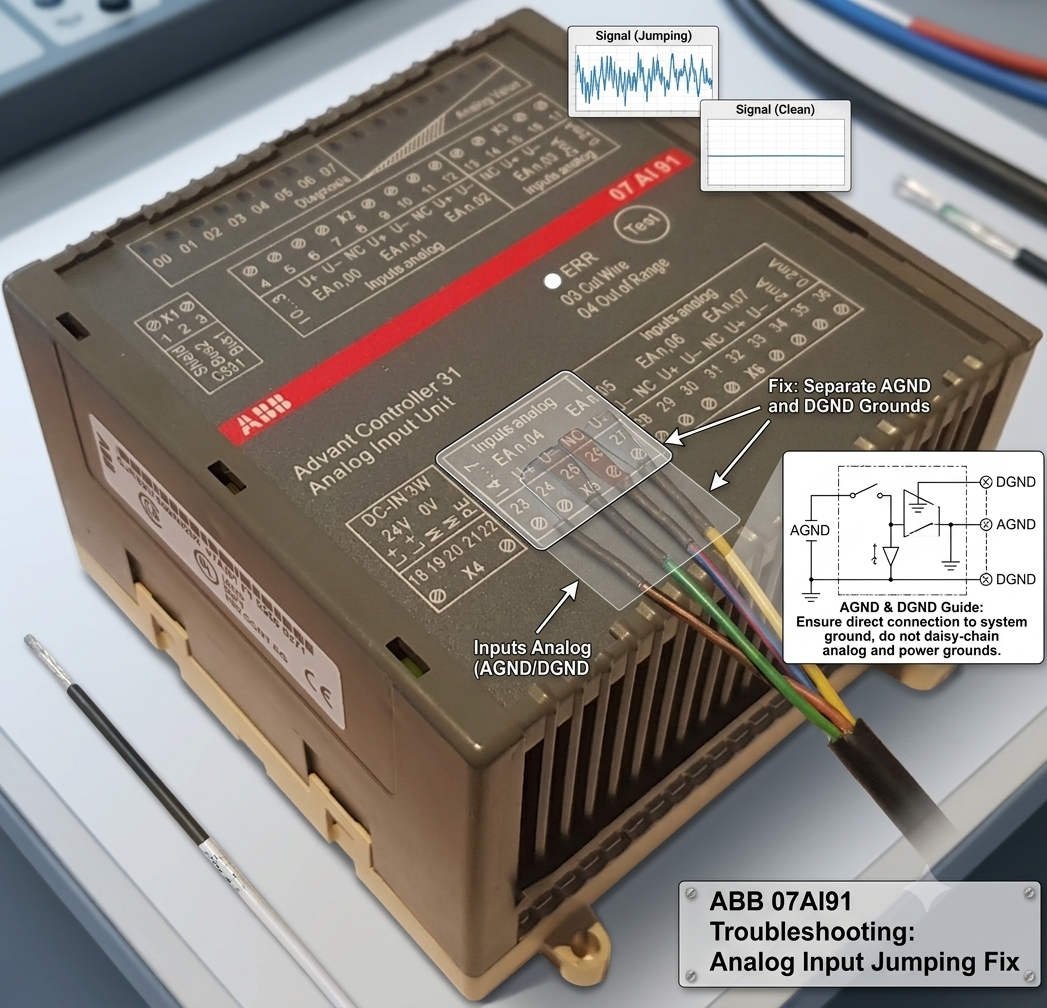
Fixing ABB DCS 07AI91 Analog Input Fluctuations via AGND and DGND Isolation

In industrial automation, field engineers frequently encounter signal instability on analog input modules. Specifically, the ABB DCS 07AI91 analog input card often exhibits severe data fluctuations or random process variable (PV) jumps. While many technicians immediately suspect faulty transmitters or bad analog-to-digital (A/D) converters, the root cause usually lies elsewhere. Improper grounding of the Analog Ground (AGND) and Digital Ground (DGND) on external terminals creates devastating ground loops.

Managing high-precision analog inputs requires strict adherence to single-point grounding principles. If you mismanage these reference points, electrical noise will easily corrupt your low-level loops. Consequently, control room operators will notice erratic spikes on their trend screens. This technical guide delivers practical solutions to eliminate ground-loop interference and restore rock-solid signal stability to your control systems.

The Operational Cost of Signal Noise in Process Automation

The 07AI91 analog input module serves as a critical data gateway by converting 4-20mA and 0-10V field signals into digital values. In continuous processing industries like oil and gas, chemical manufacturing, and power generation, accurate analog measurements directly determine PID loop performance. Therefore, minor signal fluctuations can destabilize an entire production line.

At Powergear X Automation, we observe that incorrect AGND and DGND terminal wiring damages control quality even when field instruments operate perfectly. Experienced engineers know that optimizing the external grounding architecture resolves signal jumping far more effectively than replacing expensive hardware. Protecting signal integrity ensures tighter process control, lowers equipment stress, and reduces unplanned downtime.

Deconstructing 07AI91 Technical Specifications and Noise Vulnerability

High-resolution A/D converters make the 07AI91 module highly sensitive to subtle process changes. However, this extreme precision also renders the card vulnerable to common-mode voltage noise. When the grounding system is poorly designed, the high-resolution architecture inadvertently amplifies electrical interference instead of filtering it out.

Field data indicates that if a process variable jumps by 1% to 3% while the actual physical process remains steady, grounding layout errors are usually the culprit. Although the 07AI91 features internal galvanic isolation, this feature cannot compensate for external wiring blunders. Industrial isolation shields the internal system bus from field faults; it does not grant permission to create arbitrary external ground paths.

Step-by-Step Field Guide to AGND and DGND Terminal Wiring

To eliminate data jumping on the 07AI91 module, you must strictly isolate AGND and DGND on your external marshalling terminals. Please follow these verified deployment steps to ensure clean signal acquisition:

  • Enforce Single-Point Grounding: Never bridge the AGND and DGND terminals together at the field terminal block. ABB engineers design these systems to connect at a single, controlled reference point inside the cabinet chassis.
  • Isolate Terminal Connections: Route the AGND wire exclusively to the analog signal reference plane and keep the DGND dedicated to digital logic returns.
  • Prevent Ground Loops: Double-bonding these grounds creates a closed loop that invites stray electromagnetic currents to circulate through your analog loops.

Optimizing Shield Grounding and 24VDC Power Quality

Proper cable shield management provides the next line of defense against factory automation noise. Technicians must terminate instrument cable shields solely at the control cabinet side using a dedicated copper ground bar. Leaving the field instrument side ungrounded prevents earth potential differences from driving current through the shield.

In addition, you must verify the quality of your 24VDC power distribution system. Use an oscilloscope to measure DC power ripple, ensuring it stays well below 100mV peak-to-peak. Furthermore, check the AC voltage between AGND and the Protective Earth (PE) bus. If this potential difference exceeds 1VAC, you must systematically audit your plant-wide grounding grid to locate the leakage source.

Strategic Cable Routing in High-Interference Environments

Heavy electrical machinery like variable frequency drives (VFDs), large motors, and soft starters generate massive electromagnetic fields. To safeguard your low-voltage analog loops, you must maintain rigid physical separation during cable installation. Run your analog signaling lines in separate, grounded steel conduits or distinct cable tray tiers.

Always maintain a minimum clearance of 300mm between parallel analog lines and high-voltage power cables. When signal and power runs must intersect, cross them strictly at a 90-degree right angle to minimize inductive coupling. These clean installation habits eliminate the vast majority of ghost faults that engineers mistake for hardware failures.

Industrial Case Study: Resolving Flow Meter Fluctuations

During a recent DCS upgrade at a major chemical plant, an engineer reported that a critical electromagnetic flow meter exhibited severe PV jumping after commissioning. The trend line showed random 2.5% spikes every few minutes, causing the downstream pneumatic control valve to stroke erratically. The site team initially suspected a defective 07AI91 card and replaced it twice, yet the problem persisted.

A deep audit by our team revealed that the installation contractor had jumpered AGND to DGND on the marshalling terminal strip to “simplify” wiring. This link allowed high-frequency noise from a nearby 110kW cooling pump VFD to feedback directly into the analog return path. By removing the external jumper and isolating the grounds according to standard factory automation specs, the flow meter signal stabilized instantly, proving the value of proper grounding rules.

Explore Premium Automation Hardware Solutions

Resolving complex signal anomalies requires both expert field practices and dependable control hardware. If you are looking to replace legacy components, expand your current DCS architecture, or source hard-to-find industrial control modules, we can assist you. Discover our comprehensive inventory of high-performance components and technical spares by visiting the Powergear X Automation platform today.

Frequently Asked Questions

Q1: Does a jumping PV value always indicate that the 07AI91 card is physically damaged?
No, physical hardware failure is actually rare. Field statistics show that roughly 50% of analog jump issues stem from grounding errors, 30% come from electromagnetic interference (EMI), and 15% relate to field transmitter faults. Less than 5% point to actual component degradation.

Q2: Can I ground both ends of an analog signal shield for extra protection?
Absolutely not. Grounding both ends of a shield creates a classic ground loop because different areas of a factory campus always have slightly different earth potentials. This voltage delta drives circulating currents through your shield, which induces heavy noise into your signal pairs via transformer action.

Q3: What are the main compatibility checks needed when replacing an older ABB analog card with a 07AI91?
You must verify the master controller firmware version, backplane bus compatibility, and your engineering software database configuration. Always check the manufacturer’s official compatibility matrix to ensure your channel assignments and signal range configurations map correctly without dropping data.

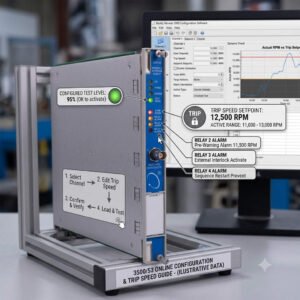
Bently Nevada 3500/53 Online Configuration & Trip Speed Guide

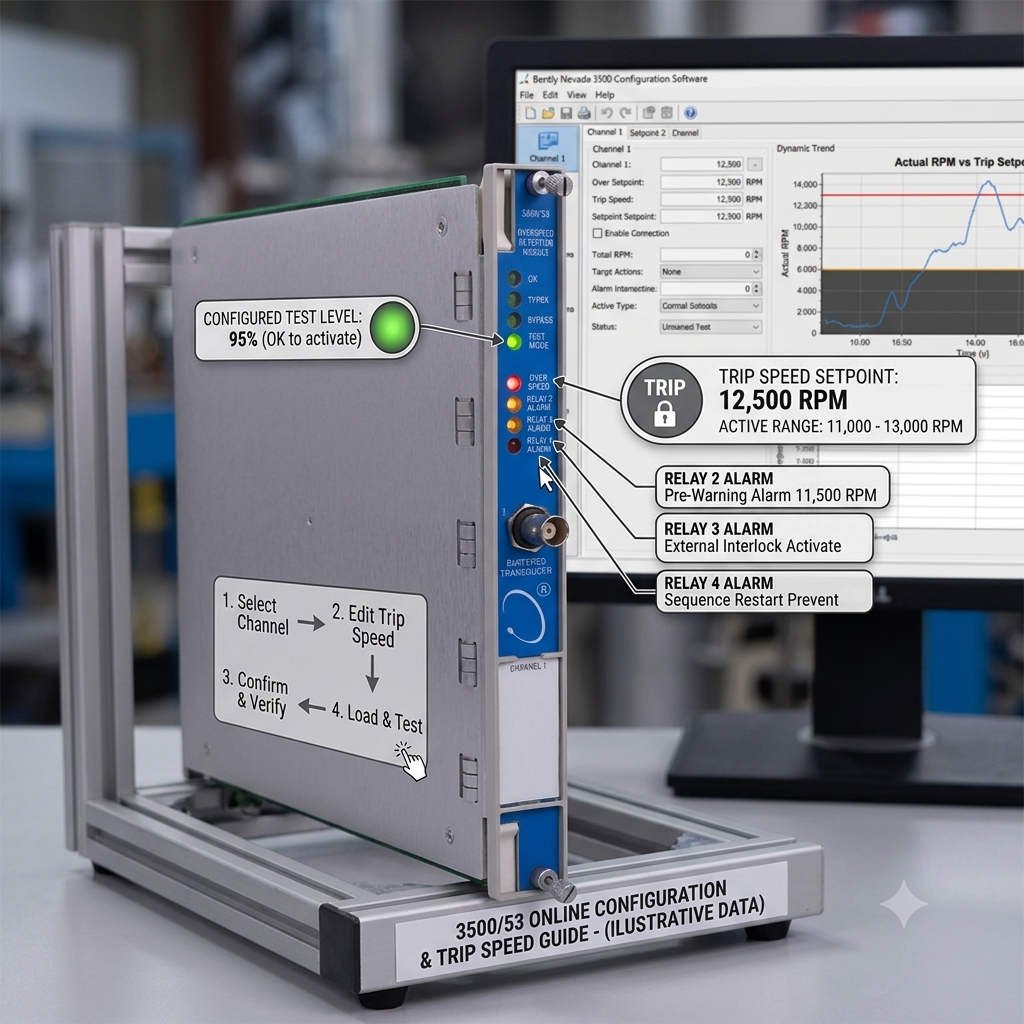
Can You Modify Bently Nevada 3500/53 Trip Speed Online? Safety Logic and Risks Explained

Modifying safety parameters in a machinery protection system requires deep technical caution. In the industrial automation sector, the Bently Nevada 3500/53 Electronic Overspeed Detection System safeguards critical rotating machinery. However, field engineers often debate whether the 3500 Rack Configuration Software allows users to modify the Trip Speed parameter while the turbine is running. The short answer depends on your system configuration, firmware version, and active safety protocols.

The Real Risks of Online Trip Speed Modifications

According to API 670 standards for machinery protection systems, operators should never alter safety-critical setpoints during machine operation. However, the Bently Nevada software environment does not always enforce a hard block on online changes. Depending on your specific system setup, an online download of a modified overspeed setpoint typically triggers one of two technical behaviors.

Scenario 1: Pending Activation Status
In newer firmware versions, the software accepts the configuration download but places the new Trip Speed into a “Pending” state. The module continues to use the old setpoint until the hardware undergoes a manual reset or a power cycle. Field engineers must remember that a “Download Successful” message does not mean the new overspeed protection value is live.

In contrast, older legacy systems or racks with relaxed security permissions might allow immediate execution. In this scenario, the overspeed setpoint changes in real time. If a technician accidentally inputs an incorrect value, the machine could lose its safety margin instantly, risking catastrophic mechanical failure during a transient surge.

Why Independent Overspeed Protection Matters in DCS and PLC Environments

The Bently Nevada 3500/53 module does not serve as a standard speed transmitter. Instead, it operates as an independent safety layer separate from the primary Distributed Control System (DCS) or Programmable Logic Controller (PLC). In factory automation plants, control systems can experience communication lag or processor overruns.

Therefore, the 3500/53 system must act autonomously. If the primary governor control fails, this module executes an emergency trip within milliseconds. This rapid response prevents rotor destruction in high-stakes applications like refinery compressors, steam turbine generators, and LNG expansion trains.

Technical Insights: Voting Logic and Configuration Security

To deliver maximum reliability, the 3500/53 module utilizes advanced voting logic, typically configured in a 2oo3 (Two Out of Three) architecture. Three independent proximity probes measure the shaft speed simultaneously. The system triggers a trip output only when at least two channels confirm an overspeed condition.

If you attempt an online configuration modification and cause a parameter mismatch between channels, you risk disrupting this voting logic. To eliminate this vulnerability, facility managers must enforce strict hardware-based security:

  • Keep the physical rack keyswitch turned to the RUN Position to block unauthorized software writes.
  • Enable software-level configuration locks and password hierarchies.
  • Enforce a strict Management of Change (MOC) policy before connecting any configuration PC.

Installation and Maintenance Best Practices for Field Engineers

Experienced automation professionals follow rigid guidelines when maintaining speed detection hardware. To ensure plant safety, always apply the following field rules:

  1. Execute Changes Only During Shutdown: Schedule all overspeed adjustments during planned maintenance windows when the rotor is completely stationary.
  2. Verify Measurement Units Carefully: Always double-check your units before hitting download. Mistaking Hertz (Hz) for Revolutions Per Minute (RPM), or entering an incorrect gear tooth count, will corrupt the safety calculation.
  3. Audit the System Event Logs: After any configuration upload, review the System Event List to confirm that the hardware accepted the parameters without generating a channel fault.

Powergear X Automation Insight: Hardware Lifecycle Strategy

Our Perspective: At Powergear X Automation, we observe that many industrial sites run Bently Nevada 3500 racks that have been in continuous operation for over a decade. While these systems are remarkably durable, running obsolete firmware creates unnecessary operational risks. Firmware mismatches between old hardware modules and newer PC configuration software frequently cause corrupt downloads or false diagnostics.

We recommend conducting a comprehensive audit of your machinery protection assets every five years. Upgrading your modules ensures full compliance with modern safety standards and guarantees clean integration with your broader plant control systems.

Industrial Application Scenario: Petrochemical Compressor Protection

Consider a large-scale centrifugal compressor driven by a steam turbine in a petrochemical plant. The plant utilizes a Rockwell Automation Allen-Bradley ControlLogix PLC for process sequencing and a Honeywell Experion DCS for continuous loop control. However, the critical overspeed trip logic resides solely in a Bently Nevada 3500 rack equipped with a 3500/53 module configured in 2oo3 voting logic.

During an annual turnaround, engineers needed to update the turbine trip speed from 4,200 RPM to 4,150 RPM based on new OEM design limits. Instead of performing an unapproved online modification while idling, the team utilized the plant’s outage window. They switched the physical rack keyswitch to PROGRAM, verified the tooth-to-frequency scaling factors, uploaded the new configuration, switched the key back to RUN, and simulated a speed signal to validate the trip relays before startup. This disciplined approach prevented accidental trips and ensured complete compliance with insurance and safety regulations.


Frequently Asked Questions

Q1: What happens if a 3500/53 channel experiences a sensor fault during operation?
In a standard 2oo3 configuration, if one proximity probe fails or loses its signal, the module flags a channel fault error but does not trip the machine. The voting logic automatically degrades to a 1oo2 (One Out of Two) safety structure, allowing the plant to continue running safely while maintenance teams replace the faulty sensor.

Q2: Can I mix old firmware modules with new software versions?
While Bently Nevada software provides backward compatibility, severe gaps between old module firmware and modern software versions can block specific parameter changes or cause communication timeouts. Always check the official compatibility matrix before attempting to modify parameters.

Q3: Is the 3500/53 module interchangeable with standard 3500/50 tachometer modules?
No, they serve different purposes. The 3500/50 is a standard tachometer designed for speed measurement, reverse rotation detection, and zero-speed tracking. The 3500/53 is a highly specialized, fast-response safety module dedicated solely to emergency overspeed protection and complies with rigorous international safety standards.


Looking to replace obsolete modules, source certified spare parts, or optimize your industrial control systems? Discover reliable hardware solutions and technical support by visiting Powergear X Automation today.

Bently Nevada 3500-42M 140734-02 Grounding Best Practices_

Bently Nevada 3500/42M 140734-02 Grounding Best Practices

Eliminating 50Hz Interference: Grounding the Bently Nevada 3500/42M 140734-02

Understanding Grounding Challenges in Control Systems

The Bently Nevada 3500/42M Proximitor/Seismic Monitor, utilizing the 140734-02 rear I/O, is a staple in industrial automation. However, engineers often face 50Hz power frequency interference that triggers false vibration alarms. We observe that these issues frequently stem from improper COM and safety ground management. Maintaining signal integrity requires precise grounding techniques to ensure accurate data within your DCS or PLC infrastructure.

Bently Nevada 3500-42M 140734-02 Grounding Best Practices_

Bently Nevada 3500-42M 140734-02 Grounding Best Practices_

The Role of the COM Terminal

Many technicians mistakenly bond the COM terminal to multiple plant grounding points. The COM terminal acts as a signal reference, not a protective earth. Connecting it to several locations creates ground loops that inject 50Hz noise into your vibration signals. This interference degrades measurement accuracy and compromises your factory automation monitoring performance. You must keep the COM terminal isolated from the safety ground path to prevent circulating currents.

Implementing Single-Point Grounding

Industry standards, including API 670 guidelines, recommend a single-point grounding strategy for signal commons. This approach forces all return currents through one controlled path. Follow these steps to optimize your installation:

  • Identify one designated grounding point inside your control cabinet.
  • Connect the signal common to this point only.
  • Ensure the cabinet ground bar links directly to the plant safety ground.
  • Route sensor cables away from high-current power conductors.
  • Verify that shields terminate correctly according to manufacturer specifications.

Strategic Insights from Power Gear X Automation Limited

Based on our field experience, approximately 75% of noise-related issues result from poor shielding rather than hardware defects. Before replacing your 3500/42M module, perform a thorough inspection of your cabling. Check for electromagnetic interference (EMI) near VFDs and large motors. If you continue to see stable 50Hz peaks across multiple channels, your grounding topology likely requires a professional review. For expert support or authentic Bently Nevada components, please visit Power Gear X Automation Limited.

Troubleshooting and Best Practices

  • ⚙️ Measure AC voltage potential between the cabinet and machine frame.
  • 🔧 Isolate shield connections during testing to identify ground loop sources.
  • ✅ Use high-quality shielded twisted-pair instrumentation cables for all sensors.
  • ⚙️ Install galvanic isolation for sensors located over 100 meters away.
  • 🔧 Inspect all terminal block connections for corrosion or loose wires.

Frequently Asked Questions

Q1: How can I distinguish electrical interference from mechanical vibration faults?
Electrical noise usually presents as a constant 50Hz frequency peak across multiple channels. Mechanical faults typically track with the machine’s running speed. If the noise disappears when you isolate the cable shield, the issue is almost certainly grounding-related.

Q2: Why does my vibration reading fluctuate when a nearby motor starts?
This indicates electromagnetic coupling or a ground loop issue. Large motors generate significant EMI. If your signal cables lack proper shielding or run parallel to motor power lines, the monitor will pick up induced noise during high-load operations.

Q3: Should I always replace the 140734-02 module when I see 50Hz noise?
Replacement is rarely the first solution. Our team at Power Gear X Automation Limited suggests performing a systematic grounding audit first. Hardware failure in the 3500 system is uncommon compared to environmental and installation-related signal corruption.

Reliable DCS Performance: Yokogawa Modules in Harsh Environments

Optimizing Yokogawa Processor Performance in Extreme Thermal Environments

The Critical Role of Thermal Resilience in Industrial Automation

Modern industrial automation demands hardware that survives beyond controlled control rooms. In sectors like oil and gas or chemical processing, ambient temperatures often fluctuate wildly. Yokogawa processor modules for CENTUM VP and legacy CS 3000 systems address these challenges directly. These controllers ensure continuous operation and safety in non-ideal environments. Consequently, engineers can place control cabinets closer to the process area. This proximity reduces signal wiring length and enhances overall response reliability.

Technical Deep Dive: Achieving Deterministic Control at 70°C

Yokogawa engineers these modules to withstand a rigorous range from -20°C to +70°C. This specification is more than a marketing figure; it represents industrial-grade component selection. Most standard PLCs suffer from thermal throttling, which causes scan jitter. However, Yokogawa maintains stable execution cycles even at peak heat. This stability ensures consistent PID performance and predictable interlock timing. Such precision is vital for pharmaceutical batch processes where timing deviations impact regulatory compliance.

Maximizing System Longevity Through Strategic Derating

At Powergear X Automation, we observe that Yokogawa utilizes conservative component derating. This design choice significantly slows the thermal aging of CPUs and power regulators. While the hardware supports 70°C, we recommend maintaining internal cabinet temperatures below 55°C. Lower temperatures exponentially improve the Mean Time Between Failures (MTBF). Furthermore, passive ventilation often proves more reliable than small air conditioners in dusty or corrosive environments.

Installation Best Practices for Harsh Field Conditions

Reliable factory automation requires more than just high-spec hardware. Proper installation remains the foundation of system uptime. Consider these technical requirements:

  • Stabilize cabinets above -10°C before performing a cold start.
  • Use locking terminal blocks to prevent vibration-induced loosening.
  • Avoid routing high-current cables near sensitive processor backplanes.
  • Implement grounding according to IEC 61000-5-2 standards.
  • Monitor mixed-generation nodes for thermal expansion issues.

Strategic Upgrading: From CS 3000 to CENTUM VP

Transitioning from legacy CS 3000 to CENTUM VP offers significant thermal advantages. Older modules are robust, but newer processors utilize advanced semiconductor processes. These modern components provide better heat dissipation and enhanced onboard diagnostics. If your facility regularly exceeds 60°C, upgrading is a proactive safety measure. Always verify firmware alignment when integrating new processors with older I/O modules to prevent communication errors.

Real-World Application Scenarios

  • Upstream Oil & Gas: Remote wellhead control in desert or arctic conditions.
  • Chemical Processing: Outdoor utility plants with high radiant heat signatures.
  • Offshore Platforms: Compact cabinets where dense I/O creates internal heat pockets.

Expert FAQ: Selection and Maintenance Insights

Q1: How do I choose between standard and wide-temperature rated modules for a new project?
Focus on the “Worst Case” internal cabinet temperature rather than the outside climate. If your cabinet lacks active cooling and houses high-density I/O, always opt for the extended range modules to prevent premature CPU aging.

Q2: Can I mix CENTUM VP processors with CS 3000 I/O in high-heat areas?
Yes, but exercise caution. While functionally compatible, older I/O modules often fail before the newer processors under thermal stress. We suggest auditing the heat tolerance of your oldest components before performing a partial upgrade.

Q3: What is the most common “hidden” failure cause in hot environments?
It is rarely the CPU itself. Instead, electrolytic capacitors in older power supply assemblies often dry out. If your system is over 10 years old, replace the power modules before pushing the system into high-temperature seasons.

Author’s Insight: Reliability in extreme temperatures is not just about survival; it is about maintaining predictable control for decades. For more technical guides and premium components, visit Powergear X Automation to optimize your control systems.

Back to Top
Product has been added to your cart