Over 50,000 hot-selling automation module components.
Siemens vs. Rockwell PLC: Selecting the Right Automation System

Siemens vs. Rockwell PLC: Selecting the Right Automation System

Strategic Comparison: Siemens vs. Rockwell PLC Systems in Industrial Automation

The Core Value of Leading Control Systems

Siemens excels in complex scenarios requiring high system integration, such as automotive and chemical manufacturing. Its TIA Portal architecture significantly reduces cross-system debugging costs for large-scale projects. Conversely, Rockwell (Allen-Bradley) dominates the North American market and discrete manufacturing sectors. Rockwell offers a more intuitive learning path for beginners entering the PLC programming field. Therefore, Siemens provides global versatility, while Rockwell ensures rapid deployment for standardized production lines.

Siemens vs. Rockwell PLC: Selecting the Right Automation System

Programming Environments: TIA Portal vs. Studio 5000

The Siemens TIA Portal integrates PLC, HMI, and drives into a single unified platform. This integration eliminates frequent software switching and boosts overall engineering efficiency. Rockwell utilizes a modular approach with Studio 5000 and FactoryTalk separated into different packages. This separation helps beginners master individual functions but increases complexity during full system integration. Based on our field experience, Siemens allows direct variable linking, whereas Rockwell often requires manual tag configuration.

Optimizing Scan Time and System Response

Siemens S7-1200 and S7-1500 controllers maintain exceptional stability under heavy program loads. Rockwell CompactLogix systems provide highly responsive performance for smaller, high-speed applications. Precise scan times are vital for accurate motion control in packaging and robotics. However, improper task priority configuration in Rockwell systems can lead to cycle jitter. Siemens employs a default cyclic structure that is often more forgiving for less experienced programmers.

Industrial Communication Protocol Compatibility

Siemens natively supports PROFINET and Profibus, featuring mature OPC UA integration for Industry 4.0. Rockwell relies on EtherNet/IP, ensuring seamless compatibility with North American equipment ecosystems. Protocol selection dictates your future expansion costs and device hardware choices. Note that interfacing Siemens with EtherNet/IP devices usually requires an external gateway. Similarly, Rockwell systems need additional modules to communicate over PROFINET networks.

Field Installation and Maintenance Standards

Siemens hardware requires strict grounding practices, particularly for sensitive analog signal modules. Rockwell systems offer slightly higher tolerance for grounding variances under North American standards. We recommend single-point grounding to prevent circulating currents in your control cabinet. In high-vibration environments like mining, Siemens spring terminals offer superior reliability. Regular maintenance must include tightening Rockwell screw terminals to prevent intermittent I/O loss.

Powergear X Automation: Expert Engineering Perspective

At Powergear X Automation, we believe the choice depends on your regional ecosystem. Siemens offers the best flexibility for multi-brand integration in European and Asian markets. However, Rockwell remains the undisputed leader for projects based in the United States. Beyond the brand name, true engineering value lies in understanding electrical specifications and communication logic. We advise engineers to focus on mastering troubleshooting skills rather than just software syntax.

Technical Implementation Checklist

  • ✅ Match the PLC brand to the regional technical support network.
  • ✅ Use shielded twisted pair cables for all analog I/O.
  • ✅ Install external surge protection for outdoor control equipment.
  • ✅ Implement UPS backup for mission-critical automation controllers.
  • ✅ Verify communication gateway requirements for multi-protocol systems.
  • ✅ Optimize task priorities to prevent scan time fluctuations.

Strategic Industry Scenarios

  • High-Speed Packaging: Rockwell CompactLogix for intuitive motion control and local support.
  • Large Chemical Plants: Siemens S7-1500 with TIA Portal for massive system integration.
  • North American Retrofits: Allen-Bradley ControlLogix for compatibility with existing plant standards.

Frequently Asked Questions (FAQ)

Q1: Should I prioritize Siemens or Rockwell for a new international project?

Consider the project location and the local spare parts supply chain. Siemens is the better choice for Asian and European sites due to its vast ecosystem. For North American sites, Rockwell ensures easier access to technicians and replacement hardware.

Q2: Is it difficult to migrate legacy code to new PLC platforms?

Siemens provides robust migration tools for S7-300 to S7-1500 transitions. However, older Rockwell systems like SLC500 may require significant manual re-coding. Always budget extra time for I/O address mapping and communication verification during upgrades.

Q3: Which platform handles third-party device integration more efficiently?

Siemens TIA Portal generally offers better multi-vendor integration tools through standardized GSD files. Rockwell is highly efficient within its own “Premier Integration” ecosystem. For a mix of brands, Siemens typically reduces the total engineering hours required.

Integrating Quantum Module with Industrial Automation Protocols

Integrating Quantum Module with Industrial Automation Protocols

Integrating the Quantum CPU Module with Industrial Ethernet: EtherNet/IP and PROFINET Compatibility

The evolution of smart manufacturing demands that high-performance computing modules, like the Quantum CPU, connect effortlessly with existing industrial networks. System integrators frequently ask about the Quantum CPU’s ability to communicate with market-leading Industrial Ethernet protocols such as EtherNet/IP and PROFINET. This detailed guide clarifies compatibility and outlines essential integration strategies for your industrial automation projects.

Integrating Quantum Module with Industrial Automation Protocols

Understanding the Quantum CPU’s Native Communication Architecture

The Quantum CPU Module is engineered for robust control and real-time data processing in control systems. Its core architecture prioritizes foundational networking capabilities. Typically, the module features built-in support for open, widely used protocols. This usually includes standard Ethernet TCP/IP and Modbus TCP. However, native support for proprietary Industrial Ethernet protocols often depends on the specific manufacturer’s design philosophy. The initial focus is on high-speed internal processing, not necessarily on protocol-specific external interfaces.

Achieving EtherNet/IP Connectivity for Factory Automation

EtherNet/IP dominates the North American factory automation landscape. This protocol relies on the Common Industrial Protocol (CIP) for data exchange. Direct, built-in support for EtherNet/IP on the Quantum CPU is uncommon. Therefore, engineers must implement supplementary solutions to achieve seamless integration. These integration methods usually involve two primary options:

  • External Communication Module: Utilizing a manufacturer-specific or third-party EtherNet/IP communication module that plugs directly into the Quantum backplane.
  • Protocol Gateway Device: Deploying an industrial gateway to translate Modbus TCP (supported by the Quantum CPU) to the required EtherNet/IP CIP messages.

Choosing the right approach depends on required data throughput and system complexity.

Integrating the Quantum CPU into a PROFINET Environment

PROFINET is the prevalent choice in European industrial automation, especially for systems built around Siemens PLCs. Full PROFINET functionality requires real-time (RT or IRT) capabilities. The Quantum CPU Module typically requires an add-on solution, much like with EtherNet/IP. The goal is enabling the Quantum to function as a PROFINET I/O Controller (Master) or I/O Device (Slave).

System integrators typically use one of the following methods:

  • Dedicated Expansion Card: Installing a specialized PROFINET interface card, often certified by the PROFINET user organization.
  • Third-Party Gateways: Employing a gateway to bridge the Quantum’s native communication (e.g., Modbus TCP) to the PROFINET network.

In addition, verifying the necessary firmware level is crucial. Some manufacturers offer firmware that enables non-native protocol support via standard Ethernet ports.

The Flexibility of Open and Standard Protocols

Even without native EtherNet/IP or PROFINET support, the Quantum CPU Module provides robust alternatives. Standard protocols ensure broad compatibility across different vendor equipment. The most common pathways include:

  • Modbus TCP: Excellent for data exchange with supervisory DCS or PLC systems.
  • OPC UA: The trend toward unified architecture favors OPC UA for secure, platform-independent data integration.
  • MQTT: Advanced Quantum models often support MQTT for lightweight, cloud-based data publishing.

Moreover, these open standards significantly reduce vendor lock-in, which is a key consideration for modern control systems.

Author’s Commentary: A Pragmatic Approach to Integration

From my experience in industrial automation, I advise against relying on native support for these protocols in general-purpose CPU modules. The strength of the Quantum lies in its processing power, not protocol standardization. Therefore, the use of high-quality industrial gateways is often the most reliable and cost-effective solution. Gateways isolate the proprietary network from the core CPU, enhancing overall system stability. I believe this modular approach is superior for systems requiring high uptime, consistent with Industry 4.0 principles.

Key Considerations for Successful Quantum Integration

Engineers must follow specific steps to ensure successful protocol integration:

  • Step 1: Check the Datasheet: Always verify the exact model’s support for specific communication modules.
  • Step 2: Define Network Role: Determine if the Quantum needs to be a Scanner/Controller (initiating communication) or an Adapter/Device (responding to requests). This affects the required module.
  • Step 3: Validate Gateway Performance: Ensure any chosen gateway can handle the required I/O count and data refresh rate for the application.

Technical Integration Checklist

  • ✅ Utilize dedicated Industrial Ethernet communication modules.
  • ⚙️ Ensure firmware supports protocol-specific features.
  • 🔧 Configure the control systems network role correctly (Controller/Scanner or Device/Adapter).

FAQ: Practical Integration Insights

Q1: Will using an external gateway negatively affect the communication speed or latency?

A: Using a gateway introduces a small, measurable latency, typically in the millisecond range. However, modern, high-speed industrial gateways are designed specifically to minimize this impact. For non-deterministic, supervisory data exchange, the latency is usually negligible. For critical, motion control systems requiring sub-millisecond updates, a direct I/O link or a native protocol module is usually required over a gateway.

Q2: What is the primary benefit of using a Quantum CPU in an existing EtherNet/IP network if native support is limited?

A: The main benefit is leveraging the Quantum’s specialized computing power. Engineers use the Quantum for complex, real-time control loops or data pre-processing (like advanced analytics or predictive maintenance algorithms) before passing summarized data to the main PLC or DCS via a gateway. It acts as an intelligent co-processor in the industrial automation setup.

Q3: Is Modbus TCP secure enough for data transmission, or is PROFINET/EtherNet/IP better?

A: Modbus TCP is inherently less secure than modern protocols like PROFINET or EtherNet/IP, as it often lacks built-in encryption and authentication features. Therefore, when using Modbus TCP for the Quantum, system security (e.g., firewall, VLAN segmentation, and VPNs) must be implemented externally to protect the data exchange. Protocols like OPC UA are generally preferred for secure, standardized communication in modern control systems.

Powergear X Automation Limited specializes in integrating high-performance computing modules, like the Quantum CPU, with diverse Industrial Ethernet protocols. We deliver robust and reliable control systems solutions. To learn more about our integration expertise and industrial gateway solutions, please visit us here: https://www.powergearx.com/

RX3i Troubleshooting

Mastering Reliability: Troubleshooting Communication Failures in RX3i PACSystems

Understanding RX3i PACSystems Communication Issues

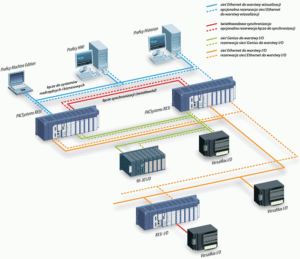
The RX3i PACSystems PLC is vital for robust industrial automation. However, communication failures can disrupt control, severely impacting factory automation. These issues range from simple loose cables to complex network configuration errors. Effective troubleshooting is crucial. We must quickly identify the root cause to maintain system uptime. This section sets the stage for expert-level diagnosis.

Initial Checks: Physical Layer and Wiring Integrity

Always start troubleshooting at the physical layer. Loose or damaged wiring is a very common culprit. Verify all Ethernet cables (for PROFINET or Modbus TCP/IP) are securely plugged in. Check cable shielding and grounding according to industry standards. Moreover, inspect power supply voltages for all modules. Consistent power ensures stable module operation and reliable data transmission.

RX3i Troubleshooting

Diagnosing Network Configuration and IP Conflicts

Incorrect network settings frequently cause communication problems. Verify that the CPU and all remote I/O devices have unique, correct IP addresses. Use the Proficy Machine Edition software to check device configurations. In addition, ensure subnet masks and gateway settings are correct across the entire control systems network. An IP address conflict will instantly halt communication.

Examining RX3i Module Status and Diagnostics

The RX3i platform provides powerful on-board diagnostics. Look for LED indicators on the CPU and communication modules (e.g., green/red status). A solid red status often signals a critical fault. Consult the CPU fault tables or diagnostic logs in the PLC programming environment. These logs offer specific error codes, significantly speeding up the repair process.

Advanced Troubleshooting: Protocol and Performance Analysis

For persistent issues, consider the communication protocol itself. For instance, PROFINET systems require correct device names and cycle times. Use network monitoring tools to analyze data traffic and identify excessive latency or packet loss. Therefore, optimizing network loading and segmenting large networks can enhance overall DCS reliability. We must ensure the network can handle the required data throughput.

RX3i Troubleshooting

Author’s Insight: The Move to High-Speed Industrial Ethernet

Modern industrial automation demands faster, more reliable communication. The trend is clearly towards high-speed industrial Ethernet like PROFINET or Ethernet/IP. While these protocols offer benefits, they also introduce configuration complexity. My experience shows that proper network documentation and rigorous commissioning are the best preventative measures against future failures. Investing in expert training is far cheaper than dealing with unexpected downtime.

Application Scenario: Redundant Control Solutions

For mission-critical applications, consider implementing an RX3i hot-standby redundancy solution. While the initial setup is more complex, a redundant system ensures continuous operation even if one CPU or communication link fails. This architectural approach is highly valued in pharmaceutical and power generation control systems. It elevates reliability, offering peace of mind to operations managers.

RX3i Troubleshooting

RX3i Troubleshooting

Enhance Your System Reliability Today!

Communication failures cost time and money. Powergear X Automation Limited offers advanced troubleshooting services and certified RX3i components.

Back to Top
Product has been added to your cart