
Troubleshooting PM802F Redundancy Failure | Powergear X
Resolving PM802F Redundancy Switching Failure: Online Diagnostics for Dual Channel Errors
Understanding the Dual Channel Error Crisis
In ABB Freelance distributed control systems (DCS), the PM802F controller manages critical process loops. However, field engineers occasionally face a catastrophic simultaneous Channel Error alarm on both the primary and backup central processing units (CPUs) during a redundancy switchover. This specific failure can halt production in continuous-process industries like petrochemical, fine chemical, and pharmaceutical manufacturing. Industrial automation professionals often assume a hardware defect caused the fault. Nevertheless, field data reveals that pure hardware failure accounts for less than fifteen percent of these incidents. Most issues stem from complex synchronization disruptions, fiber optic instability, firmware mismatches, or unbalanced controller loading.
The Mechanics of Redundancy Synchronization States
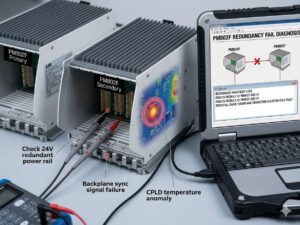
The redundancy mechanism relies on constant data mirroring between the active and standby units to ensure seamless hot-standby switching. Engineers must monitor the real-time synchronization status through Freelance Engineering diagnostics before initiating any maintenance. The system exhibits several distinct operational states during runtime. A Synchronized status indicates a complete data mirror, making it safe for manual or automatic switchover. Conversely, a Synchronizing state points to an ongoing initial data transfer, which introduces significant switching risks. If the system displays Not Synchronized, the runtime data between the two units is mismatched, rendering the redundancy completely invalid.
Root Causes of Interrupted Synchronization Channels
When both controllers report a Channel Error concurrently, the physical and logical communication link has failed. Technicians frequently discover reversed transmit (TX) and receive (RX) fiber lines during commissioning or post-maintenance startups. Moreover, microscopic physical contamination inside ST fiber connectors increases optical attenuation beyond acceptable limits. In large-scale factory automation projects, excessive CPU utilization can trigger synchronization timeouts. If the primary controller scan rate exceeds eighty percent during a major online application download, it may fail to update its partner within the designated time window. This timeout forces both units into an isolated error state.
Analyzing Firmware and Control Project Consistency
A frequent error during emergency maintenance involves replacing only one damaged controller while leaving the older partner online. ABB Freelance architecture requires absolute consistency across the redundant pair to maintain stable operations. System synchronization will fail if the firmware revisions do not match perfectly. Furthermore, any discrepancy in the Control Builder project cyclic redundancy check (CRC) checksum prevents successful data mirroring. Inconsistent Fieldbus Foundation High-Speed Ethernet (FF/HSE) communication objects or outdated I/O topology definitions also disrupt the background synchronization process. Consequently, the backup controller may remain trapped in a permanent Synchronizing loop.
Evaluating Redundancy Link Communication Quality
Healthy link light-emitting diodes (LEDs) on the controller faceplate do not guarantee flawless data transmission. Intermittent optical degradation often hides behind solid green indicators, causing random switching failures during load transitions. High electromagnetic interference (EMI) environments, such as compressor stations or variable frequency drive (VFD) cabinets, severely impact communication quality if fiber cables run parallel to high-voltage lines. Engineers must track specific health metrics to predict failures before they disrupt operations.
- Optical Attenuation: Fluctuations greater than 3 dB indicate dirty connectors or excessive cable bending.
- Redundancy Latency: An increasing latency trend indicates packet loss and imminent timeout alarms.
- CRC Communication Errors: Continuous increments reveal electrical noise or failing transceiver modules.
- CPU Utilization: Sustained loading above 80% delays the critical redundancy background tasks.
Online Inspection and Maintenance Protocols
Engineers must follow a strict diagnostic sequence before physically removing any hardware from the rack. First, open the Freelance Engineering diagnostics console to verify the active and standby assignments. Second, confirm that the synchronization counter is updating steadily. Never extract a suspected backup CPU while the synchronization process is incomplete, because this action can force the primary controller into a standalone degraded mode. If a channel error exists, avoid repeated forced role switching or simultaneous reboots, as these actions corrupt the runtime redundancy buffers. Stabilize the communication medium first, allow one controller to establish a firm primary role, and let the system rebuild synchronization gradually.
Expert Insights from Powergear X Automation Limited
As industrial control systems age, lifecycle management becomes crucial for plant reliability. Our engineering team at Powergear X Automation Limited notes that mixed-generation hardware and firmware variants cause over sixty percent of chronic synchronization issues. When migrating older Freelance systems, users must strictly validate the compatibility matrix for control software, CI modules, and Ethernet topologies. Replacing individual components without checking project CRCs often introduces hidden vulnerabilities. We highly recommend executing a comprehensive digital diagnostic audit before scheduling hardware upgrades during planned turnarounds.
Industrial Application and Solution Scenario
Consider a large refinery utilizing redundant controllers to manage a critical distillation column interlock system. During a routine maintenance window, the secondary controller suddenly lost its connection, and both units flagged a dual channel error. Instead of replacing the expensive CPU modules immediately, the instrument team checked the diagnostic logs. The event log showed a continuous increment in CRC communication errors, coinciding with the startup of a nearby heavy-duty cooling pump. Technicians rerouted the fiber optic cables into a shielded conduit and cleaned the ST connectors with isopropyl alcohol. The optical attenuation dropped by 4 dB, the synchronization state returned to Synchronized within minutes, and the plant avoided an unscheduled shutdown scenario.
Frequently Asked Questions
How do you differentiate between a physical fiber fault and a software logic conflict when troubleshooting redundancy errors?
Look directly at the error counters in the engineering tool. A physical fault causes a steady rise in CRC errors and sudden link drops, whereas a logic conflict allows the link to stay active while keeping the backup unit stuck in a continuous synchronizing loop with mismatched project checksums.
What specific field tools are necessary to validate the synchronization channel without interrupting live operations?
Engineers should use the internal Freelance Diagnostics software tool to read live buffer states and counter trends online. For physical validation, an optical power meter can measure line attenuation at the patch panel without disconnecting the active online controller.
Why does an online project download occasionally break the synchronization link on healthy controller pairs?
When a project download contains massive structural changes or expanded I/O topologies, the primary unit requires extra processing power to compile the changes. If the base CPU utilization is already high, this extra load delays the synchronization heartbeat packets, causing the backup unit to declare a timeout fault.
For more technical documentation, original spare parts, and advanced system integration support, please visit the official website of Powergear X Automation Limited to consult with our certified application engineers.