Over 50,000 hot-selling automation module components.
Honeywell CC-PWRN01 Guide Thermal Management in DCS Cabinets

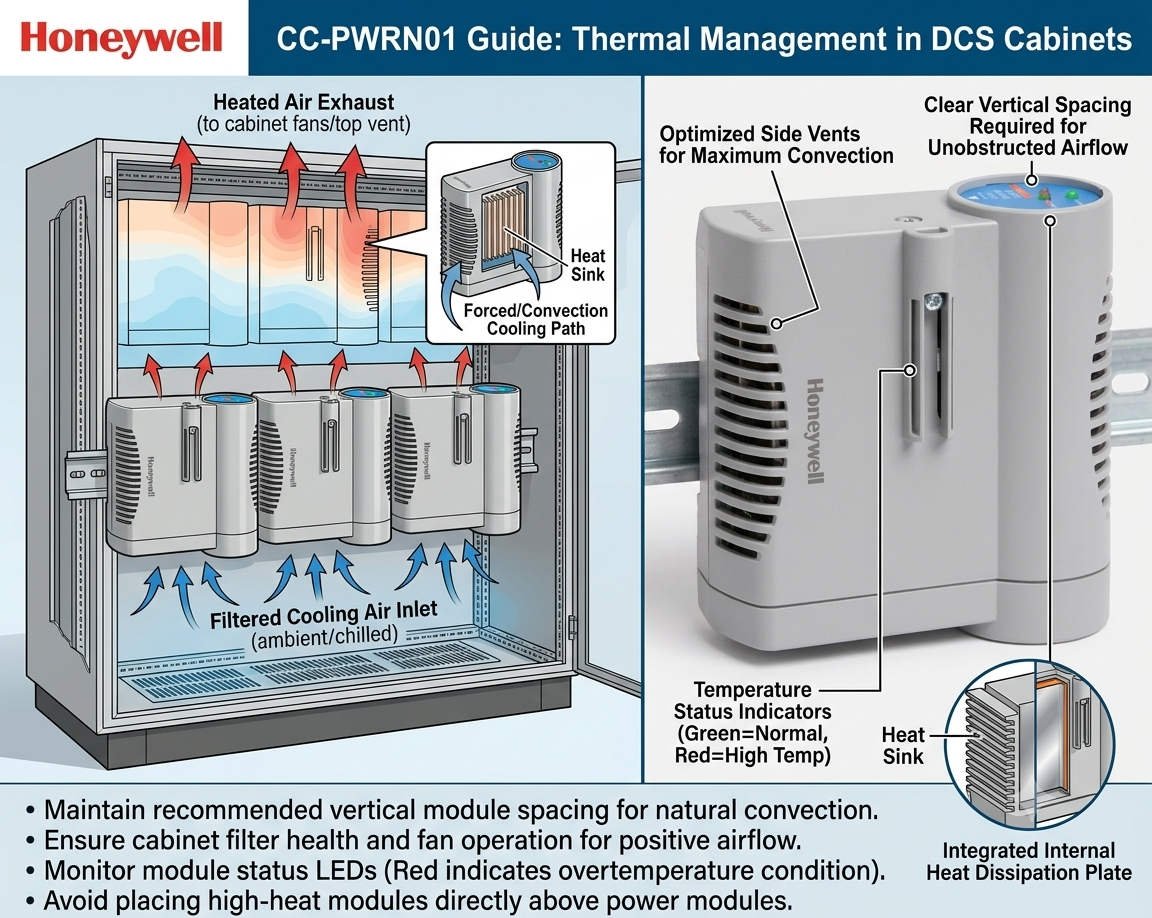
Honeywell CC-PWRN01 Guide: Thermal Management in DCS Cabinets

Ensuring DCS Stability: Thermal Management for the Honeywell CC-PWRN01 Power Module

The Critical Role of Reliable Power in Industrial Automation

The Honeywell CC-PWRN01 power module provides essential redundant energy to modern Distributed Control Systems (DCS). It secures continuous operations in demanding sectors like oil, gas, and pharmaceutical production. However, system reliability depends heavily on proper thermal management. Overheating remains a leading cause of premature component failure in industrial environments. Therefore, engineers must prioritize vertical installation spacing to maintain long-term system health.
Honeywell CC-PWRN01 Guide Thermal Management in DCS Cabinets

Honeywell CC-PWRN01 Guide Thermal Management in DCS Cabinets

Optimizing Vertical Spacing for Natural Convection

For the CC-PWRN01, maintaining a vertical clearance of 50–75 mm is vital for air circulation. Natural convection moves heat from the bottom to the top of the cabinet. If you obstruct this flow, internal temperatures may exceed the +70°C design limit. Moreover, restricted airflow significantly shortens the lifespan of sensitive electrolytic capacitors. In our experience, tight spacing creates hot spots that sit 15°C above the ambient cabinet temperature.

Managing Load Capacity to Reduce Heat Generation

Power modules generate substantially more heat when operating at peak capacity. Continuous high-load conditions accelerate the aging process of internal electronics. As a result, the risk of cascading failures in redundant configurations increases. At Powergear X Automation, we suggest designing systems for 60–70% of the nominal load. This conservative approach provides a safety buffer during seasonal temperature spikes or ventilation issues.

Adapting Cabinet Ventilation for Harsh Climates

The CC-PWRN01 typically relies on passive cooling within the control cabinet. Sealed or high-IP-rated enclosures require even larger spacing to prevent heat accumulation. In regions like the Middle East or Southeast Asia, ambient heat demands stricter standards. We frequently increase vertical spacing to ≥80 mm for these high-temperature projects. Furthermore, integrating heat exchangers or fan trays becomes mandatory when passive cooling reaches its physical limits.

Installation Best Practices for Power Modules

Proper physical placement ensures that heat does not affect other critical system components. Engineers should always stack power modules vertically to align with natural airflow. Additionally, avoid placing sensitive controllers or I/O processors directly above a heat-generating power supply. We once resolved recurring communication faults in a refinery by simply relocating a controller away from a module’s heat path. These small adjustments prevent significant thermal stress on the entire DCS architecture.

Routine Maintenance and Thermal Inspection Strategies

Regular inspections keep your factory automation system running at peak efficiency. Use infrared thermometers to measure the surface temperature of the CC-PWRN01 during operation. If surface readings exceed 65°C, you must immediately investigate airflow obstructions or spacing issues. Moreover, dust accumulation can reduce heat dissipation efficiency by up to 20%. Therefore, cleaning internal components during scheduled shutdowns is a simple yet effective reliability strategy.

Professional Insights from Powergear X Automation

At Powergear X Automation, we believe that thermal design is as important as electrical wiring. Modern power modules like the CC-PWRN01 are highly efficient, but they still follow the laws of thermodynamics. Neglecting a few centimeters of space can lead to millions in lost production due to an unexpected trip. We recommend a comprehensive thermal audit for every cabinet upgrade to ensure modern hardware performs within its optimal environment.

Technical Installation Checklist

  • Maintain a minimum of 50–75 mm vertical clearance between units.
  • Mount modules vertically to support natural bottom-to-top airflow.
  • Use perforated cable ducts to avoid trapping heat near the module.
  • Avoid tight cable bundling directly above the power supply vents.
  • Verify that the total load stays under 75% for unventilated cabinets.

Industrial Application Scenarios

  • Offshore Platforms: Maintaining redundant power in compact, high-ambient-temperature control rooms.
  • Chemical Processing: Preventing thermal-induced shutdowns in sealed cabinets protected from corrosive gases.
  • Pharmaceutical Batching: Ensuring high-availability power for critical sequence controllers during long production cycles.

Expert FAQ: CC-PWRN01 Implementation

Q1: How do I verify if my current cabinet spacing is sufficient?
If your vertical spacing is ≥50 mm and the cabinet interior stays below 40°C under full load, your setup is generally safe. However, if you notice the module shell feels excessively hot to the touch, consider increasing the gap to 80 mm or adding an exhaust fan to the cabinet roof.

Q2: Can I replace legacy Honeywell power supplies with the CC-PWRN01 directly?
While they are often mechanically compatible, never skip a thermal audit. Newer modules might have higher power densities and different heat profiles than 20-year-old units. Ensure the existing cabinet layout can handle the heat dissipation of the new module before finalizing the retrofit.

Q3: What are the signs of a power module failing due to heat?
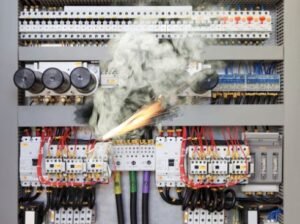
Look for discolored plastic housing, bulging capacitors visible through the vents, or frequent “redundancy lost” alarms. If you detect a sweet or burnt smell during a cabinet inspection, the module is likely overheating and requires immediate replacement to avoid a total system failure.

For more technical guides and high-quality automation components, visit Powergear X Automation today.
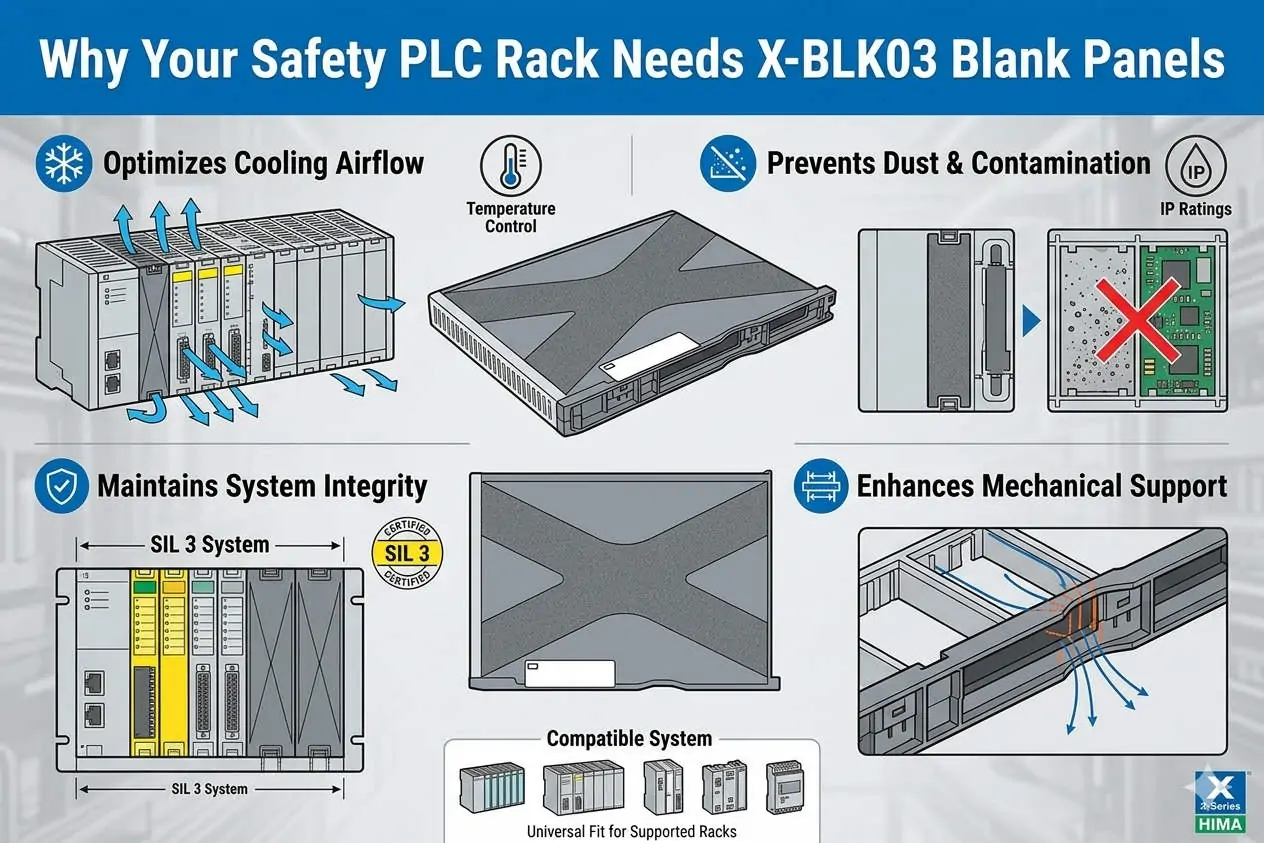

Why Your Safety PLC Rack Needs X-BLK03 Blank Panels

HIMA X-BLK03 Guide: Airflow Management in HIMax Racks

The Critical Role of HIMA X-BLK03 Blank Panels in HIMax Safety System Thermal Management

Beyond Aesthetics: The Functional Necessity of the X-BLK03

In high-stakes environments like oil and gas or power generation, every component must serve a safety function. The HIMA X-BLK03 blank panel is far more than a cosmetic filler for empty rack slots. It acts as a critical airflow regulator within the HIMax chassis. By sealing unused slots, the X-BLK03 maintains the internal pressure needed for efficient heat dissipation. This ensures that safety-instrumented systems (SIS) remain within their certified temperature ranges during continuous operation.

Why Your Safety PLC Rack Needs X-BLK03 Blank Panels

Why Your Safety PLC Rack Needs X-BLK03 Blank Panels

Optimizing Airflow and Thermal Stability in DCS Racks

Industrial control systems rely on predictable convection currents to cool sensitive processors and I/O modules. When an engineer leaves a slot open, the intended thermal channel collapses. Hot air begins to recirculate within the rack instead of exhausting through the top vents. Consequently, localized “hot spots” develop, which can prematurely age electronic components. According to industry reliability data, operating a PLC just 10°C above its rated temperature can halve its expected lifespan.

Enhancing EMC Shielding and Environmental Protection

The X-BLK03 also provides vital protection against electromagnetic interference (EMC) and physical contaminants. Open slots serve as entry points for airborne dust or conductive particles common in cement and chemical plants. These particles can settle on backplanes, eventually causing short circuits or signal degradation. Moreover, the metal-backed design of the X-BLK03 maintains the Faraday cage effect of the rack. This shielding protects the system from external high-frequency noise that could trigger intermittent faults.

Strategic Installation and Maintenance Best Practices

Proper planning during the initial cabinet layout prevents long-term thermal failures. We recommend these essential steps for field technicians:

  • ✅ Slot Coverage: Install X-BLK03 panels in every unused slot from day one of commissioning.
  • ⚙️ Ventilation Clearance: Maintain at least 100mm of vertical clearance above and below the HIMax rack.
  • 🔧 Preventive Audits: Verify the presence of all blank panels during annual safety integrity level (SIL) audits.
  • 🛡️ Component Integrity: Ensure the panel screws are tightened to maintain ground contact for EMC effectiveness.

Expert Commentary from Powergear X Automation Limited

At Powergear X Automation Limited, we often see thermal issues dismissed as “minor” until a CPU module trips. In SIL-3 rated environments, thermal stability is a prerequisite for safety. We advise against using third-party or “homemade” covers for HIMax racks. Generic alternatives rarely meet the specific flame retardancy standards (UL 94-V0) or the airflow resistance profiles of the original HIMA equipment. Investing in genuine X-BLK03 panels is a small price for maintaining system uptime and compliance.

Addressing Temperature Derating in Safety Systems

Most industrial automation hardware includes a derating curve, where performance drops as ambient temperatures rise. Without blank panels, a rack might operate at 55°C even if the room is only 40°C. This narrow margin leaves little room for unexpected HVAC failures. By utilizing the X-BLK03, you ensure the cooling air reaches the core of the modules. This practice keeps the system running safely within its intended engineering specifications defined by IEC 61508.

Industrial Solution Scenarios

  • Offshore Platforms: Maintaining strict EMC shielding in compact, high-density electrical rooms.
  • Chemical Refineries: Preventing corrosive salt-air or dust from settling on internal backplane connectors.
  • Future Expansion: Pre-provisioning racks for future I/O modules while maintaining immediate thermal integrity.

Frequently Asked Questions (FAQ)

Q: Will the HIMax system report a software error if a blank panel is missing?
No, the system does not electronically monitor the presence of physical blank panels. However, the internal temperature sensors on adjacent modules may trigger a high-temperature alarm. It is a physical safety requirement rather than a software-monitored one.

Q: Can I remove blank panels to help “vent” a hot rack?
Actually, removing panels makes the situation worse. It breaks the “chimney effect” of the rack’s cooling design. If your rack is overheating, check your external cabinet fans or clearance rather than removing the X-BLK03.

Q: How do blank panels impact the G3 harsh environment rating?
While the panels themselves are passive, they are essential for maintaining the integrity of a sealed or pressurized cabinet. They prevent the ingress of sulfurous gases and moisture that lead to PCB corrosion in G3-rated environments.

For more technical insights and to source genuine safety system components, please visit the official Powergear X Automation Limited website.

The Hidden Cost of Heat: How Overheating Kills Drives and PLCs

Understanding the Silent Killer in Industrial Automation

Heat is an insidious enemy in industrial automation. It quietly degrades critical components. High temperatures directly shorten the lifespan of Variable Frequency Drives (VFDs) and Programmable Logic Controllers (PLCs). Therefore, ignoring thermal management guarantees future failures. Engineers must prioritize effective cooling solutions now. This proactive approach saves significant repair costs later. High ambient temperatures severely challenge control systems.

The Hidden Cost of Heat How Overheating Kills Drives and PLCs

The Critical Impact on PLCs and DCS Modules

PLCs (Programmable Logic Controllers) are the brains of factory automation. Distributed Control Systems (DCS) also rely on sensitive electronics. Excessive heat accelerates component aging within these modules. Moreover, heat can introduce subtle data corruption errors. These errors compromise system reliability and safety. Proper enclosure cooling is not optional; it is mandatory. For instance, reputable manufacturers like Siemens and Rockwell Automation specify strict operating temperature limits. Ignoring these limits voids warranties and risks catastrophic downtime.

VFDs and Motor Drives: Thermal Stress Points

Variable Frequency Drives (VFDs), or motor drives, generate considerable heat themselves. They handle high currents to control motor speed. Internal power semiconductors (IGBTs) are especially susceptible to thermal stress. As a result, overheating drastically reduces IGBT life. Frequent thermal cycling also weakens solder joints. This eventually leads to intermittent faults and complete drive failure. Effective dissipation of this internal heat is vital for drive longevity. Manufacturers must design for robust thermal management.

The Hidden Cost of Heat How Overheating Kills Drives and PLCs

Experience and Expertise: The Cost of Component Degradation

My field experience confirms heat damage is slow but inevitable. We often see technicians replacing components prematurely. They replace them not due to electrical fault, but due to thermal fatigue. Overheated capacitors bulge and fail. Control boards become brittle and cracked. In addition, dust buildup often exacerbates the heat problem. This creates a vicious cycle of rising temperatures and accelerating failure rates. Preventing this requires regular inspection and cleaning protocols. Maintaining lower operating temperatures maximizes the system Mean Time Between Failures (MTBF).

Selecting the Right Enclosure Cooling Solution

Implementing effective cooling is the only defense against thermal death. Choosing the right method depends on the environment. Air conditioners offer precise temperature and humidity control. However, they require maintenance and consume energy. Filtered fan systems are simpler but only work when the ambient air is clean and cooler. For extreme or dirty environments, advanced liquid cooling or specialized heat exchangers are better options. Companies must budget for robust thermal solutions within their industrial automation projects. This investment ensures long-term operational success.

The Hidden Cost of Heat How Overheating Kills Drives and PLCs

Author’s Viewpoint: A Proactive Shift in Maintenance

Many companies still adopt a reactive maintenance strategy. They only fix equipment after it fails. This approach is costly and inefficient in the modern era. I believe a shift to proactive thermal monitoring is crucial. Implementing thermal imaging during routine checks can identify hot spots early. Therefore, corrective action can be taken before failure occurs. This proactive stance significantly reduces unscheduled downtime. It also enhances the overall safety and productivity of the factory automation line. This is a clear indicator of a mature maintenance program.

Application Case: Optimizing Control Panel Life

Prolonging the life of your control systems requires premium cooling solutions. Powergear X Automation Limited offers high-performance thermal management products. They help protect your sensitive PLCs, DCS, and VFDs from destructive heat.

ModelCooling Capacity (BTU/hr)FeaturesBest Application
CoolMax 25002,500Compact design, high efficiency, basic display.Small-to-Mid Enclosures, Clean Environments
ThermoGuard 60006,000Robust construction, integrated condensate evaporator, IoT monitoring ready.Mid-to-Large Enclosures, High Heat Loads
EcoCool 40004,000Energy-saving inverter technology, NEMA 4X rated (corrosion resistant).Outdoor/Washdown Areas, Energy Critical Sites

Selection Guidance:

  • For a compact panel with a moderate heat load in a clean indoor setting, the CoolMax 2500 offers a cost-effective, efficient solution.
  • If your enclosure is large, houses multiple VFDs, and requires robust monitoring, the ThermoGuard 6000 provides necessary capacity and advanced features.
  • When environmental protection (dust, water, corrosion) and energy savings are top priorities, the EcoCool 4000 with its NEMA 4X rating and inverter technology is the ideal choice.

Protect Your Investment Now. Click here to explore the full range of Powergear X Automation Limited cooling products and secure your system’s longevity.

Back to Top
Product has been added to your cart