Over 50,000 hot-selling automation module components.
ABB CI522A Redundancy Guide for AC800M Control Systems

ABB CI522A Redundancy Guide for AC800M Control Systems

Does CI522A Support Redundancy? Implementing ABB AC800M Serial Interfaces

The Role of CI522A in Industrial Control Systems

The ABB CI522A serves as a vital communication interface within the AC800M DCS ecosystem. It provides essential serial connectivity, typically supporting RS-232 or RS-485 protocols for third-party device integration. However, engineers must understand that the CI522A does not offer native hardware redundancy. Unlike high-level Ethernet modules like the CI854A, it operates as a single-channel interface. Consequently, designers must plan for system-level availability rather than relying on module-level failover.
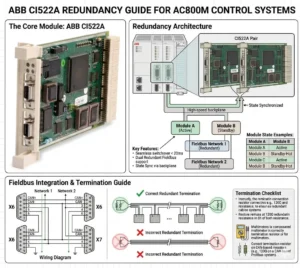
ABB CI522A Redundancy Guide for AC800M Control Systems

ABB CI522A Redundancy Guide for AC800M Control Systems

Technical Architecture and Communication Constraints

The internal design of the CI522A lacks dual-port circuitry or hot-standby capabilities. As a result, any failure in the module or the serial physical link causes an immediate communication loss. In critical sectors like oil and gas, this single-point failure poses a significant risk to data acquisition. Therefore, maintenance teams must prioritize external backup strategies. Industry reports suggest that while serial protocols remain relevant, their inherent lack of built-in redundancy drives the shift toward smarter gateways.

Integration with Redundant AC800M Controllers

While the module itself is non-redundant, you can utilize the CI522A within redundant PM861 or PM864 controller pairs. In this configuration, each controller hosts its own independent CI522A module. This setup maintains high availability at the controller level during a switchover. However, the field device must support dual communication paths to ensure a seamless transition. Many legacy Modbus RTU devices only allow one master, which creates a significant bottleneck in automated production lines.

Optimizing Protocol Redundancy via Modbus and Custom Serial

The CI522A primarily handles Modbus RTU and proprietary serial strings. Since Modbus RTU follows a strict master-slave architecture, achieving redundancy requires complex application-level logic. Moreover, any disruption in the master’s polling sequence can lead to device timeouts. As a result, many modern facilities deploy serial-to-Ethernet converters. This allows the system to leverage ABB’s Redundant Network Routing Protocol (RNRP) for much higher reliability than traditional serial links.

Installation Standards for High-Reliability Environments

Reliable operation starts with proper physical layer installation. Serial communication is notoriously sensitive to electromagnetic interference (EMI) and ground loops. To maintain signal integrity, follow these technical standards:

  • ✅ Use high-quality shielded twisted-pair (STP) cables for all RS-485 runs.
  • ✅ Ensure the cable shield is grounded at only one end to prevent loop currents.
  • ✅ Implement isolated repeaters to segment long daisy chains and limit failure propagation.
  • ✅ Install surge protection for any outdoor cable runs exceeding 50 meters.

Strategic Maintenance and Field Engineering Insights

From the perspective of Powergear X Automation Limited, we recommend treating the CI522A as a legacy bridge. While it is highly reliable for its intended purpose, it represents a “non-redundant edge” in your control system. If your project demands 99.99% uptime, consider migrating to Ethernet-based I/O. However, for retrofitting existing systems where downtime must be minimized, the CI522A remains a cost-effective solution for interfacing with localized analyzers and older PLCs.

Application Scenarios and Practical Solutions

  • Chemical Processing: Use dual gateways to bridge CI522A serial data into the redundant Ethernet backbone of the AC800M.
  • Power Plants: Distribute critical sensors across multiple CI522A modules to ensure that a single module failure does not blind the entire operator station.
  • Water Treatment: Leverage the CI522A for non-critical monitoring while keeping core control on redundant Ethernet modules.

Frequently Asked Questions (FAQ)

Q: Can the AC800M firmware automatically switch between two CI522A modules if one fails?
No, the firmware does not perform an automatic “bumpless” switch for serial modules. You must write specific logic in Control Builder M to detect a “Module Error” and manually redirect communication tasks to a secondary module or port.

Q: Is the CI522A compatible with all versions of the PM866 controller?
The CI522A is compatible with most AC800M controllers, including the PM866. However, always verify that your specific firmware version supports the serial protocol you intend to use, as some older versions have library limitations for custom serial strings.

Q: How can I prevent data collisions when using two controllers with two CI522A modules?
The most effective way is to use a “Heartbeat” logic. Only the active controller should enable its CI522A communication block. If the backup controller takes over, it enables its communication port after a brief delay to ensure the serial bus is clear.

For high-quality modules and expert technical support for your control systems, visit the official Powergear X Automation Limited website to view our latest inventory.
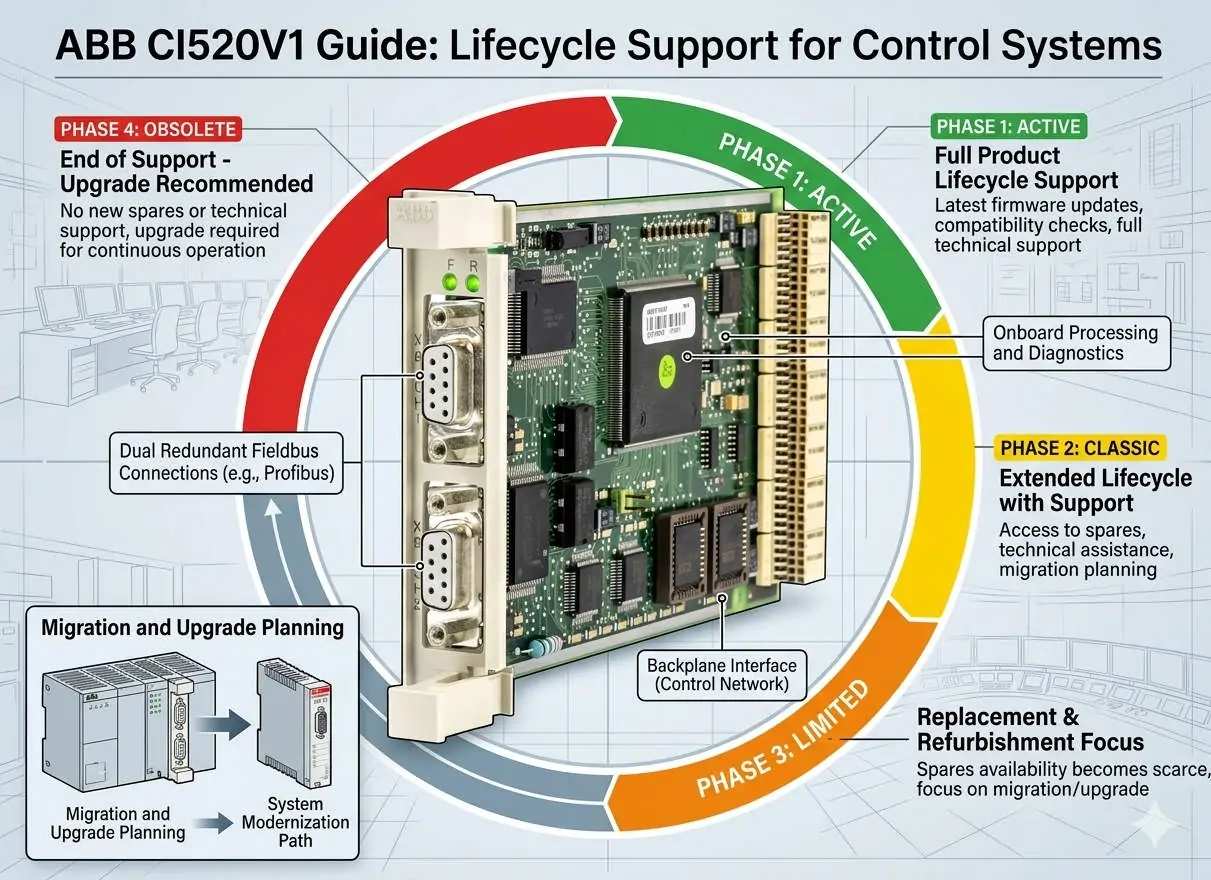
ABB CI520V1 Guide Lifecycle Support for Control Systems

Upgrading to CI520V1: Solving Component Obsolescence in DCS

Strategic Migration with ABB CI520V1: Ensuring Lifecycle Continuity in Industrial Automation

Enhancing System Reliability via Modern Communication Interfaces

The ABB CI520V1 represents a critical evolution in communication interface technology for distributed control systems (DCS). While legacy hardware often faces the threat of obsolescence, the V1 update serves as a high-reliability bridge for aging infrastructure. Industries like oil and gas or chemical processing rely on these modules to maintain connectivity without expensive full-scale upgrades. Therefore, the primary value of the CI520V1 lies in securing long-term operability through modernized hardware architecture.

ABB CI520V1 Guide Lifecycle Support for Control Systems

ABB CI520V1 Guide Lifecycle Support for Control Systems

Technical Comparison: CI520 vs. CI520V1 Lifecycle Management

The most significant distinction between the original CI520 and the CI520V1 is component availability. The legacy CI520 relies on electronic parts that are now discontinued by global manufacturers. In contrast, the CI520V1 utilizes RoHS-compliant, actively supported components to align with modern supply chain standards. As a result, plants can mitigate the risk of extended downtime caused by hardware shortages. This shift ensures that critical spare parts remain accessible for the next decade of operation.

Optimizing Signal Integrity and Electrical Robustness

In harsh factory automation environments, electromagnetic interference (EMI) frequently compromises data transmission. The CI520V1 addresses this by incorporating improved Electromagnetic Compatibility (EMC) tolerance. It provides superior resistance to transients and electrical noise generated by variable frequency drives (VFDs) or high-current motors. Moreover, this enhanced robustness leads to better fault predictability and reduces the occurrence of intermittent communication errors that plague legacy systems.

Seamless Integration and Firmware Compatibility Requirements

The CI520V1 maintains protocol-level backward compatibility, which simplifies the migration process for most ABB control systems. Engineers usually do not need to rewrite complex application logic or communication blocks. However, subtle differences in firmware behavior regarding timeout handling or diagnostic reporting may exist. Consequently, Powergear X Automation Limited recommends conducting validation tests in safety-critical systems. This step ensures that the newer hardware revision integrates perfectly with the existing controller’s firmware environment.

Precision Installation and Maintenance Best Practices

Replacing a legacy module requires more than just physical swapping to ensure peak performance. Technicians should treat the upgrade as an opportunity to audit the entire communication loop. Improper grounding often masks issues that newer, more sensitive modules might detect as faults. Consider these essential technical steps:

  • ✅ Verify that the controller firmware version supports the V1 hardware revision.
  • ✅ Inspect cable shielding and ensure single-point grounding to prevent noise loops.
  • ✅ Confirm the specific backplane requirements before attempting any module replacement.
  • ✅ Test communication stability under full industrial load conditions.

Strategic Insights from Powergear X Automation Limited

At Powergear X Automation Limited, we believe that proactive hardware management is superior to reactive repair. Waiting for a CI520 failure in a petrochemical plant can result in losses exceeding the cost of the module by a factor of a thousand. We suggest a phased replacement strategy where the CI520V1 replaces older units during scheduled maintenance windows. This approach aligns with modern asset management strategies and protects the plant against sudden market shortages of discontinued components.

Industrial Application Scenarios and Solutions

  • Oil & Gas Refineries: Maintaining high-speed data links between remote I/O stations and the central DCS.
  • Chemical Processing: Ensuring signal integrity in environments with high electrical noise and strict safety protocols.
  • Legacy Power Plants: Extending the life of 15-year-old control cabinets by replacing obsolete communication interfaces.

Technical Maintenance FAQ

Q: Can the CI520V1 be hot-swapped while the system is under live load?
While many ABB backplanes support hot-swapping, it depends on the specific controller configuration and mounting base. We strongly advise powering down the module slot before replacement to avoid inrush current damage or backplane arcing, unless your specific documentation confirms hot-swap support.

Q: What is the most common error when upgrading from the older CI520?
The most frequent issue is a “Module Not Detected” error, which usually stems from outdated controller firmware. Even if the wiring is identical, the CPU must be updated to recognize the new hardware revision ID of the V1 module.

Q: Does the V1 version offer any speed advantages over the original module?
Functional speed remains identical to ensure logic timing consistency. The “V1” designation focuses on reliability, EMC protection, and component longevity rather than increasing the baud rate or data throughput.

For more technical specifications and to secure your inventory of high-quality interface modules, please visit the official Powergear X Automation Limited website.

Emerson VE4035S2B1 Guide Installation and DCS Integration

Emerson VE4035S2B1 Guide: Installation and DCS Integration

Resolving “Offline” Status in Emerson DeltaV VE4035S2B1 Interface Modules

Critical Value of Stable I/O Communication in DCS Environments

In high-stakes industries like oil and gas or pharmaceuticals, a single “Offline” status in DeltaV Explorer can halt production. The Emerson DeltaV VE4035S2B1 serves as a vital bridge for data exchange within the Distributed Control System (DCS). When this module loses its software handshake, the controller cannot process field signals. Consequently, maintaining a “Live” state is essential for deterministic control and preventing expensive cascading alarms across the facility.

Emerson VE4035S2B1 Guide Installation and DCS Integration

Emerson VE4035S2B1 Guide Installation and DCS Integration

Understanding Backplane Communication and Physical Integrity

The VE4035S2B1 communicates via a high-speed backplane within the DeltaV carrier system. If the module appears offline, it usually signals a disruption in the cyclic data exchange. According to industry reports from groups like the International Society of Automation (ISA), physical connectivity remains a leading cause of system downtime. Oxidation on terminal connectors or slight misalignments often break these sensitive communication paths. As a result, PID loops may enter safe states or revert to manual mode.

The Importance of Configuration Alignment and Node Matching

Digital configuration must perfectly mirror the physical hardware setup for successful module activation. The DeltaV system verifies the slot position, node assignment, and module type during the boot sequence. However, engineers frequently overlook the “Auto-Sense” step after replacing hardware. If the software configuration does not match the physical slot, the module remains stuck in an offline state. Therefore, proper software binding is just as critical as the hardware itself for industrial automation reliability.

Power Supply Stability and Electrical Sensitivity

The VE4035S2B1 module requires a highly stable 24VDC power bus to initialize correctly. Power dips or electrical noise in high-load cabinets can cause initialization failures. While the hardware may appear powered on, the internal processor might fail to complete its handshake with the controller. In our experience at Powergear X Automation Limited, we recommend dedicated power supplies for I/O banks to minimize interference. Stable voltage prevents intermittent offline events during heavy system startups.

Proven Maintenance Procedures for Rapid Recovery

Restoring an offline module requires a systematic approach to identify the root cause quickly. Follow these professional steps to ensure system health:

  • ✅ Confirm the module is fully seated and locked in the carrier slot.
  • ✅ Inspect the terminal blocks for bent pins or loose wiring connections.
  • ✅ Perform an “Auto-Sense I/O” operation within DeltaV Explorer.
  • ✅ Download the updated configuration to the controller to refresh the binding.
  • ✅ Review the system event logs for specific communication or hardware fault codes.

Expert Commentary from Powergear X Automation Limited

At Powergear X Automation Limited, we believe that preventive maintenance is the best defense against DCS failures. The VE4035S2B1 is a robust component, yet it relies heavily on the environment around it. We often see modules replaced unnecessarily when a simple re-seating or configuration refresh would suffice. As factory automation moves toward more complex architectures, understanding these fundamental handshakes becomes a competitive advantage for maintenance teams.

Application Scenarios and Industry Solutions

  • Chemical Processing: Prevents missing field signals from triggering emergency interlocks in volatile environments.
  • Pharmaceutical Manufacturing: Ensures compliance and data integrity by maintaining constant I/O synchronization.
  • Refinery Operations: Supports redundant controller architectures by providing reliable interface points for critical sensors.

Frequently Asked Questions (FAQ)

Q: How can I distinguish between a hardware failure and a configuration error?
Observe the status LEDs on the front of the VE4035S2B1. If the LEDs show a normal green sequence but the software says “Offline,” the issue is almost certainly configuration-based. A total lack of LED activity usually indicates a dead module or power failure.

Q: Can firmware mismatches keep my module from going online?
Yes. If the controller firmware version is significantly newer or older than the module revision, the handshake may fail. Always check the Emerson DeltaV compatibility matrix when integrating newer hardware into an legacy system.

Q: Is it safe to “hot-swap” the VE4035S2B1 while the system is running?
While DeltaV supports hot-swapping most I/O modules, you should always check the specific carrier and module documentation first. Removing a module during active control will trigger a fault, so ensure your loops are in a safe state before proceeding.

For high-quality spare parts and technical support for your control systems, please visit the official Powergear X Automation Limited website today.

SE4302T01 DCS Module Improving Signal Integrity Tips

SE4302T01 DCS Module: Improving Signal Integrity Tips

Resolving Channel Interference in SE4302T01 DCS Modules through Advanced Signal Isolation

Addressing Signal Integrity in High-Demand DCS Environments

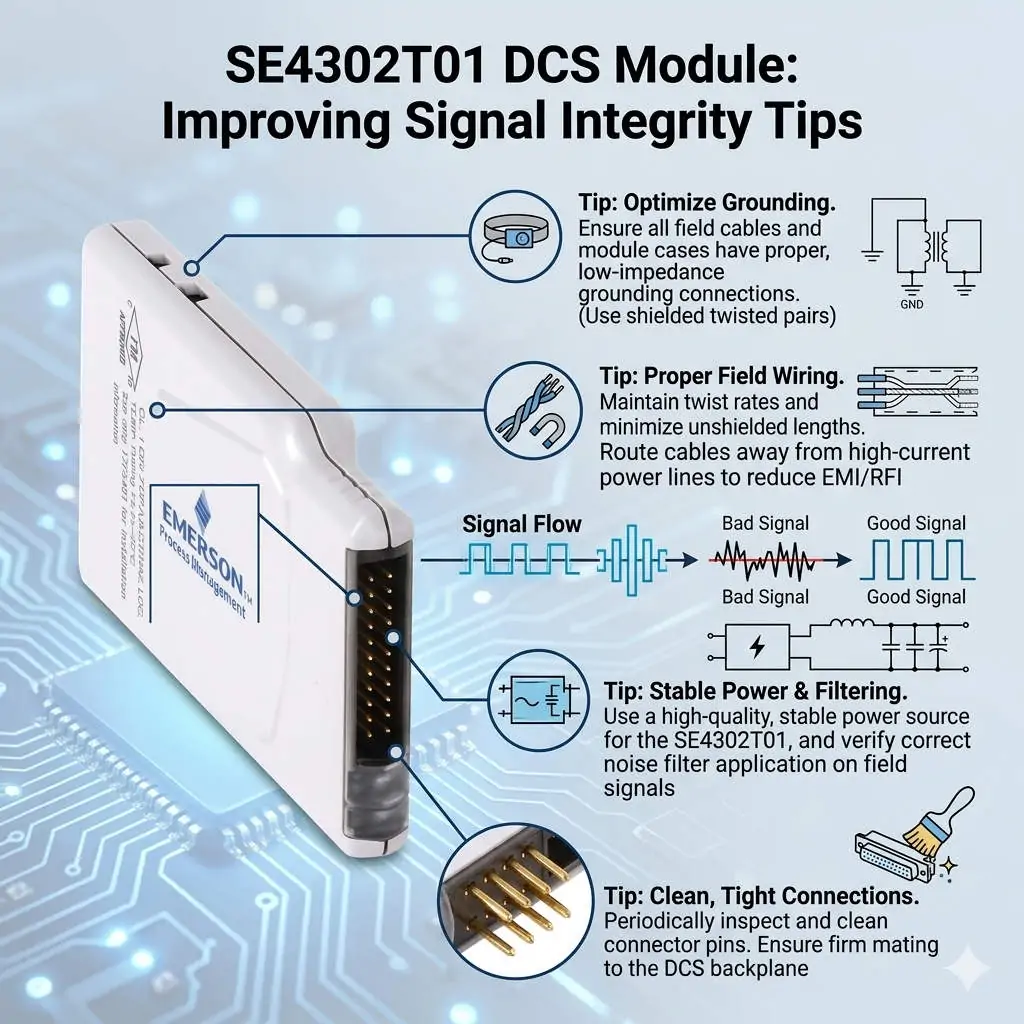
The SE4302T01 module functions as a critical interface for signal acquisition within Distributed Control Systems (DCS). However, engineers frequently encounter channel interference in petrochemical and pharmaceutical plants. These facilities often feature long cable runs and significant electromagnetic interference (EMI). While some mistake these fluctuations for hardware failure, they usually stem from signal integrity issues. Maintaining measurement accuracy is vital to prevent false trips and ensure process stability across the plant.

SE4302T01 DCS Module Improving Signal Integrity Tips

SE4302T01 DCS Module Improving Signal Integrity Tips

The Importance of Galvanic Isolation for SE4302T01 Stability

Direct exposure to field signals without proper galvanic isolation makes the SE4302T01 vulnerable. Ground loops and common-mode noise can easily penetrate the system near high-power motors or Variable Frequency Drives (VFDs). Therefore, adding an external isolator provides a necessary barrier against electrical noise. This setup significantly improves signal stability and reduces intermittent faults that plague unprotected modules. According to recent industrial automation trends, robust isolation remains a top priority for preventing unexpected downtime.

Balancing Module Response Time and High-Frequency Noise Filtering

Fast-response modules provide excellent dynamic tracking but also capture unwanted transient noise. Many engineers observe that “interference” is actually high-frequency noise misinterpreted as valid data. To solve this, you must balance responsiveness with stability. Introducing an isolator with built-in hardware filtering allows the DCS to receive clean data. Moreover, configuring software damping within the control system further refines the signal. This dual-layered approach ensures the system reacts to real process changes rather than electrical artifacts.

Compliance with EMC Standards and Environmental Immunity

Industrial sites rarely provide ideal conditions for electromagnetic compatibility (EMC). Modules operating near their immunity limits, as defined by IEC 61000 standards, often exhibit erratic behavior. This instability frequently occurs in aging plants where shielding and grounding systems have degraded over time. Isolation devices act as an additional EMC barrier. As a result, they extend the reliability of the SE4302T01 even in harsh, noisy environments where standard hardware might struggle to maintain precision.

Operational Guidance for Maintenance and Installation

Before replacing hardware, maintenance teams should verify the grounding topology of the entire loop. Improper grounding, such as multiple ground points or floating shields, causes most interference cases.

  • ✅ Ensure signal cable shields connect to ground at only one end to prevent loops.
  • ✅ Install signal isolators close to the DCS input side in mixed-signal environments.
  • ✅ Combine isolators with Surge Protection Devices (SPD) for outdoor or long-distance cable runs.
  • ✅ Periodically inspect cable integrity to identify degraded shielding or insulation.

These proactive steps often resolve “faults” without necessitating expensive module replacements.

Strategic Insights from Powergear X Automation Limited

At Powergear X Automation Limited, we emphasize that channel interference is often a system-level challenge. Replacing the SE4302T01 should be your final step after exhausting wiring and isolation checks. We have observed that adding high-quality isolators is more cost-effective than constant hardware swaps. This strategy improves long-term stability without altering the fundamental DCS architecture. Investing in proper isolation today prevents the high costs associated with process instability and false alarms tomorrow.

Industrial Application Scenarios

  • Petrochemical Refining: Prevents signal drift in temperature and pressure loops near heavy rotating machinery.
  • Pharmaceutical Manufacturing: Ensures precise measurement during sensitive batch processes where EMI from cleanroom equipment is high.
  • Retrofit Projects: Provides a practical solution for noise issues when rerouting existing cables is physically impossible.

Frequently Asked Questions (FAQ)

Q: How can I distinguish between a hardware failure and external interference?
Disconnect the field wiring and apply a local, clean 4-20mA source directly to the module input. If the reading stabilizes instantly, the issue lies in the field wiring or EMI, not the internal hardware of the module.

Q: Will adding an isolator introduce a delay in my control loop?
Most modern signal isolators have a response time in the millisecond range. While they do add a negligible delay, the benefits of a stable, noise-free signal far outweigh the slight increase in latency for 95% of industrial applications.

Q: Is it necessary to use HART-compatible isolators with the SE4302T01?
If your field instruments rely on HART protocol for remote calibration or diagnostics, you must select an isolator that supports HART pass-through. Standard isolators will strip the digital signal, leaving only the analog 4-20mA component.

For high-performance components and expert support in optimizing your DCS, please visit the official Powergear X Automation Limited website to view our latest technical solutions.

Honeywell CC-PAIM01 Analog Accuracy and Drift Management

Honeywell CC-PAIM01: Analog Accuracy and Drift Management

Maximizing Precision: The Role of Temperature Compensation in CC-PAIM01 Modules

The Critical Value of Thermal Stability in Analog Inputs

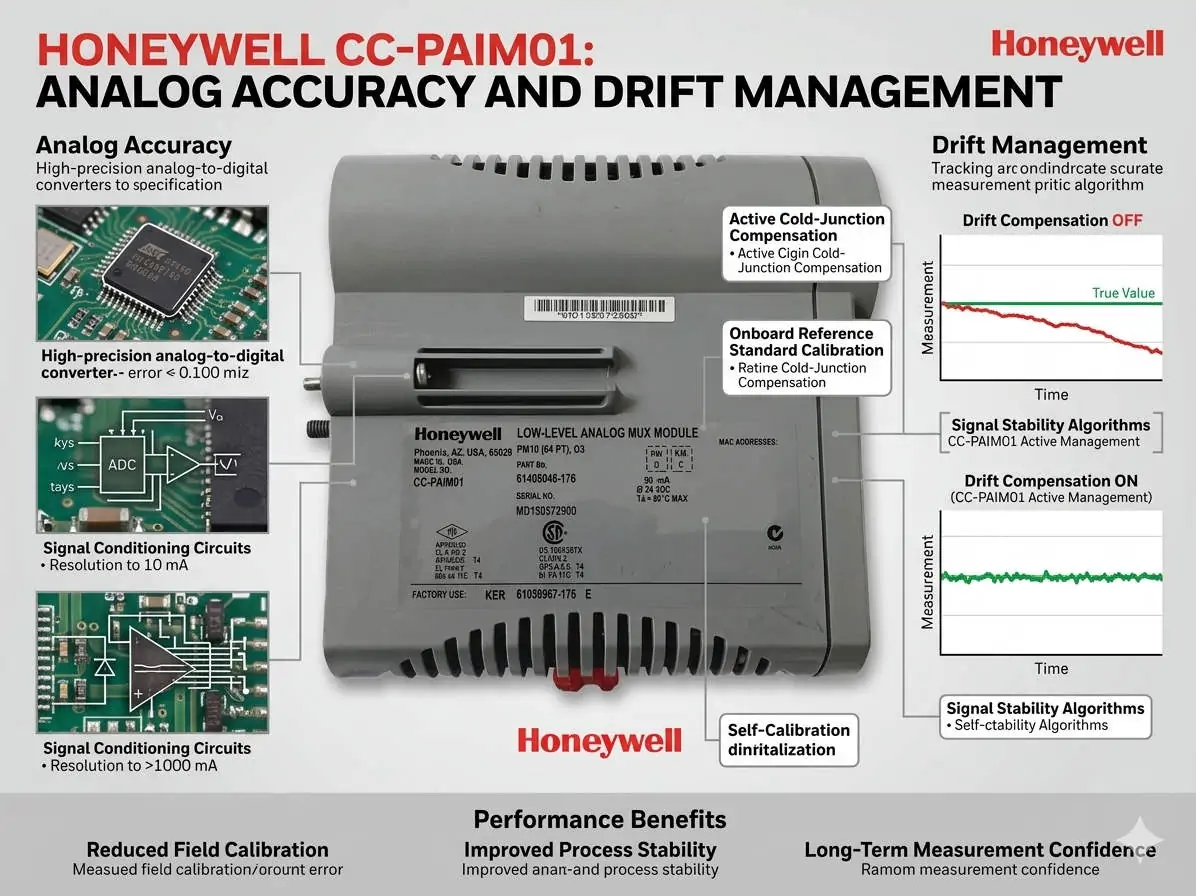
The Honeywell CC-PAIM01 analog input module plays a vital role in maintaining high-accuracy signal acquisition. In volatile industries like petrochemicals and pharmaceuticals, thermal drift can compromise process stability. Even minor temperature fluctuations can lead to measurement bias. Therefore, engineers must prioritize internal temperature compensation to ensure product quality. Accurate field calibration maintains signal integrity and prevents the need for premature hardware replacement.

Honeywell CC-PAIM01 Analog Accuracy and Drift Management

Honeywell CC-PAIM01 Analog Accuracy and Drift Management

Understanding the Impact of Temperature Drift Coefficients

While the CC-PAIM01 includes built-in compensation, environmental stress and component aging eventually introduce drift. A typical drift coefficient of ±0.01%/°C might appear insignificant at first glance. However, in high-precision flow or pressure loops, these errors accumulate quickly. As a result, uncompensated drift creates offset errors in 4–20 mA signals. This issue is particularly prevalent in outdoor cabinets that lack strict climate control.

Maintaining High-Resolution Signal Fidelity

Thermal stability directly influences the effectiveness of high-resolution A/D conversion. When temperatures shift, the resulting offset errors reduce the module’s effective resolution. This loss of fidelity can trigger unnecessary control loop oscillations in complex DCS environments. Moreover, advanced control strategies like tight-tolerance PID loops become less reliable. Consistent thermal management ensures that the module provides the granular data required for modern factory automation.

Professional Field Calibration Procedures

Successful calibration requires a stable environment and precise tools. Our team at Powergear X Automation recommends following these technical steps:

  • Isolate the input channel from the process.
  • Connect a precision signal source with ±0.005% accuracy.
  • Allow the module to thermally stabilize for 45 minutes.
  • Execute zero and span calibration via DCS engineering tools.
  • Apply multi-point checks at 4, 12, and 20 mA.

Strategic Cabinet Thermal Management

Hardware placement significantly affects long-term performance. Always install modules away from heat-generating components like power supplies or VFDs. Ideally, maintain cabinet temperature variations within a ±5°C range. In one refinery project, relocating a module 15 cm away from a heat source reduced alarms by 60%. Therefore, physical layout is just as important as software configuration for system reliability.

Expert Insights from Powergear X Automation

At Powergear X Automation, we believe technical discipline drives operational excellence. Many engineers misdiagnose grounding noise as temperature drift. Always verify your single-point grounding and use shielded twisted-pair cables before recalibrating. By combining proper installation with routine verification, you extend the lifecycle of your Honeywell assets while ensuring peak performance.

Technical Summary Checklist

  • ✅ Verify temperature compensation curves during commissioning.
  • ✅ Use precision calibrators for all analog loop checks.
  • ✅ Maintain strict physical separation from power cables.
  • ✅ Implement annual calibration for critical control loops.
  • ✅ Ensure firmware compatibility before replacing legacy modules.

Industrial Application Scenarios

  • Pharmaceutical Batch Processing: Maintaining strict temperature-dependent chemical reactions.
  • Oil and Gas Custody Transfer: Ensuring highly accurate flow measurements for billing.
  • Power Generation: Monitoring turbine pressure sensors in high-heat environments.

Implementation FAQ

Q1: When should I prioritize recalibration over module replacement?
If you notice a consistent offset that correlates with seasonal temperature changes, recalibration is the first step. Modules usually last over a decade, but their compensation curves may shift after 3 to 5 years of continuous operation.

Q2: How does the CC-PAIM01 handle extreme outdoor environments?
While rated for -20°C to +60°C, the module performs best when shielded from direct sunlight. We recommend using air-conditioned panels or sun shields to keep the internal cabinet temperature stable near 25°C.

Q3: What is the biggest mistake made during field calibration?
Skipping the thermal “warm-up” period is a common error. If you calibrate a cold module immediately after opening the cabinet, the settings will drift again as the module reaches its operating temperature.

For more technical guides and high-quality automation hardware, visit the Powergear X Automation website.

Thermal Management for Bently Nevada 3500-42M Monitors

Thermal Management for Bently Nevada 3500/42M Monitors

Thermal Management Risks for Bently Nevada 3500/42M Proximitor Seismic Monitors

Critical Role of Vibration Monitoring in Industrial Automation

The Bently Nevada 3500/42M serves as a vital component in high-reliability vibration and position monitoring. In sectors like oil and gas or power generation, this module protects critical rotating machinery. However, thermal stress can compromise its signal accuracy. Excessive heat directly undermines system stability. As a result, operators may face false alarms or missed mechanical faults.

Thermal Management for Bently Nevada 3500-42M Monitors

Thermal Management for Bently Nevada 3500-42M Monitors

Technical Impact of Overheating on Signal Integrity

The standard operating range for the 3500/42M typically spans from 0°C to 65°C. When internal temperatures exceed these limits, signal conditioning circuits begin to drift. Moreover, high heat accelerates the aging of electrolytic capacitors. This degradation shortens the module’s overall lifespan significantly. In many refinery environments, poor ventilation pushes temperatures above 70°C, causing intermittent channel dropouts.

Operational Risks and Response Stability Challenges

Heat introduces electrical noise and ADC instability within the monitor’s analog front-end. Consequently, proximitor signal scaling may drift away from calibrated values. These deviations often lead to false high-vibration alarms. Such errors trigger unnecessary machinery shutdowns and lost production time. Conversely, drift might mask early-stage bearing wear. This delay turns minor maintenance into a catastrophic unplanned outage.

System-Level Reliability in Rack Architectures

The 3500 system architecture relies on seamless integration between modules and power supplies. An overheating 3500/42M module increases the total thermal load of the entire rack. This heat transfer can trigger system-wide watchdog resets. Furthermore, redundant configurations suffer when thermal stress affects both primary and backup channels simultaneously. Maintaining a balanced thermal profile is essential for modern control systems.

Installation and Maintenance Best Practices

Field experience suggests that most overheating issues stem from installation errors rather than hardware defects. Engineers must prioritize cabinet thermal management to ensure longevity. Proper airflow prevents heat pockets from forming around sensitive electronics. In addition, dust accumulation acts as a thermal insulator, blocking essential cooling paths.

  • ✅ Maintain minimum airflow clearance at the top and bottom of the rack.
  • ✅ Avoid placing racks near heat sources like VFD panels or transformers.
  • ✅ Inspect and clean cabinet air filters monthly in dusty environments.
  • ✅ Utilize positive-pressure cabinets to keep internal components clean.
  • ✅ Verify total rack power load against the Power Supply Unit (PSU) rating.

Strategic Selection and Compatibility Insights

The 3500/42M offers backward compatibility within the 3500 rack series. However, hardware revisions and firmware versions must align for optimal performance. Older racks often lack the optimized airflow designs found in newer chassis. Therefore, users should verify rack revision levels before performing upgrades. Ignoring environmental conditions during selection often leads to premature module failure.

Expert Commentary from Powergear X Automation Limited

At Powergear X Automation Limited, we believe thermal management is a core part of machinery protection strategy. High-performance modules like the 3500/42M require stable environments to deliver precision. We often see random alarms disappear simply by redistributing modules to improve airflow. Treating cooling as an afterthought is a risk no plant manager should take. For high-quality automation parts and expert support, explore our solutions at Powergear X Automation Limited.

Application Scenarios and Solutions

  • High-Speed Turbines: Requires precise displacement monitoring where even 1°C of drift can trigger a safety trip.
  • Refinery Compressors: Utilizes seismic monitoring in harsh, ambient heat conditions requiring active cooling.
  • Remote Pumping Stations: Depends on self-diagnostics to alert maintenance teams of thermal rising before a fault occurs.

Frequently Asked Questions (FAQ)

Q: How can I detect overheating before it causes a system shutdown?
We recommend using thermal imaging cameras during routine inspections. This technique reveals hot spots that standard temperature sensors might miss. Also, monitor the “System Event List” for frequent self-test warnings or intermittent channel status changes.

Q: Will adding more fans to the cabinet always solve the problem?
Not necessarily. If the internal rack airflow is blocked by cabling or overpacking, external fans won’t help. You must ensure a clear path for air to move through the module slots themselves.

Q: Does the 3500/42M have a built-in automatic shutdown for heat?
The module includes self-protection logic, but it usually triggers a “Module Fault” rather than a clean shutdown. By the time this happens, your machinery protection is already compromised. Prevention through environmental control is the only safe approach.

Looking for reliable Bently Nevada modules or expert advice on rack configuration? Visit Powergear X Automation Limited today for global shipping and technical excellence.

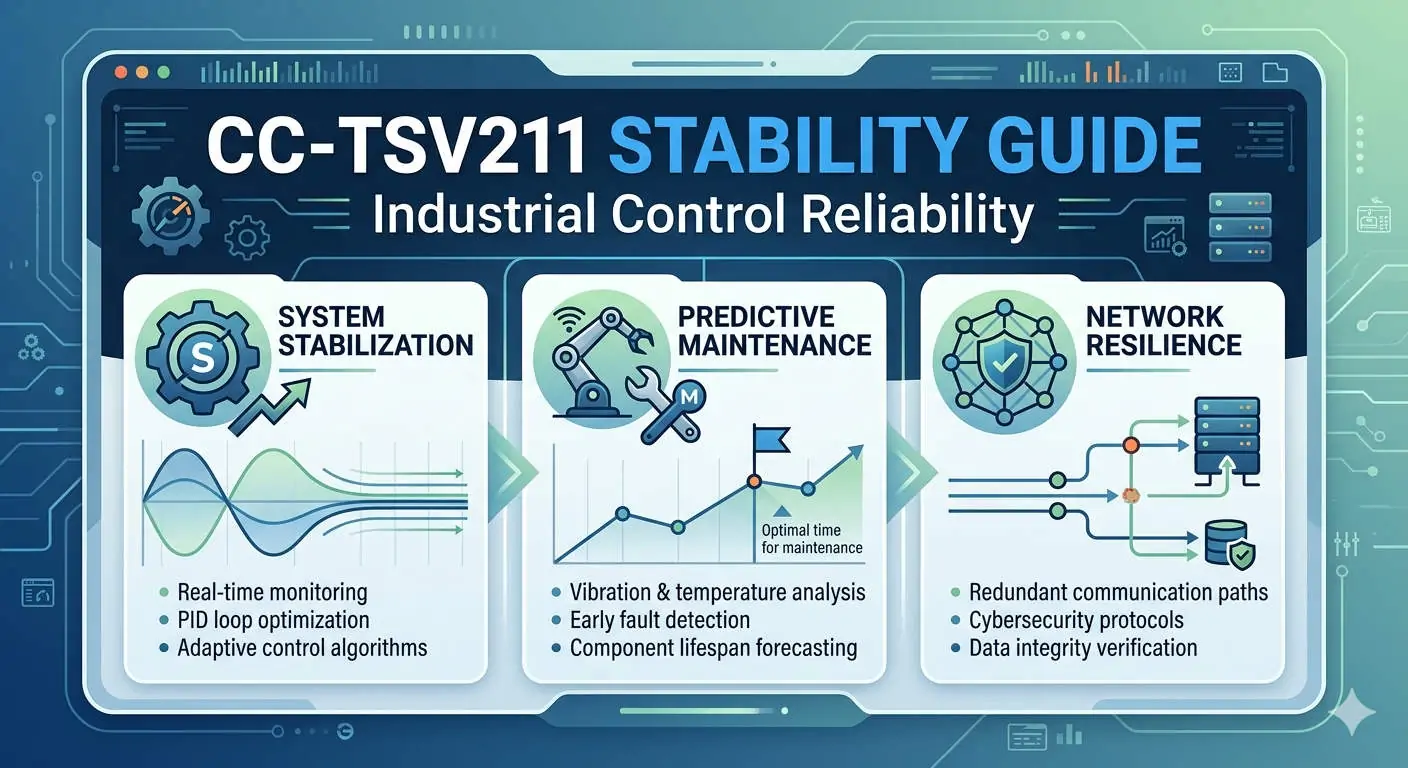
CC-TSV211 Stability Guide Industrial Control Reliability

Honeywell CC-TSV211: Solving Vibration in DCS Systems

Ensuring Peak Performance of the Honeywell CC-TSV211 in High-Vibration Environments

The Vital Role of the CC-TSV211 in Modern DCS Architecture

The Honeywell CC-TSV211 module serves as a cornerstone for stable signal acquisition within complex Distributed Control Systems (DCS). It operates reliably in demanding sectors like petrochemical plants and compressor stations. However, mechanical vibration remains a silent threat to long-term uptime. Even robust components face wear when exposed to constant kinetic energy. Therefore, engineers must address mechanical stability to protect the core value of their automation investment.

CC-TSV211 Stability Guide Industrial Control Reliability

CC-TSV211 Stability Guide Industrial Control Reliability

Mechanical Challenges for Control Systems in Heavy Industry

Most control cabinets assume a relatively static environment for electronic modules. In contrast, rotating machinery skids or turbines generate continuous micro-vibrations. These forces can gradually loosen terminal connections or cause fatigue in PCB connectors. As a result, standard mounting may prove insufficient over several years of operation. We recommend viewing mechanical reinforcement as a necessary upgrade for high-stress zones.

Protecting Signal Integrity Against Kinetic Interference

Vibration impacts more than just the physical structure of the CC-TSV211. It can also degrade signal quality by fluctuating contact resistance. These fluctuations often introduce electrical noise or trigger intermittent faults. In safety-critical sectors like Oil & Gas, such errors may cause expensive nuisance shutdowns. Consequently, maintaining mechanical rigidity directly supports the overall reliability of the industrial process.

Bridging the Gap Between Standards and Field Reality

The CC-TSV211 complies with standard industrial vibration classes, such as IEC 60068. Nevertheless, real-world conditions often exceed these laboratory benchmarks due to structural resonance or poor damping. Our experience at Powergear X Automation shows that compliance does not always guarantee long-term survival. Therefore, site-specific assessments are crucial for equipment located near reciprocating compressors or heavy feeders.

Strategic Reinforcement for High-Vibration Zones

When you install the CC-TSV211 in high-vibration areas, additional hardware is essential. Consider the following technical measures to enhance stability:

  • ✅ Install DIN rail end clamps to prevent lateral module shifting.
  • ✅ Use anti-vibration mounting plates inside the control cabinet.
  • ✅ Apply shock-absorbing pads between the cabinet and its foundation.
  • ✅ Secure all I/O wiring within 15 cm of the terminal block.
  • ✅ Use high-quality ferrules to prevent stranded wire fraying.

Advanced Maintenance Protocols for Control Modules

Standard annual inspections are often inadequate for vibration-heavy installations. Instead, adopt a proactive 3-to-6-month maintenance cycle. Technicians should verify terminal torque settings and check for signs of oxidation or micro-arcing. Moreover, thermal imaging can identify abnormal heat buildup caused by loose connections. These steps help prevent sudden failures before they impact production output.

Expert Analysis from Powergear X Automation

At Powergear X Automation, we believe that the environment dictates the installation strategy. The CC-TSV211 is a remarkably engineered module, but it requires a stable foundation to excel. We often advise clients to relocate sensitive I/O cabinets if vibration levels become extreme. This proactive approach significantly reduces the total cost of ownership for factory automation systems.

Application Scenario: Compressor Skid Monitoring

In a recent project involving a large reciprocating compressor, the DCS experienced frequent “bad PV” alarms. The culprit was not a faulty CC-TSV211, but vibration-induced terminal loosening. After we implemented locking DIN rail clips and flexible conduit transitions, the signal stabilized completely. This case proves that mechanical integrity is the backbone of digital precision.

Purchasing and Technical FAQ

Q1: Does the CC-TSV211 require reinforcement in a standard control room?
No, standard control room environments typically lack the mechanical stress required for extra bracing. You only need reinforcement when mounting the module on-site near heavy machinery or on portable equipment skids.

Q2: How does vibration affect the lifecycle of Honeywell I/O modules?
Unmanaged vibration accelerates solder joint fatigue and connector wear. By using the reinforcement techniques mentioned above, you can often extend the operational life of the module by 30% to 50% in harsh zones.

Q3: Is the CC-TSV211 hot-swappable during maintenance?
Yes, but you must exercise extreme caution in high-vibration areas. Ensure that the backplane remains secure and that new connections are torqued immediately to prevent arcing during the installation process.

For more technical insights and premium automation components, visit the official Powergear X Automation website today.

Fix 1769-AENTR BOOTP IP Issues | Industrial Automation Guide

Fix 1769-AENTR BOOTP IP Issues | Industrial Automation Guide

Troubleshooting 1769-AENTR IP Assignment Failures in Industrial Networks

The 1769-AENTR EtherNet/IP adapter acts as a critical communication bridge for CompactLogix distributed I/O systems. When BOOTP fails to assign an IP address, commissioning halts immediately. This delay directly impacts startup schedules and production timelines in high-stakes industries. At Powergear X Automation Limited, we see this challenge frequently during site integrations and system upgrades.

Fix 1769-AENTR BOOTP IP Issues | Industrial Automation Guide

Understanding 1769-AENTR BOOTP Behavior and Firmware States

New modules ship with BOOTP/DHCP enabled by default to allow initial network identification. However, once you assign an address and disable the BOOTP setting, the module locks its configuration. Consequently, the hardware will no longer broadcast requests to the server. If you are reusing a module, it likely retains a static IP from its previous environment.

Overcoming Ethernet Topology and DLR Constraints

The 1769-AENTR features a dual-port embedded switch supporting Device Level Ring (DLR) technology. While DLR provides high availability, an unconfigured ring supervisor can block broadcast traffic. Therefore, BOOTP packets may fail to reach your engineering workstation. Managed switches with strict VLAN segmentation often exacerbate this issue by filtering out necessary broadcast signals.

The Critical Role of MAC Address Precision

BOOTP servers function through strict MAC address matching protocols. Even a single character error in the server utility prevents the assignment process. In crowded control panels, engineers often misread the small print on the side label. We recommend using a digital camera to capture the MAC ID clearly before rail mounting the device.

Step-by-Step Hardware Recovery Procedures

If the module remains unresponsive, you must force it back into its discovery state. Follow these technical steps to restore communication:

  • Power Cycle: Disconnect the 24V DC supply to clear the volatile memory.
  • Module Reseat: Remove the unit from the 1769 bus for 10 seconds to ensure a full discharge.
  • USB Interface: Utilize the onboard USB port for direct configuration if the Ethernet path is blocked.
  • Factory Reset: Use the physical reset button (if equipped) to revert to out-of-box BOOTP settings.

Expert Insights from Powergear X Automation Limited

In our experience at Powergear X Automation Limited, 90% of “defective” modules are simply misconfigured. We often find that disabling the Windows Firewall on the commissioning laptop resolves “No Request Received” errors instantly. Furthermore, using RSLinx Classic with the “EtherNet/IP” driver is frequently more reliable than the standalone BOOTP/DHCP utility.

Application Scenarios and Selection Criteria

The 1769-AENTR is ideal for pharmaceutical and petrochemical plants requiring high-speed I/O data rates. When selecting between this and the 1769-AENT, consider the dual-port requirement. The AENTR is essential for DLR topologies, whereas the AENT is sufficient for simple star networks. Always verify your total backplane power budget before adding high-density analog modules.

Technical FAQ: Engineering Perspective

Q: Why does the module stop appearing in the BOOTP list after a successful first attempt?
A: Once the “Disable BOOTP/DHCP” command is sent, the module stops broadcasting. It now expects communication via its assigned static IP. You must use RSLinx to see it again.

Q: Can I use the 1769-AENTR in a standard non-managed switch environment?
A: Yes, it works in star, linear, or ring topologies. However, for maximum E-E-A-T reliability in factory automation, managed switches are preferred to monitor traffic health.

Q: How do I handle firmware mismatches during commissioning?
A: Use ControlFlash or ControlFlash Plus. Ensure your Studio 5000 AOP (Add-On Profile) matches the physical hardware version to avoid I/O connection faults.

Explore our full range of high-reliability control components at Powergear X Automation Limited for your next automation project.

Allen-Bradley 1769-IT6 Guide: CJC Technology and SEO Best Practices

Allen-Bradley 1769-IT6 Guide: CJC Technology and SEO Best Practices

Optimizing Temperature Precision with the Allen-Bradley 1769-IT6 Thermocouple Module

The Allen-Bradley 1769-IT6 stands as a cornerstone in modern industrial automation. This six-channel thermocouple input module provides high-density temperature sensing for CompactLogix systems. According to recent reports by MarketsandMarkets, the demand for precision control in smart factories continues to rise. The 1769-IT6 meets this demand by delivering exceptional accuracy in demanding thermal environments.

Allen-Bradley 1769-IT6 Guide: CJC Technology and SEO Best Practices

Understanding Integrated Cold Junction Compensation (CJC)

The 1769-IT6 integrates cold junction compensation directly into the module hardware. This design eliminates the need for external reference junctions or specialized terminal blocks. An internal thermistor monitors the temperature at the module connectors. Therefore, the system automatically adjusts the millivolt signal from the thermocouple. This correction ensures that ambient temperature swings do not compromise your process data.

Technical Performance and Resolution Standards

This module supports multiple thermocouple types including J, K, T, E, R, S, and B. It utilizes a high-resolution Delta-Sigma analog-to-digital converter. Consequently, engineers achieve stable PID control loops with minimal signal noise. Accurate data is vital for industries like pharmaceutical manufacturing. In these sectors, even a minor temperature drift can trigger a total batch failure. The 1769-IT6 provides the reliability needed for such critical applications.

Noise Immunity and Industrial Shielding

Electrical noise often plagues factory floors with large motors and VFDs. The 1769-IT6 features robust input filtering to mitigate high-frequency interference. However, hardware features alone cannot solve all noise issues. Proper shielding and grounding remain essential for peak performance. We recommend using twisted-pair shielded cables to maintain signal integrity over long distances. This approach aligns with IEEE standards for industrial signal wiring.

Installation Best Practices for Senior Engineers

  • Thermal Management: Maintain at least 50mm of clearance around the module for airflow.
  • Wiring Integrity: Use only specific thermocouple extension wire to prevent junction errors.
  • Grounding Strategy: Connect the cable shield to earth ground at the chassis end only.
  • Avoid Heat Sources: Do not install the module directly above high-heat components like power supplies.

Comparing 1769-IT6 with Standard Analog Inputs

Unlike general-purpose analog modules, the 1769-IT6 is purpose-built for low-voltage millivolt signals. Standard 4-20mA inputs require external transmitters to handle thermocouples. In contrast, the 1769-IT6 connects directly to the sensor. This reduces the number of failure points in your architecture. Moreover, it lowers the overall system cost by removing intermediate hardware requirements.

Expert Insight from Powergear X Automation Limited

At Powergear X Automation Limited, we observe that most field errors stem from improper wiring. Many technicians mistakenly use standard copper wire for thermocouple extensions. This creates “accidental” cold junctions that the module cannot see. For the best results, always verify your wire chemistry matches your sensor type. If you are upgrading an older system, ensure your Studio 5000 software includes the latest Add-On Profile (AOP) for this module.

Discover high-quality automation components and expert technical support at Powergear X Automation Limited today.

Industrial Application Scenarios

  • Petrochemical Refining: Monitoring reactor skin temperatures where stability is a safety requirement.
  • Food & Beverage: Precise oven control for industrial baking to ensure product consistency.
  • Heat Treatment: Managing kiln cycles where high-resolution data prevents metal fatigue.

Frequently Asked Questions

How do I handle fluctuating readings in a high-vibration environment?
Unstable readings often result from loose terminal connections or induced EMI. Ensure all terminal screws are torqued to spec. Additionally, enable the software-based digital filter within the module configuration to smooth out transient spikes.

Can I mix different thermocouple types on a single 1769-IT6 module?
Yes, the 1769-IT6 allows individual channel configuration. You can define Type K for Channel 0 and Type J for Channel 1. However, ensure each channel uses the correct compensating cable to avoid measurement bias.

What is the most common cause of CJC inaccuracy in a control panel?
The most common cause is a temperature gradient across the terminal block. If one side of the module is hotter than the other, the internal sensor may report an incorrect reference. Proper panel ventilation is the best solution for this issue.

Clear 1769-L32E Major Faults: Expert PLC Troubleshooting Guide

Clear 1769-L32E Major Faults: Expert PLC Troubleshooting Guide

Mastering Major Fault Recovery for the Allen-Bradley 1769-L32E CompactLogix

The 1769-L32E serves as a cornerstone in modern industrial control. This EtherNet/IP-enabled controller bridges the gap between small-scale logic and complex integrated systems. However, encountering a “Major Fault” can bring production to a standstill. Understanding the mechanics behind these errors is vital for any field engineer aiming to minimize downtime and maintain system integrity.

Clear 1769-L32E Major Faults: Expert PLC Troubleshooting Guide

Understanding the Mechanics of Controller Fault States

A Major Fault transitions the 1769-L32E into a halted state to protect hardware and personnel. During this mode, the controller stops executing user logic and sets outputs to their configured “Safe State.” This immediate shutdown is critical in high-speed packaging or chemical processing where erratic behavior could be catastrophic. Active monitoring via the status LEDs provides the first clue; a flashing red “OK” light typically indicates a recoverable major fault.

The Role of CompactFlash in System Recovery

The 1769-L32E utilizes CompactFlash (CF) non-volatile memory for robust program retention. While this ensures the controller recovers after power loss, it can create a “fault loop.” If the CF card contains a corrupted image or a program with an inherent logic error, the controller will reload that error every time it boots. Therefore, engineers must verify the “Load Image” settings in RSLogix 5000 before initiating a cold restart on-site.

Strategic Troubleshooting Procedures in the Field

Restoring a faulted system requires a disciplined, step-by-step approach to identify the root cause rather than just clearing the symptom. Follow this validated workflow to ensure long-term stability:

  • Step 1: Establish a connection using Studio 5000 or RSLogix 5000 software.
  • Step 2: Navigate to the Controller Properties and select the Major Faults tab.
  • Step 3: Record the Fault Type and Code (e.g., Type 04, Code 31 for an index out of range).
  • Step 4: Address the hardware failure or modify the offending rung of logic.
  • Step 5: Clear the fault in the software and return the key switch to Run Mode.

Identifying Common Hardware and Communication Triggers

External factors often trigger internal logic faults. In the industrial automation sector, electrical noise remains a primary culprit for backplane instability. According to IEEE standards, improper grounding can lead to intermittent communication losses. When the 1769-L32E loses contact with a critical I/O module, it may trigger a Major Fault to prevent the process from running blindly. High-vibration environments can also loosen terminal blocks, leading to module connection timeouts.

Expert Insights from Powergear X Automation Limited

At Powergear X Automation Limited, we observe that many “unexplained” faults stem from aging power supplies or firmware mismatches. As these controllers approach their end-of-life cycle, the internal capacitors may degrade. We recommend a proactive migration strategy for units exceeding ten years of service. Standardizing your firmware versions across the plant floor is also essential. This practice reduces the risk of unexpected instruction behavior during routine maintenance or part replacement.

Advanced Selection: When to Repair or Replace

Choosing between troubleshooting and replacement depends on the frequency of the errors. If a 1769-L32E experiences recurring non-recoverable faults (Solid Red LED), the internal circuitry likely has permanent damage. In such cases, replacing the unit is more cost-effective than risking a multi-day outage. For new installations, always ensure your choice aligns with the I/O count and memory requirements of your specific application.

Typical Solution Scenarios

  • Water Treatment Skids: Using the 1769-L32E for PID control and remote telemetry over EtherNet/IP.
  • Material Handling: Managing high-speed sorters where localized I/O processing is required.
  • Automotive Assembly: Integrating with various sensors and actuators via the 1769 backplane.

Frequently Asked Questions (FAQ)

1. Why does my controller fault immediately after I clear it?
This usually happens because the trigger—such as a “Divide by Zero” error or an array overflow—is still present in your logic. The controller re-executes the bad code the moment it enters Run Mode. You must fix the math or logic constraints before resetting.

2. Can I clear a major fault without using a laptop or software?
In some cases, toggling the physical key switch from Run to Program and back to Run can clear minor recoverable faults. However, for a Major Fault, a power cycle or software intervention is typically required to ensure the cause is acknowledged.

3. How does electrical noise specifically cause a Major Fault?
High-frequency noise from VFDs can corrupt data packets on the backplane. If the controller receives “garbage” data where it expects a module heartbeat, it assumes a hardware failure and enters a fault state to maintain safety.

For more technical support and high-quality industrial components, visit the experts at Powergear X Automation Limited today.

Back to Top
Product has been added to your cart