Understanding RX3i PACSystems Communication Issues
The RX3i PACSystems PLC is vital for robust industrial automation. However, communication failures can disrupt control, severely impacting factory automation. These issues range from simple loose cables to complex network configuration errors. Effective troubleshooting is crucial. We must quickly identify the root cause to maintain system uptime. This section sets the stage for expert-level diagnosis.
Initial Checks: Physical Layer and Wiring Integrity
Always start troubleshooting at the physical layer. Loose or damaged wiring is a very common culprit. Verify all Ethernet cables (for PROFINET or Modbus TCP/IP) are securely plugged in. Check cable shielding and grounding according to industry standards. Moreover, inspect power supply voltages for all modules. Consistent power ensures stable module operation and reliable data transmission.

Diagnosing Network Configuration and IP Conflicts
Incorrect network settings frequently cause communication problems. Verify that the CPU and all remote I/O devices have unique, correct IP addresses. Use the Proficy Machine Edition software to check device configurations. In addition, ensure subnet masks and gateway settings are correct across the entire control systems network. An IP address conflict will instantly halt communication.
Examining RX3i Module Status and Diagnostics
The RX3i platform provides powerful on-board diagnostics. Look for LED indicators on the CPU and communication modules (e.g., green/red status). A solid red status often signals a critical fault. Consult the CPU fault tables or diagnostic logs in the PLC programming environment. These logs offer specific error codes, significantly speeding up the repair process.
Advanced Troubleshooting: Protocol and Performance Analysis
For persistent issues, consider the communication protocol itself. For instance, PROFINET systems require correct device names and cycle times. Use network monitoring tools to analyze data traffic and identify excessive latency or packet loss. Therefore, optimizing network loading and segmenting large networks can enhance overall DCS reliability. We must ensure the network can handle the required data throughput.
Author’s Insight: The Move to High-Speed Industrial Ethernet
Modern industrial automation demands faster, more reliable communication. The trend is clearly towards high-speed industrial Ethernet like PROFINET or Ethernet/IP. While these protocols offer benefits, they also introduce configuration complexity. My experience shows that proper network documentation and rigorous commissioning are the best preventative measures against future failures. Investing in expert training is far cheaper than dealing with unexpected downtime.
Application Scenario: Redundant Control Solutions
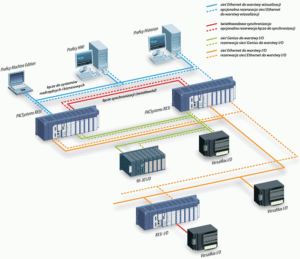
For mission-critical applications, consider implementing an RX3i hot-standby redundancy solution. While the initial setup is more complex, a redundant system ensures continuous operation even if one CPU or communication link fails. This architectural approach is highly valued in pharmaceutical and power generation control systems. It elevates reliability, offering peace of mind to operations managers.

RX3i Troubleshooting
Enhance Your System Reliability Today!
Communication failures cost time and money. Powergear X Automation Limited offers advanced troubleshooting services and certified RX3i components.