Over 50,000 hot-selling automation module components.
Triconex 8310 Power Module: Thermal Management and Maintenance

Triconex 8310 Power Module: Thermal Management and Maintenance

Handling Triconex 8310 Power Module Over-Temperature Alarms

The Triconex 8310 Power Module provides power to critical safety systems. An “Over Temperature” alarm is a serious warning. It means the module is getting too hot. This guide explains the causes and solutions to keep your Safety Instrumented System (SIS) reliable.

Triconex 8310 Power Module: Thermal Management and Maintenance

Why Over-Temperature Alarms Happen

The module has internal temperature sensors. It alarms to protect itself from heat damage. Common causes are:

  • Poor Cabinet Ventilation: Blocked air vents or failed cooling fans.
  • High Ambient Temperature: The room or area where the cabinet is located is too hot.
  • Overloaded Module: The module is supplying more current than designed for.
  • Dust and Debris: Dirt buildup on the module or cabinet filters blocks airflow.

Immediate Actions When the Alarm Occurs

  1. Do Not Ignore It: This is a predictive warning. The system may still run, but the risk of failure is high.
  2. Check Redundancy: In a Tricon system, other power modules should keep the system online. Verify system status is still healthy.
  3. Inspect the Cabinet: Quickly check for obvious issues like a stopped fan or blocked intake.

Step-by-Step Troubleshooting

  • Measure Temperatures: Use a thermometer to check the air temperature inside the cabinet near the module. Compare it to the specification (typically 60°C maximum).
  • Check Airflow: Ensure all cooling fans are running. Clean or replace air filters.
  • Clear Obstructions: Make sure there is at least 3 inches of clear space around the module for air to flow.
  • Review Load: Check if the total current draw on the module is within its rated capacity.
  • Compare Modules: In a redundant setup, check if all power modules report similar temperatures. One running much hotter may be faulty.

Long-Term Prevention Solutions

  • Improve Cabinet Cooling: Upgrade fans, add an air conditioner, or install a heat exchanger.
  • Relocate the Cabinet: Move it away from direct sunlight or other heat sources like furnaces.
  • Schedule Preventive Maintenance: Clean filters and check fans every 3-6 months.
  • Replace in Pairs: If a module is old or faulty, replace redundant modules together to ensure balanced performance.

Important Safety Notes

  • Do Not Disable the Alarm: This removes a critical layer of protection.
  • Follow SIL Procedures: Any maintenance on a safety system must follow your site’s Safety Integrity Level (SIL) protocols and require proper authorization.
  • Use Genuine Parts: Always use certified Triconex replacement modules from authorized suppliers to maintain system certification.

Example: Fixing a Recurring Alarm

A chemical plant had frequent over-temperature alarms. Technicians found the cabinet filter was completely clogged with dust. After cleaning the filter and verifying fan operation, the cabinet temperature dropped by 12°C. The alarms stopped, and the modules returned to normal operation.

Frequently Asked Questions (FAQ)

Operational Questions

  • Is it safe to keep running with this alarm active?
    The system is designed to tolerate it temporarily due to redundancy. However, you must investigate immediately. Continuous overheating will lead to module failure and possible system shutdown.

Maintenance Questions

  • Can I clean the module itself with compressed air?
    Yes, but with caution. Use low pressure and hold the fans still to prevent damage. Always follow the manufacturer’s cleaning guidelines.

Procurement Questions

  • Are all Triconex 8310 modules the same?
    No. There are different hardware revisions. For a SIL system, it is critical to use the correct, matched revision as specified in your system documentation.

For genuine Triconex replacement parts and expert support, visit Powergear X Automation.
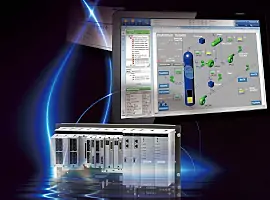
Yokogawa CENTUM VP

Yokogawa CENTUM VP: The Distributed Control System for High-Reliability Industrial Automation

Yokogawa’s CENTUM VP: The Global Standard in DCS

Yokogawa’s CENTUM VP is a globally recognized distributed control system (DCS). It is a leader in industrial automation and process control. This system offers unmatched reliability and superior performance. Moreover, the architecture provides a robust platform for complex operations.

The Evolving CENTUM VP DCS System and Network I/O (N-IO)

Yokogawa’s latest CENTUM VP R6 significantly improves the engineering environment. It drastically reduces time and effort for system setup. In addition, a new I/O system, the Network I/O (N-IO), enhances the lineup. The N-IO is the next-generation Smart Configurable I/O. Earlier systems used F-I/O (Field I/O) architecture. The high-speed Vnet/IP control network ensures rapid operator screen updates. Vnet/IP operates at one Gigabit per second, guaranteeing updates within one second. This network adheres to the IEEE 802.3 standard.

Yokogawa CENTUM VP

Distributed Control: The Core of CENTUM VP Architecture

CENTUM VP uses a true Distributed Control Architecture. It deliberately avoids a traditional Client/Server model. This design is highly advantageous for factory automation. The system database is fully distributed across each Field Control Station (FCS). Importantly, the FCS is completely redundant. This redundancy provides a switchover time of less than one millisecond. The Master Engineering Station (ENG) holds only a copy of this database. Consequently, the main database resides in the controller.

Key Advantages of Yokogawa’s Distributed Architecture

This distributed approach offers unique benefits over Client/Server models. Operator Stations (HIS) directly fetch data from the controllers. Therefore, the system update time remains at a fast one second. The architecture has no single point of failure, unlike server-based systems. Server failure would otherwise lead to data loss across all operator stations. Furthermore, individual plant units can undergo independent commissioning. Engineers can later merge the databases on the Master ENG. This design enhances system operability and availability.

Why CENTUM VP Redefines Industrial Automation Over Conventional DCS Technology

Vnet/IP: High-Reliability Control Network for Process Control

Vnet/IP is the critical control network connecting all CENTUM VP components. It ensures the real-time, high-reliability communication necessary for stable process control. Vnet/IP is a dual-redundant control network, utilizing Bus 1 and Bus 2. Bus 1 handles primary control data. If Bus 1 fails, communication automatically switches to Bus 2 without interruption. Importantly, Bus 2 can also handle open communication. This allows generic Ethernet connectivity with non-Centum components like printers. Loss of one bus does not restrict open communication.

Configurable N-IO and Its Impact on Field Wiring

The N-IO (Network I/O) offers significant flexibility and reduced footprints. The configurable I/O modules can handle various signal types. This eliminates the need for numerous dedicated I/O types. Field signal wires connect directly to the I/O modules. This design drastically reduces the required cabinets and inter-panel wiring. However, careful junction box grouping and cable management are essential. Engineers must meticulously plan the assignment of redundant and non-redundant signals. This directly impacts the system’s overall availability and simplifies maintenance planning.

Integrated Safety with ProSafe-RS and “One Solution” Concept

Yokogawa also offers the ProSafe-RS Safety Instrumented System (SIS). ProSafe-RS is IEC/TÜV certified for SIL 3 applications. This fail-safe, standalone system is typically integrated with CENTUM VP on the same Vnet/IP network. This seamless integration eliminates the need for a separate gateway. A common Human Machine Interface (HMI) serves both the DCS and the SIS functions. Operators access all safety and control data through a single window. ProSafe-RS truly implements the “One process, One Network, One Window, One solution” philosophy in industrial automation.

Why CENTUM VP Redefines Industrial Automation Over Conventional DCS Technology

Application Scenarios and Solutions

The robust and integrated nature of Yokogawa’s CENTUM VP and ProSafe-RS makes it ideal for critical industries. Refineries, petrochemical plants, and power generation facilities heavily rely on this architecture. The distributed database enhances operational continuity. Furthermore, the integrated safety system simplifies regulatory compliance.

Discover Advanced DCS Solutions

To leverage the power of advanced DCS and PLC solutions for your specific industrial challenges, click the link below. Powergear X Automation Limited offers expert design, integration, and support for your control systems needs.

Discover our range of industrial automation products and solutions at Powergear X Automation Limited

Back to Top
Product has been added to your cart