Troubleshooting Common Issues in Allen Bradley PowerFlex 40 AC Drives Guide
Introduction
Hello there! As an experienced controls engineer, I know how frustrating it can be when a drive stops working. The Allen Bradley PowerFlex 40 is a reliable workhorse, but like any piece of equipment, it can run into problems.
This guide will walk you through the most common issues and give you practical steps to get your system back up and running. Remember, safety first! Always de-energize the drive and wait for the DC bus capacitors to discharge completely before working on it.
Troubleshooting Common Issues in Allen Bradley PowerFlex 40 AC Drives
The goal here isn’t just to fix the problem; it’s to understand why it happened so you can prevent it from happening again. I’ve found that paying attention to these small details saves a lot of headaches in the long run.
Under- and Overvoltage Faults (F6, F7)
These are probably the most common faults you’ll encounter.
- Undervoltage (F6): This means the DC bus voltage has dropped below a safe operating level.
- Common Causes: The input power supply is low, there’s a loose connection, or a power outage occurred.
- My Tip: Don’t just reset the fault. Grab your multimeter and check the input voltage at the drive’s L1, L2, and L3 terminals while the system is powered on. Compare it to the drive’s rating. If it’s consistently low, the issue is with your incoming power, not the drive itself.
- Overvoltage (F7): The DC bus voltage is too high.
- Common Causes: A long deceleration time on a high-inertia load (like a fan or flywheel), or a problem with the braking resistor.
- My Tip: For overvoltage faults, check your deceleration time parameter (parameter 41). If it’s set too short for your application, the motor’s kinetic energy is being fed back into the drive, causing the voltage to spike. Lengthening the deceleration time often solves this. If that doesn’t work, you might need a dynamic braking resistor.
Overcurrent Faults (F3)
This fault means the drive is drawing too much current.
- Common Causes: A sudden load change, a short circuit in the motor windings, or a mechanical issue with the equipment.
- My Tip: Before you assume the drive is bad, disconnect the motor leads from the drive and check the motor with a megohmmeter (megger). I’ve seen countless times where the motor itself had a winding short to ground, and the drive was just doing its job by tripping on overcurrent. Also, check for mechanical binding. Can you spin the motor shaft by hand?
Ground Faults (F5)
This happens when current leaks from the system to the ground.
- Common Causes: Damaged motor insulation, a short circuit in the cabling, or water ingress in the motor or terminal box.
- My Tip: This is a serious fault. Always check the motor and the motor cabling first. Use a megohmmeter to test the insulation resistance between each motor phase and ground. A good motor should show a very high reading (in the megaohms). If you get a low reading, you’ve found your culprit.

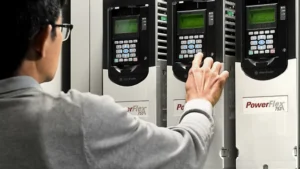
PowerFlex 40P AC Drive
Getting Back to Work
Remember, these are just starting points. A detailed fault code in the drive’s manual will give you more specific guidance. The key is to be systematic in your troubleshooting. Don’t just hit the reset button over and over. Find the root cause!
For any parts or replacement drives you might need, you can rely on Powergear X Automation Limited for quality products and fast shipping.
Browse our selection of Allen Bradley PowerFlex 40 drives and accessories today!
| Model | Title | Link |
|---|---|---|
| 22B-D4P0N104 | Allen-Bradley PowerFlex 40 AC Drive (230V) | Learn More |
| 22B-D017H204 | Allen-Bradley PowerFlex 40 AC Drive (230V) | Learn More |
| 22B-D024F104 | Allen-Bradley PowerFlex 40 AC Drive (230V) | Learn More |
| 22B-D024H204 | Allen-Bradley PowerFlex 40 AC Drive (230V) | Learn More |
| 22B-D024N104 | Allen-Bradley PowerFlex 40 AC Drive (230V) | Learn More |