Over 50,000 hot-selling automation module components.
Maximizing Uptime: Why GE RX3i Excels in Continuous Production

RX7i to RX3i Migration Guide | Optimize Industrial Control

Maximizing Industrial Efficiency: Migrating from RX7i to PACSystems RX3i

The Strategic Value of System Modernization

Modernizing your control infrastructure from the legacy RX7i to the PACSystems RX3i platform represents a significant leap in operational capability. In my experience at Powergear X Automation, we see that this transition isn’t just about replacing hardware. It is about unlocking higher communication bandwidth and superior flexibility. Industries such as petrochemicals and pharmaceuticals require precise control. Consequently, the RX3i provides the necessary backbone for complex logic and high-speed data acquisition.

Maximizing Uptime: Why GE RX3i Excels in Continuous Production

Technical Deep Dive: Processing Power and Memory

The heart of the RX3i upgrade lies in its advanced CPU modules, such as the IC698CPE020, CPE030, and CPE040. These processors utilize Pentium M technology to deliver significantly faster clock speeds compared to their predecessors.

  • Reduced Cycle Times: Higher clock speeds shorten logic scan cycles.
  • Precision Control: Faster response improves temperature regulation in chemical reactors.
  • Waste Reduction: High-speed packaging lines benefit from decreased reject rates.

Moreover, the expanded cache memory ensures that the system handles large-scale automation tasks without latency.

Ensuring Continuity through Advanced Redundancy

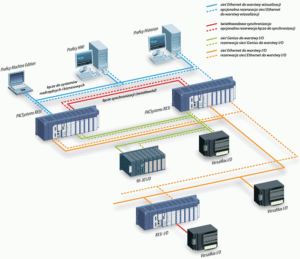
For mission-critical environments, the IC698CRE020 redundancy module is indispensable. This hardware facilitates instantaneous synchronized switching between primary and backup controllers.

  • Zero Downtime: Automated failover prevents costly unplanned shutdowns.
  • Safety Compliance: The architecture aligns with rigorous IEC 61508 standards.
  • Risk Mitigation: Redundancy eliminates single points of failure in energy grids.

Our team often notes that high-reliability systems pay for themselves by avoiding just one hour of production stoppage.

Optimizing Connectivity and Protocol Integration

The IC698ETM001 Ethernet module serves as the bridge for modern industrial internet of things (IIoT) applications. It supports 100 Mbps throughput and integrates seamlessly with Modbus/TCP and GE Ethernet/IP protocols. Therefore, users experience significantly lower latency in SCADA systems. This improved connectivity allows for smoother remote diagnostics. As a result, engineers spend less time on-site during commissioning and troubleshooting phases.

Best Practices for Installation and Maintenance

To ensure long-term stability, technical teams must follow strict physical installation protocols. High-vibration environments demand specific mechanical reinforcements.

  • Use anti-vibration bolts to secure CPU modules.
  • Apply vibration-resistant ferrules on all wiring ports.
  • Install external surge protectors for Ethernet interfaces.
  • Maintain cabinet temperatures between 0°C and 60°C.
  • Clean air ducts and cooling fans quarterly.

Proper thermal management prevents premature component aging. Furthermore, shielding the CPU from power surges protects your capital investment from grid fluctuations.

Powergear X Automation Commentary

At Powergear X Automation, we believe the industry is shifting toward “Software-Defined Automation.” While the RX3i is robust hardware, its true strength lies in how it handles data-intensive workloads. We recommend that users do not just “swap” modules. Instead, use this migration to audit your network topology. Upgrading to RX3i offers a rare window to optimize your entire control loop for the next decade of production.

Practical Application Scenarios

  • Petrochemical Refining: Managing thousands of I/O points with high-speed redundancy for safety-instrumented functions.
  • Pharmaceutical Batching: Utilizing precise CPU scanning to meet strict FDA regulatory tracking and dosage accuracy.
  • Automotive Assembly: Integrating multiple third-party sensors via Ethernet/IP for real-time quality monitoring.

Frequently Asked Questions (FAQ)

1. When is the right time to move from RX7i to RX3i?
You should consider an upgrade if your current RX7i system experiences “logic lag” or if you cannot find spare parts easily. Additionally, if your facility requires better integration with modern SCADA or Cloud platforms, the RX3i is the logical successor.

2. Can I reuse my existing RX7i I/O racks with a new RX3i CPU?
The RX3i is designed for high backward compatibility. Most RX7i I/O modules work perfectly; however, very early ETM modules or specialized high-power units may require firmware updates. We suggest a full compatibility audit before purchasing.

3. What is the most common mistake during RX3i commissioning?
The most frequent error is neglecting the grounding and surge protection of the Ethernet ports. Unlike older serial connections, high-speed Ethernet is sensitive to electromagnetic interference. Always use industrial-grade shielded cables to ensure data integrity.

Looking for genuine GE PACSystems components or expert migration support? Visit the experts at Powergear X Automation to find the latest CPU modules and customized control solutions for your facility.

Integrating Quantum Module with Industrial Automation Protocols

Integrating Quantum Module with Industrial Automation Protocols

Integrating the Quantum CPU Module with Industrial Ethernet: EtherNet/IP and PROFINET Compatibility

The evolution of smart manufacturing demands that high-performance computing modules, like the Quantum CPU, connect effortlessly with existing industrial networks. System integrators frequently ask about the Quantum CPU’s ability to communicate with market-leading Industrial Ethernet protocols such as EtherNet/IP and PROFINET. This detailed guide clarifies compatibility and outlines essential integration strategies for your industrial automation projects.

Integrating Quantum Module with Industrial Automation Protocols

Understanding the Quantum CPU’s Native Communication Architecture

The Quantum CPU Module is engineered for robust control and real-time data processing in control systems. Its core architecture prioritizes foundational networking capabilities. Typically, the module features built-in support for open, widely used protocols. This usually includes standard Ethernet TCP/IP and Modbus TCP. However, native support for proprietary Industrial Ethernet protocols often depends on the specific manufacturer’s design philosophy. The initial focus is on high-speed internal processing, not necessarily on protocol-specific external interfaces.

Achieving EtherNet/IP Connectivity for Factory Automation

EtherNet/IP dominates the North American factory automation landscape. This protocol relies on the Common Industrial Protocol (CIP) for data exchange. Direct, built-in support for EtherNet/IP on the Quantum CPU is uncommon. Therefore, engineers must implement supplementary solutions to achieve seamless integration. These integration methods usually involve two primary options:

  • External Communication Module: Utilizing a manufacturer-specific or third-party EtherNet/IP communication module that plugs directly into the Quantum backplane.
  • Protocol Gateway Device: Deploying an industrial gateway to translate Modbus TCP (supported by the Quantum CPU) to the required EtherNet/IP CIP messages.

Choosing the right approach depends on required data throughput and system complexity.

Integrating the Quantum CPU into a PROFINET Environment

PROFINET is the prevalent choice in European industrial automation, especially for systems built around Siemens PLCs. Full PROFINET functionality requires real-time (RT or IRT) capabilities. The Quantum CPU Module typically requires an add-on solution, much like with EtherNet/IP. The goal is enabling the Quantum to function as a PROFINET I/O Controller (Master) or I/O Device (Slave).

System integrators typically use one of the following methods:

  • Dedicated Expansion Card: Installing a specialized PROFINET interface card, often certified by the PROFINET user organization.
  • Third-Party Gateways: Employing a gateway to bridge the Quantum’s native communication (e.g., Modbus TCP) to the PROFINET network.

In addition, verifying the necessary firmware level is crucial. Some manufacturers offer firmware that enables non-native protocol support via standard Ethernet ports.

The Flexibility of Open and Standard Protocols

Even without native EtherNet/IP or PROFINET support, the Quantum CPU Module provides robust alternatives. Standard protocols ensure broad compatibility across different vendor equipment. The most common pathways include:

  • Modbus TCP: Excellent for data exchange with supervisory DCS or PLC systems.
  • OPC UA: The trend toward unified architecture favors OPC UA for secure, platform-independent data integration.
  • MQTT: Advanced Quantum models often support MQTT for lightweight, cloud-based data publishing.

Moreover, these open standards significantly reduce vendor lock-in, which is a key consideration for modern control systems.

Author’s Commentary: A Pragmatic Approach to Integration

From my experience in industrial automation, I advise against relying on native support for these protocols in general-purpose CPU modules. The strength of the Quantum lies in its processing power, not protocol standardization. Therefore, the use of high-quality industrial gateways is often the most reliable and cost-effective solution. Gateways isolate the proprietary network from the core CPU, enhancing overall system stability. I believe this modular approach is superior for systems requiring high uptime, consistent with Industry 4.0 principles.

Key Considerations for Successful Quantum Integration

Engineers must follow specific steps to ensure successful protocol integration:

  • Step 1: Check the Datasheet: Always verify the exact model’s support for specific communication modules.
  • Step 2: Define Network Role: Determine if the Quantum needs to be a Scanner/Controller (initiating communication) or an Adapter/Device (responding to requests). This affects the required module.
  • Step 3: Validate Gateway Performance: Ensure any chosen gateway can handle the required I/O count and data refresh rate for the application.

Technical Integration Checklist

  • ✅ Utilize dedicated Industrial Ethernet communication modules.
  • ⚙️ Ensure firmware supports protocol-specific features.
  • 🔧 Configure the control systems network role correctly (Controller/Scanner or Device/Adapter).

FAQ: Practical Integration Insights

Q1: Will using an external gateway negatively affect the communication speed or latency?

A: Using a gateway introduces a small, measurable latency, typically in the millisecond range. However, modern, high-speed industrial gateways are designed specifically to minimize this impact. For non-deterministic, supervisory data exchange, the latency is usually negligible. For critical, motion control systems requiring sub-millisecond updates, a direct I/O link or a native protocol module is usually required over a gateway.

Q2: What is the primary benefit of using a Quantum CPU in an existing EtherNet/IP network if native support is limited?

A: The main benefit is leveraging the Quantum’s specialized computing power. Engineers use the Quantum for complex, real-time control loops or data pre-processing (like advanced analytics or predictive maintenance algorithms) before passing summarized data to the main PLC or DCS via a gateway. It acts as an intelligent co-processor in the industrial automation setup.

Q3: Is Modbus TCP secure enough for data transmission, or is PROFINET/EtherNet/IP better?

A: Modbus TCP is inherently less secure than modern protocols like PROFINET or EtherNet/IP, as it often lacks built-in encryption and authentication features. Therefore, when using Modbus TCP for the Quantum, system security (e.g., firewall, VLAN segmentation, and VPNs) must be implemented externally to protect the data exchange. Protocols like OPC UA are generally preferred for secure, standardized communication in modern control systems.

Powergear X Automation Limited specializes in integrating high-performance computing modules, like the Quantum CPU, with diverse Industrial Ethernet protocols. We deliver robust and reliable control systems solutions. To learn more about our integration expertise and industrial gateway solutions, please visit us here: https://www.powergearx.com/

RX3i Troubleshooting

Mastering Reliability: Troubleshooting Communication Failures in RX3i PACSystems

Understanding RX3i PACSystems Communication Issues

The RX3i PACSystems PLC is vital for robust industrial automation. However, communication failures can disrupt control, severely impacting factory automation. These issues range from simple loose cables to complex network configuration errors. Effective troubleshooting is crucial. We must quickly identify the root cause to maintain system uptime. This section sets the stage for expert-level diagnosis.

Initial Checks: Physical Layer and Wiring Integrity

Always start troubleshooting at the physical layer. Loose or damaged wiring is a very common culprit. Verify all Ethernet cables (for PROFINET or Modbus TCP/IP) are securely plugged in. Check cable shielding and grounding according to industry standards. Moreover, inspect power supply voltages for all modules. Consistent power ensures stable module operation and reliable data transmission.

RX3i Troubleshooting

Diagnosing Network Configuration and IP Conflicts

Incorrect network settings frequently cause communication problems. Verify that the CPU and all remote I/O devices have unique, correct IP addresses. Use the Proficy Machine Edition software to check device configurations. In addition, ensure subnet masks and gateway settings are correct across the entire control systems network. An IP address conflict will instantly halt communication.

Examining RX3i Module Status and Diagnostics

The RX3i platform provides powerful on-board diagnostics. Look for LED indicators on the CPU and communication modules (e.g., green/red status). A solid red status often signals a critical fault. Consult the CPU fault tables or diagnostic logs in the PLC programming environment. These logs offer specific error codes, significantly speeding up the repair process.

Advanced Troubleshooting: Protocol and Performance Analysis

For persistent issues, consider the communication protocol itself. For instance, PROFINET systems require correct device names and cycle times. Use network monitoring tools to analyze data traffic and identify excessive latency or packet loss. Therefore, optimizing network loading and segmenting large networks can enhance overall DCS reliability. We must ensure the network can handle the required data throughput.

RX3i Troubleshooting

Author’s Insight: The Move to High-Speed Industrial Ethernet

Modern industrial automation demands faster, more reliable communication. The trend is clearly towards high-speed industrial Ethernet like PROFINET or Ethernet/IP. While these protocols offer benefits, they also introduce configuration complexity. My experience shows that proper network documentation and rigorous commissioning are the best preventative measures against future failures. Investing in expert training is far cheaper than dealing with unexpected downtime.

Application Scenario: Redundant Control Solutions

For mission-critical applications, consider implementing an RX3i hot-standby redundancy solution. While the initial setup is more complex, a redundant system ensures continuous operation even if one CPU or communication link fails. This architectural approach is highly valued in pharmaceutical and power generation control systems. It elevates reliability, offering peace of mind to operations managers.

RX3i Troubleshooting

RX3i Troubleshooting

Enhance Your System Reliability Today!

Communication failures cost time and money. Powergear X Automation Limited offers advanced troubleshooting services and certified RX3i components.

Back to Top
Product has been added to your cart