
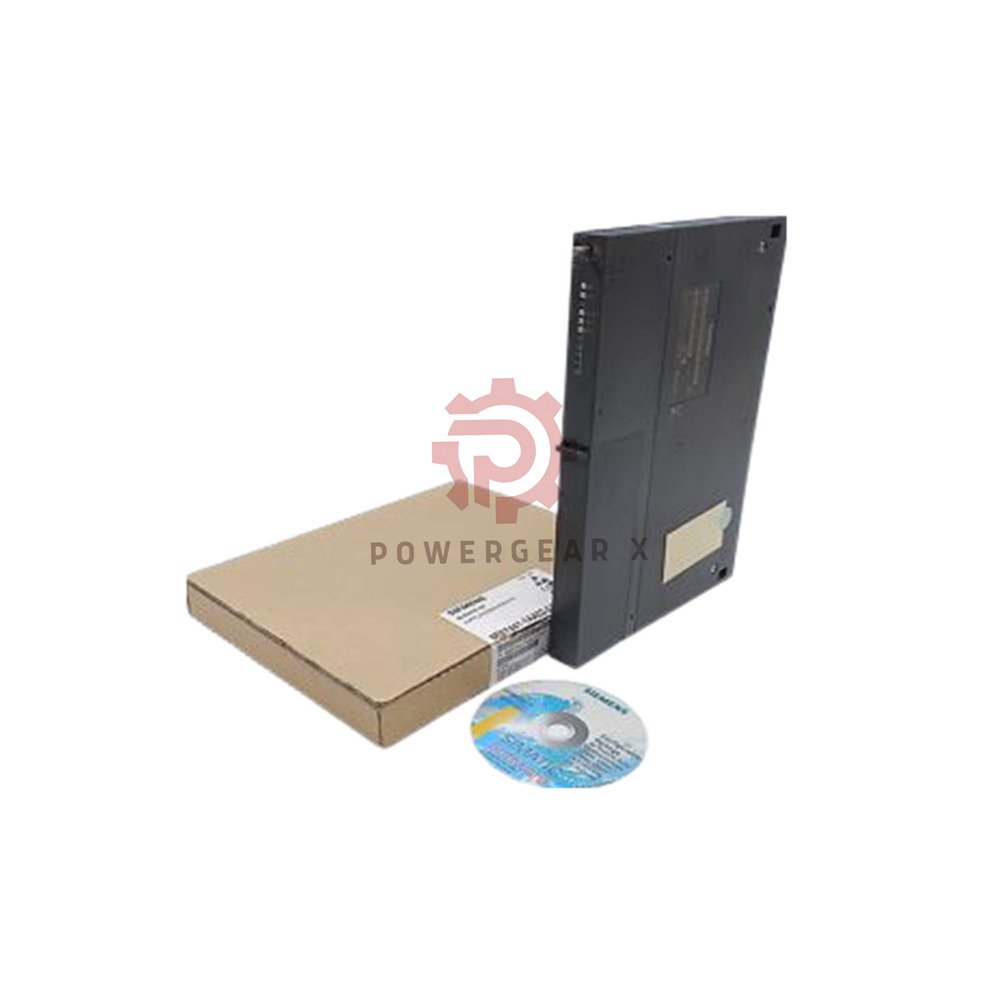


Product details
Product Overview
- Siemens 6ES7441-1AA03-0AE0 – point-to-point communication module for SIMATIC S7-400 systems
- Offers 1 configurable serial channel for flexible device connectivity
- Supports RS232, RS422/485, and 20mA TTY interface types
- Transmits data at up to 38.4 kbps with multiple protocol options
- Ideal for connecting printers, barcode readers, and legacy serial instruments
Technical Specifications – Hierarchical View
- General information
- Brand: Siemens
- Model: 6ES7441-1AA03-0AE0
- Series: SIMATIC S7-400
- Product type: CP 441-1 Communications Module
- Weight: approx. 720 g (interface module +100 g)
- Dimensions: 25 x 290 x 210 mm (W x H x D)
- Power supply
- 5 V DC: required (from backplane bus)
- 24 V DC: required (for interface module)
- Backplane current draw: max. 700 mA at 5 V
- Interface module consumption: 300 mA at 5 V
- 20mA TTY interface: additional 45 mA at 24 V
- Interface types (field-selectable)
- RS232C (V.24) – cable length max 10 m
- RS422/485 (X.27) – cable length max 1200 m
- 20mA TTY – cable length max 1000 m
- One channel, configurable for any interface type
- Protocol support
- 3964(R) – Siemens standard for point-to-point
- ASCII – free protocol for custom devices
- Printer driver – HP LaserJet, DeskJet, IBM Proprinter
- User-defined protocols also supported
- Transmission speeds
- RS232: max 38.4 kbps (all protocols)
- RS422/485: max 38.4 kbps (all protocols)
- 20mA TTY: max 19.2 kbps (3964R/ASCII/Printer)
- Memory & connections
- Memory for parameters: 1-5 KB
- Memory for message texts: 0-55 KB
- Max connections: 8 simultaneous
- S7 extended communication: supported
Expert Review – Engineer’s Insight
- This module solves a common problem: connecting non-Siemens devices to S7-400 systems. One channel handles most serial tasks effectively.
- The 38.4 kbps speed works well for printers and simple instruments. For high-speed data logging, consider CP 441-2 with 115.2 kbps.
- 20mA TTY remains useful for older weigh scales and barcode readers. Many plants still operate this legacy equipment.
- Configuration via STEP 7 is straightforward. The CD includes parameter assignment forms for quick setup.
Compatible Devices & Applications
- Works with all SIMATIC S7-400 CPUs (standard and redundant systems)
- Printers: HP LaserJet, DeskJet, IBM Proprinter, and custom drivers
- Measurement instruments: scales, analyzers, barcode scanners
- Legacy serial devices: 20mA TTY terminals, RS232/422 industrial instruments
- Typical industries: manufacturing, logistics, chemical, food & beverage
Installation & Configuration Guide
- Installation steps
- Mount CP 441-1 in S7-400 rack (U-bus connector required)
- Select interface module (RS232, RS422/485, or 20mA TTY)
- Install interface module onto the CP 441-1 base unit
- Connect 24 V DC supply for interface module
- Wire serial cable to your device (observe pinout)
- Configuration tips
- Use STEP 7 for parameter assignment (CD included)
- Select protocol: 3964R, ASCII, or printer driver
- Set baud rate matching your target device
- Test communication with simple send/receive functions
- Cable recommendations
- RS232: keep under 10 m (use shielded cable)
- RS422/485: up to 1200 m (twisted-pair, shielded)
- 20mA TTY: up to 1000 m (use proper termination)
Package Contents
- 1x Siemens 6ES7441-1AA03-0AE0 CP 441-1 base module
- 1x Configuration software CD
- Interface module sold separately (select RS232, RS422/485, or 20mA TTY)
Shipping & Warranty
- 12-month warranty against manufacturing defects
- Shipping: FedEx, UPS, DHL (calculated at checkout)
- Orders dispatch within 12-24 hours on business days
Comparison – CP 441-1 vs CP 441-2
- 6ES7441-1AA03-0AE0 (CP 441-1) – 1 channel, 38.4 kbps max, basic point-to-point communication
- 6ES7441-2AA03-0AE0 (CP 441-2) – 2 channels, 115.2 kbps max, enhanced diagnostics, more protocols
- Choose CP 441-1 for single-device connections with moderate speed requirements
- Choose CP 441-2 for multi-device setups or high-speed data transfer
Frequently Asked Questions
- Q: Can I use this module with a barcode scanner?
- A: Yes. Configure ASCII protocol with matching baud rate and data format. The module reads scanner data directly.
- Q: What interface module do I need for RS232?
- A: Order the RS232C (V.24) interface module separately. The CP 441-1 base does not include it.
- Q: Why is 20mA TTY limited to 19.2 kbps?
- A: This is a hardware limitation of the TTY interface. For higher speeds, use RS232 or RS422/485.
- Q: Does this module support MODBUS RTU?
- A: Not directly. You can use ASCII protocol to implement MODBUS RTU with custom programming.
- Q: Can I connect a weighing scale to the CP 441-1?
- A: Yes. Most industrial scales output ASCII data over RS232. Match the baud rate and configure ASCII driver.
Buying Guide – Selection Advice
- Choose 6ES7441-1AA03-0AE0 for single serial device connections up to 38.4 kbps.
- Need two channels or higher speed? Select CP 441-2 (6ES7441-2AA03-0AE0).
- Verify your target device’s interface type: RS232, RS422/485, or 20mA TTY.
- Order the corresponding interface module together with the CP 441-1 base.
- Check cable length requirements before installation – 20mA TTY supports 1000m.
Contact & Support
- Email: sales@powergearx.com
- WhatsApp: +86 18030005825 (click to chat)
Copyright © 2026 Powergear X Automation Limited. All rights reserved.
Original Source: https://www.powergearx.com/

There are no reviews yet.